AniPeak - Anime TV SUB & DUB
تازہ کاری
موجودہ ورژن
1.0.5
پیشکش بذریعہ

اپنے موبائل فون پر AniPeak - Anime TV SUB & DUB کا استعمال کرتے وقت زیادہ چارج ہونے کی فکر نہ کریں، خود کو چھوٹی اسکرین سے آزاد کریں اور ایپ کو زیادہ بڑے ڈسپلے پر استعمال کرنے کا لطف اٹھائیں۔ اس کے بعد سے کی بورڈ اور ماؤس کے ساتھ اپنے ایپ کا فل اسکرین کا تجربہ حاصل کریں۔ MEmu آپ کو وہ تمام حیران کن خصوصیات پیش کرتا ہے جن کی آپ کو توقع کرتے ہیں: فوری انسٹال اور آسان سیٹ اپ، وجدانی کنٹرول، مزید بیٹری، موبائل ڈیٹا کی کوئی حد نہیں اور اب مزید پریشان کن کالز نہیں۔ نئے برانڈ کا MEmu 9 آپ کے کمپیوٹر پر AniPeak - Anime TV SUB & DUB استعمال کرنے کے لیے بہترین اختیار ہے۔ MEmu کثیر نظیری منیجر بیک وقت 2 یا اس سے زیادہ اکاؤنٹس کھولنا ممکن بناتا ہے۔ اور سب اہم بات، ہمارا خصوصی ایمولیشن انجن آپ کے پی سی کی پوری طاقت ریلیز کرتے ہوئے ہر چیز ہموار اور قابل تفریح بناتا ہے۔
مزید دکھائیں
MEmu Play کے ساتھ PC پر AniPeak - Anime TV SUB & DUB استعمال کرنے کے شاندار تجربے سے لطف اٹھائیں۔ یہ ایک طاقتور مفت اینڈرائیڈ ایمولیٹر ہے جو آپ کو ان کے ڈیسک ٹاپ ورژن کے لیے ہزاروں اینڈرائیڈ ایپس فراہم کرتا ہے۔ دوستوں کے ساتھ جڑنے اور اعلی کارکردگی کے ساتھ اپنے کام کو چمکانے کا لطف اٹھائیں! AniPeak brings Japanese anime and Chinese donghua together in one place.
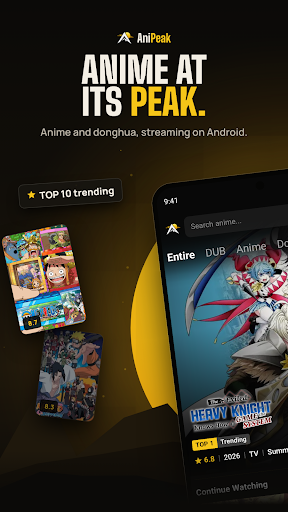
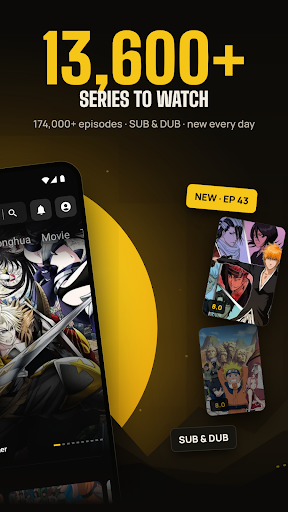
AniPeak brings Japanese anime and Chinese donghua together in one place. Browse anime series, track the seasonal airing schedule, save your anime list, and get notified when new episodes are out.
WHY ANIPEAK
- 6500+ anime and donghua series
- SUB and DUB on the episode page, with 3,000+ dubbed series
- New episodes added daily, shortly after they air
- Built for phones and tablets, with a clean dark design
A HOME PAGE THAT KEEPS UP
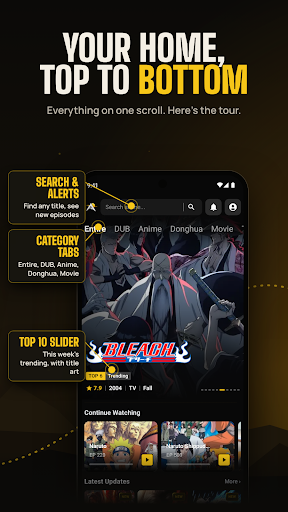
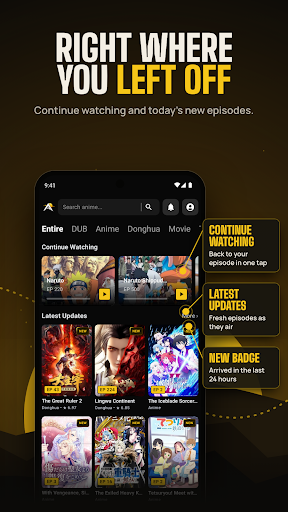
Open the app and the week's top 10 trending series are waiting at the top. Below that you'll find Continue Watching, the latest episode updates with a NEW tag on anything from the last 24 hours, plus Most Watched, Most Bookmarked and Recently Added. Category tabs let you jump straight to DUB, Anime, Donghua, Movie, TV, OVA, ONA and Special.
SUB OR DUB, YOUR CALL
Every episode page shows which versions are ready before you press play, so you can pick subtitles or the English dub. Choose your default video version, resolution and subtitle style in Settings, and turn on autoplay for the next episode or auto skip for intros and outros.
KNOW WHAT AIRS TODAY
The release schedule lists every series airing each day of the week, with its time slot, format and season.
ANIME AND DONGHUA IN ONE LIBRARY
Explore the full catalog from A to Z, filter by Anime, Donghua or Movie, browse by category, or search any title in seconds. Chinese donghua sits right next to seasonal Japanese anime, updated as new episodes arrive.
PICK UP WHERE YOU STOPPED
Your watch history remembers the exact episode you were on, grouped by day. Bookmark series to find them in one tap, and download episodes to watch later. Get a notification when a new episode is out or when someone replies to your comment.
JOIN THE CONVERSATION
Every episode has its own comment section. Share your reactions, reply to other fans and add GIFs. Sort comments by Popular or New.
WATCH WITHOUT ADS
AniPeak is free to use and supported by ads. Watch one short ad to unlock a stretch of ad-free viewing, or go VIP through Google Play to remove ads completely and get a VIP badge on your profile.
GOOD TO KNOW
• Sign in once with your Google account to save your bookmarks, history and comments
• Works on Android phones and tablets running Android 7.0 or later
• Free to download, contains ads, optional in-app purchases
Support: support@anipeak.us
Website: https://anipeak.us
Privacy Policy: https://anipeak.us/privacy
AniPeak does not own the anime titles, artwork or characters shown in the app. They belong to their respective owners.
مزید دکھائیں

1. MEmu انسٹالر ڈاؤن لوڈ کریں اور سیٹ اپ مکمل کریں

2. MEmu شروع کریں اسکے بعد ڈیسکٹاپ پر Google Play کھولیں

3. Google Play میں AniPeak - Anime TV SUB & DUB تلاش کریں
Install
4. AniPeak - Anime TV SUB & DUB ڈاؤن لوڈ کریں اور انسٹال کریں
5. انسٹال مکمل ہونے کے بعد سٹارٹ کرنے کے لیے آئیکن پر کلک کریں

6. MEmu کے ساتھ پی سی پر AniPeak - Anime TV SUB & DUB کھیلنے کا لطف لیں
MEmu پلے بہترین اینڈرائڈ ایمولیٹر ہے اور 100 ملین لوگ اس کے زبردست اینڈرائڈ گیمنگ تجربہ سے لطف اندوز ہو رہے ہیں۔ MEmu کی ورچولائزیشن ٹیکنالوجی آپ کو اپنے PC پر ہزاروں اینڈرائڈ گیمز یہاں تک کہ انتہائی گرافک والے گیمز باسہولت کھیلنے کی طاقت دیتی ہے۔
بہتر گرافکس کے ساتھ بڑی اسکرین؛ طویل دورانیہ، بیٹری یا لامحدود موبائل ڈیٹا کے بغیر۔
کی بورڈ اور ماؤس یا گیم پیڈ کے عین مطابق کنٹرول کے لیے کی میپنگ کا پورا سپورٹ۔
کثیر مثالی منیجر کے ساتھ بیک وقت ایک پی سی پر متعدد گیم اکاؤنٹس یا ٹاسکس۔
پی سی پر درج ذیل مراحل پر عمل کرتے ہوئے پر AniPeak - Anime TV SUB & DUB استعمال کریں: u003c/p>