AniPeak - Anime TV SUB & DUB
अपडेट किया गया
वर्तमान वर्शन
1.0.5
संसाधन

AniPeak - Anime TV SUB & DUB पर अपनी मोबाइल डेटा सीमा पार करने को अलविदा कहें और छोटी स्क्रीन की सीमाओं से मुक्त होकर बड़े डिस्प्ले के लाभों का अनुभव करें। अब, आप अपने कीबोर्ड और माउस का उपयोग करके फुल-स्क्रीन मोड में टॉपर्स क्लैन की शक्ति का अनुभव कर सकते हैं। MEmu Play में वे सभी बेहतरीन सुविधाएँ हैं जिनकी आप अपेक्षा करते हैं: त्वरित इंस्टॉलेशन और आसान सेटअप, सहज नियंत्रण, बैटरी की आवश्यकता नहीं, और कोई डेटा या कॉल समय सीमा नहीं। नया MEmu 9 आपके कंप्यूटर पर AniPeak - Anime TV SUB & DUB का उपयोग करने के लिए सबसे अच्छा विकल्प है। हमारा मालिकाना मल्टी-इंस्टेंस मैनेजर एक साथ दो या अधिक खातों को चलाने का समर्थन करता है। इससे भी महत्वपूर्ण बात यह है कि हमारा अनूठा इम्यूलेशन इंजन आपके कंप्यूटर के प्रदर्शन का पूरा उपयोग करता है, जिससे एक सहज और निर्बाध अनुभव मिलता है।
और दिखाएं
MEmu Play के साथ PC पर AniPeak - Anime TV SUB & DUB इस्तेमाल करने के शानदार अनुभव का आनंद लें। यह एक शक्तिशाली मुफ़्त Android एमुलेटर है जो आपको डेस्कटॉप वर्ज़न के लिए हज़ारों Android ऐप्स उपलब्ध कराता है। दोस्तों से जुड़ने और अपने काम को और भी बेहतर बनाने का आनंद लें! AniPeak brings Japanese anime and Chinese donghua together in one place.
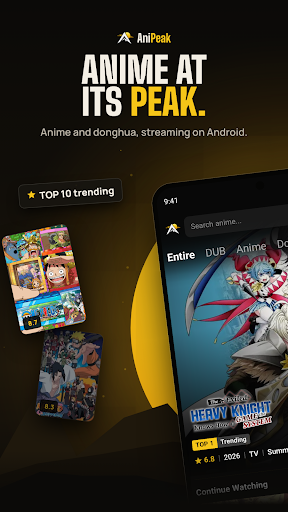
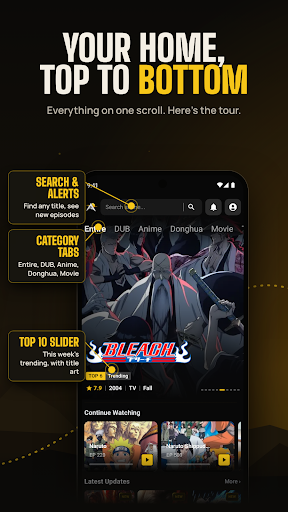
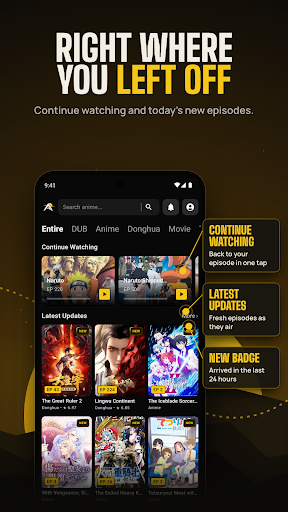
AniPeak brings Japanese anime and Chinese donghua together in one place. Browse anime series, track the seasonal airing schedule, save your anime list, and get notified when new episodes are out.
WHY ANIPEAK
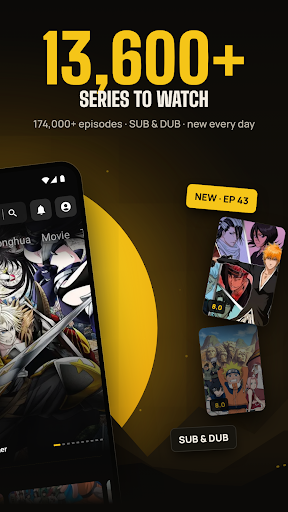
- 6500+ anime and donghua series
- SUB and DUB on the episode page, with 3,000+ dubbed series
- New episodes added daily, shortly after they air
- Built for phones and tablets, with a clean dark design
A HOME PAGE THAT KEEPS UP
Open the app and the week's top 10 trending series are waiting at the top. Below that you'll find Continue Watching, the latest episode updates with a NEW tag on anything from the last 24 hours, plus Most Watched, Most Bookmarked and Recently Added. Category tabs let you jump straight to DUB, Anime, Donghua, Movie, TV, OVA, ONA and Special.
SUB OR DUB, YOUR CALL
Every episode page shows which versions are ready before you press play, so you can pick subtitles or the English dub. Choose your default video version, resolution and subtitle style in Settings, and turn on autoplay for the next episode or auto skip for intros and outros.
KNOW WHAT AIRS TODAY
The release schedule lists every series airing each day of the week, with its time slot, format and season.
ANIME AND DONGHUA IN ONE LIBRARY
Explore the full catalog from A to Z, filter by Anime, Donghua or Movie, browse by category, or search any title in seconds. Chinese donghua sits right next to seasonal Japanese anime, updated as new episodes arrive.
PICK UP WHERE YOU STOPPED
Your watch history remembers the exact episode you were on, grouped by day. Bookmark series to find them in one tap, and download episodes to watch later. Get a notification when a new episode is out or when someone replies to your comment.
JOIN THE CONVERSATION
Every episode has its own comment section. Share your reactions, reply to other fans and add GIFs. Sort comments by Popular or New.
WATCH WITHOUT ADS
AniPeak is free to use and supported by ads. Watch one short ad to unlock a stretch of ad-free viewing, or go VIP through Google Play to remove ads completely and get a VIP badge on your profile.
GOOD TO KNOW
• Sign in once with your Google account to save your bookmarks, history and comments
• Works on Android phones and tablets running Android 7.0 or later
• Free to download, contains ads, optional in-app purchases
Support: support@anipeak.us
Website: https://anipeak.us
Privacy Policy: https://anipeak.us/privacy
AniPeak does not own the anime titles, artwork or characters shown in the app. They belong to their respective owners.
और दिखाएं

1. MEmu इंस्टॉलर को डाउनलोड करें और इंस्टॉलेशन को पूरा करें

2. MEmu शुरू करें फिर होमपेज पर Google Play खोलें

3. Google Play में AniPeak - Anime TV SUB & DUB खोजें
Install
4. AniPeak - Anime TV SUB & DUB डाउनलोड कर इंस्टॉल करें
5. इंस्टॉल पूरा होने पर आइकन दबाएं

6. MEmu का उपयोग करके अपने कंप्यूटर पर AniPeak - Anime TV SUB & DUB का अनुभव करें
MEmu Play सबसे बेहतरीन मुफ़्त Android एमुलेटर है और 5 करोड़ लोग पहले ही इसके शानदार Android ऐप अनुभव का आनंद ले चुके हैं। MEmu 9 वर्चुअलाइज़ेशन तकनीक आपको अपने PC पर हज़ारों Android ऐप्स, यहाँ तक कि सबसे ज़्यादा ग्राफ़िक्स वाले ऐप्स भी, आसानी से चलाने की सुविधा देती है।
असीमित बैटरी या मोबाइल डेटा के साथ बेहतर ग्राफिक्स के साथ बड़ी स्क्रीन; लंबी अवधि।
कीबोर्ड और माउस या गेमपैड के उत्तम नियंत्रण के लिए संपूर्ण कीमैपिंग का समर्थन करता हैं।
एक ही पीसी पर मल्टी-इंस्टेंस मैनेजर के साथ एक समय में कई गेम खाते या कार्य कर सकते हैं।
Use AniPeak - Anime TV SUB & DUB on PC by following steps: