Chatta - Live Meet Friends
تازہ کاری
موجودہ ورژن
2.0.900
پیشکش بذریعہ

اپنے موبائل فون پر Chatta - Live Meet Friends کا استعمال کرتے وقت زیادہ چارج ہونے کی فکر نہ کریں، خود کو چھوٹی اسکرین سے آزاد کریں اور ایپ کو زیادہ بڑے ڈسپلے پر استعمال کرنے کا لطف اٹھائیں۔ اس کے بعد سے کی بورڈ اور ماؤس کے ساتھ اپنے ایپ کا فل اسکرین کا تجربہ حاصل کریں۔ MEmu آپ کو وہ تمام حیران کن خصوصیات پیش کرتا ہے جن کی آپ کو توقع کرتے ہیں: فوری انسٹال اور آسان سیٹ اپ، وجدانی کنٹرول، مزید بیٹری، موبائل ڈیٹا کی کوئی حد نہیں اور اب مزید پریشان کن کالز نہیں۔ نئے برانڈ کا MEmu 9 آپ کے کمپیوٹر پر Chatta - Live Meet Friends استعمال کرنے کے لیے بہترین اختیار ہے۔ MEmu کثیر نظیری منیجر بیک وقت 2 یا اس سے زیادہ اکاؤنٹس کھولنا ممکن بناتا ہے۔ اور سب اہم بات، ہمارا خصوصی ایمولیشن انجن آپ کے پی سی کی پوری طاقت ریلیز کرتے ہوئے ہر چیز ہموار اور قابل تفریح بناتا ہے۔
مزید دکھائیں
MEmu Play کے ساتھ PC پر Chatta - Live Meet Friends استعمال کرنے کے شاندار تجربے سے لطف اٹھائیں۔ یہ ایک طاقتور مفت اینڈرائیڈ ایمولیٹر ہے جو آپ کو ان کے ڈیسک ٹاپ ورژن کے لیے ہزاروں اینڈرائیڈ ایپس فراہم کرتا ہے۔ دوستوں کے ساتھ جڑنے اور اعلی کارکردگی کے ساتھ اپنے کام کو چمکانے کا لطف اٹھائیں! Chat easier, connect with people, make life more joyful.
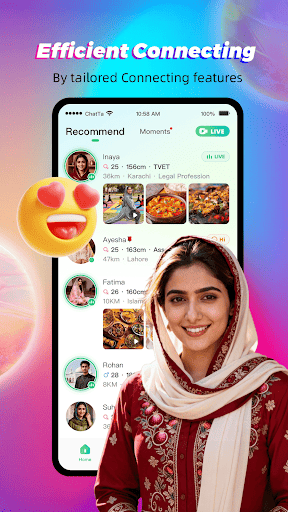
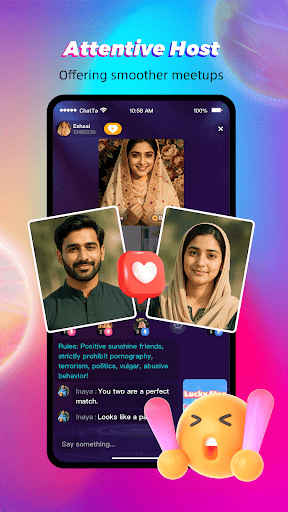
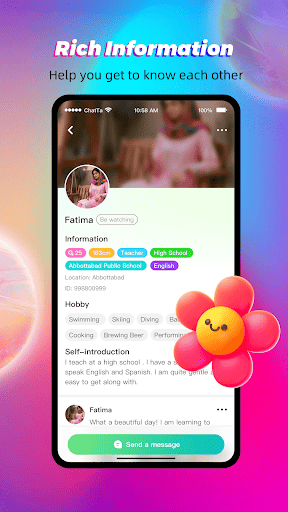
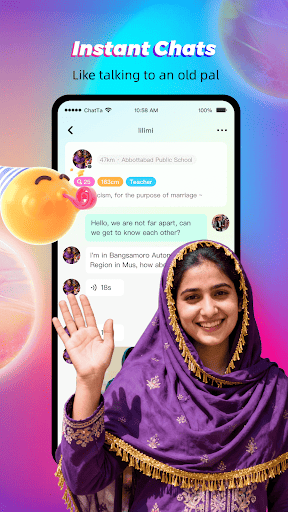
Chat easier, connect with people, make life more joyful.
Chatta is a social app that helps people create meaningful connections and make real friends.
Chatta encourages you to be who you are and helps you find like-minded people.
Whether you want to meet friends, discover interesting people, or expand your social circle, Chatta is the place to be!
Our mission is to inspire users all over the world and let each user foster genuine connections with others.
We are committed to giving users a safe and secure environment to connect with others and express themselves.
We focus on live streaming and community sharing. You can make real connections, engage in live video chats, make lasting friendships and build your community here.
We have a Host role in the 3-party live room to help you break the ice with friends. They will help you start conversations, find more friends, and get more happiness.
Why Chatta?
- Photo Verified Profiles: Connect with real people. Search for like-minded people and chat with them freely.
- Live Host: A host role in the 3-party live room to help users socialize and build friendships.
- Watch Live Stream: Our live room is designed for building genuine connections, allowing users to talk freely and become friends.
- Live Video Chat: Enjoy real-time video chats with friends. Share moments as they happen.
- Live Voice Chat: Don't want to show your face? Live voice chat is your perfect choice. Casual, drop-in audio conversations with no pressure.
- Sharing Community: Share your interests and daily moments to start conversations. Chatta cherishes warm, safe, and good vibes — a community where people respect each other and communicate freely.
- Connect with People Worldwide: Chat with people from the United States, Saudi Arabia, UAE, Kuwait, Oman and more. Discover a diverse, creative global community.
Join Us If You:
- Want to watch live streams and interact with hosts and other viewers in real-time
- Want to overcome social anxiety and meet interesting people
- Enjoy chatting with people from around the world
- Want to meet and chat with people nearby
- Are looking to make friends and build lasting connections
- Enjoy live audio chats and community interactions
- Love sharing your daily life
Download now and start connecting! No matter where you are, real friendships always happen on Chatta.
مزید دکھائیں

1. MEmu انسٹالر ڈاؤن لوڈ کریں اور سیٹ اپ مکمل کریں

2. MEmu شروع کریں اسکے بعد ڈیسکٹاپ پر Google Play کھولیں

3. Google Play میں Chatta - Live Meet Friends تلاش کریں
Install
4. Chatta - Live Meet Friends ڈاؤن لوڈ کریں اور انسٹال کریں
5. انسٹال مکمل ہونے کے بعد سٹارٹ کرنے کے لیے آئیکن پر کلک کریں

6. MEmu کے ساتھ پی سی پر Chatta - Live Meet Friends کھیلنے کا لطف لیں
MEmu پلے بہترین اینڈرائڈ ایمولیٹر ہے اور 100 ملین لوگ اس کے زبردست اینڈرائڈ گیمنگ تجربہ سے لطف اندوز ہو رہے ہیں۔ MEmu کی ورچولائزیشن ٹیکنالوجی آپ کو اپنے PC پر ہزاروں اینڈرائڈ گیمز یہاں تک کہ انتہائی گرافک والے گیمز باسہولت کھیلنے کی طاقت دیتی ہے۔
بہتر گرافکس کے ساتھ بڑی اسکرین؛ طویل دورانیہ، بیٹری یا لامحدود موبائل ڈیٹا کے بغیر۔
کی بورڈ اور ماؤس یا گیم پیڈ کے عین مطابق کنٹرول کے لیے کی میپنگ کا پورا سپورٹ۔
کثیر مثالی منیجر کے ساتھ بیک وقت ایک پی سی پر متعدد گیم اکاؤنٹس یا ٹاسکس۔
پی سی پر درج ذیل مراحل پر عمل کرتے ہوئے پر Chatta - Live Meet Friends استعمال کریں: u003c/p>