Clone Master- Multi Dual Space
تازہ کاری
موجودہ ورژن
2.7.9.10
پیشکش بذریعہ

اپنے موبائل فون پر Clone Master- Multi Dual Space کا استعمال کرتے وقت زیادہ چارج ہونے کی فکر نہ کریں، خود کو چھوٹی اسکرین سے آزاد کریں اور ایپ کو زیادہ بڑے ڈسپلے پر استعمال کرنے کا لطف اٹھائیں۔ اس کے بعد سے کی بورڈ اور ماؤس کے ساتھ اپنے ایپ کا فل اسکرین کا تجربہ حاصل کریں۔ MEmu آپ کو وہ تمام حیران کن خصوصیات پیش کرتا ہے جن کی آپ کو توقع کرتے ہیں: فوری انسٹال اور آسان سیٹ اپ، وجدانی کنٹرول، مزید بیٹری، موبائل ڈیٹا کی کوئی حد نہیں اور اب مزید پریشان کن کالز نہیں۔ نئے برانڈ کا MEmu 9 آپ کے کمپیوٹر پر Clone Master- Multi Dual Space استعمال کرنے کے لیے بہترین اختیار ہے۔ MEmu کثیر نظیری منیجر بیک وقت 2 یا اس سے زیادہ اکاؤنٹس کھولنا ممکن بناتا ہے۔ اور سب اہم بات، ہمارا خصوصی ایمولیشن انجن آپ کے پی سی کی پوری طاقت ریلیز کرتے ہوئے ہر چیز ہموار اور قابل تفریح بناتا ہے۔
مزید دکھائیں
Download Clone Master- Multi Dual Space on PC with MEmu Android Emulator. Enjoy playing on big screen. - کلونر ماسٹر کے ساتھ اپنے اینڈرائیڈ ڈیوائس کی پوری صلاحیت کو غیر مقفل کریں۔.
- کلونر ماسٹر کے ساتھ اپنے اینڈرائیڈ ڈیوائس کی پوری صلاحیت کو غیر مقفل کریں۔
-- پریمیئر ایپ کلوننگ ٹول خاص طور پر جدید ترین Android 15 ایکو سسٹم کے لیے ڈیزائن کیا گیا ہے۔
-- کلونر ماسٹر صارفین کو اپنی موجودہ ایپس کی متعدد کاپیاں بنانے اور ان کا نظم کرنے کے قابل بناتا ہے۔
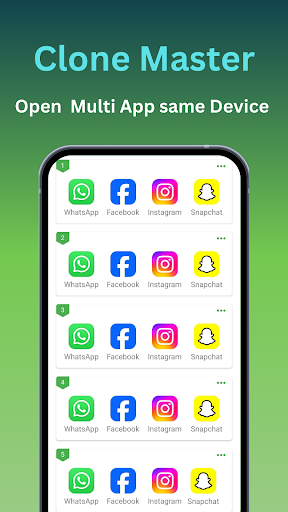
-- دوہری ایپ کی خصوصیات کے لیے متعدد اکاؤنٹس استعمال کرنے کے لیے بیک وقت تمام ایپلیکیشنز کو کلون کریں۔
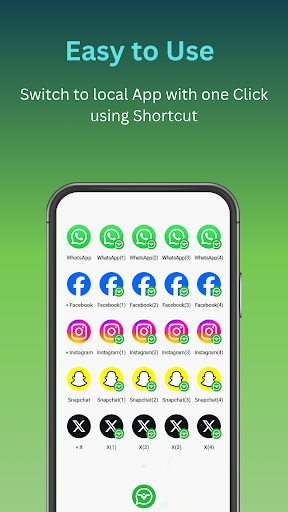
-- آپ ایک ہی ڈیوائس پر متعدد واٹس ایپ، فیس بک، انسٹاگرام، لائن، سگنل، ٹیلیگرام، امو اور اسنیپ چیٹ اکاؤنٹس چلا سکتے ہیں۔
--ہم متعدد اسٹریمنگ پلیٹ فارمز کو چلانے میں مدد کرتے ہیں جیسے Hotstar، Netflix، Tango، Mika، Elo Elo، وغیرہ۔
--آپ اپنی تمام Google سروس کی ضروریات کے لیے Google Play Store، Google Workspace اکاؤنٹس، Google Sheets، اور Google Meet سمیت متعدد Google سروسز چلا سکتے ہیں۔
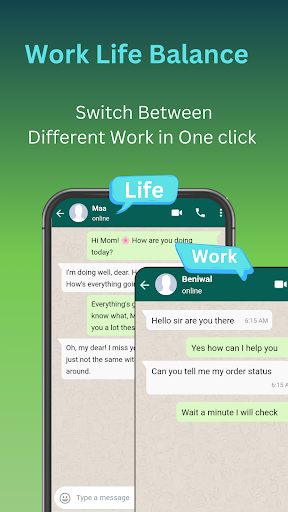
--اگر میں تمام ایپلی کیشنز کے ساتھ ذاتی اور پیشہ ورانہ ورک اسپیس چاہتا ہوں اور ایک ہی ڈیوائس پر کام کرتا ہوں۔
کلونر ماسٹر کیوں؟
اینڈرائیڈ 15 مطابقت:-
اینڈروئیڈ 15 کی جدید خصوصیات سے فائدہ اٹھانے کے لیے تیار کردہ، کلونر ماسٹر آپ کی تمام کلون ایپس پر ہموار آپریشن، بیٹری کے بہتر استعمال، اور ایپ کی بہتر کارکردگی کو یقینی بناتا ہے۔
سیملیس ایپ کلوننگ: - چاہے وہ سوشل میڈیا ہو، گیمنگ ہو یا پروڈکٹیوٹی ایپس، کلونر ماسٹر آسانی سے آپ کی پسندیدہ ایپس کو نقل کرتا ہے، جس سے متعدد اکاؤنٹس کے بیک وقت استعمال کی اجازت ملتی ہے۔
حسب ضرورت صارف کا تجربہ: - ہر کلون ایپ کو اپنی ترجیح کے مطابق بنائیں۔ واقعی ذاتی نوعیت کا اسمارٹ فون تجربہ بنانے کے لیے ایپ کے نام، شبیہیں اور اجازتوں کو حسب ضرورت بنائیں۔
بہتر رازداری کی خصوصیات: - کلونر ماسٹر رازداری پر مرکوز خصوصیات فراہم کرتا ہے جیسے کلون شدہ ایپس کے لیے پوشیدگی لاگ ان اور ذاتی اور کام کے ڈیٹا کو الگ کرنے کی صلاحیت، اس بات کو یقینی بناتے ہوئے کہ آپ کی معلومات محفوظ رہیں۔
یوزر فرینڈلی انٹرفیس: - اپنے بدیہی ڈیزائن کے ساتھ، کلونر ماسٹر ایپ کلوننگ کو ہر کسی کے لیے قابل رسائی بناتا ہے۔ صرف چند ٹیپس کے ساتھ ایپس کو کلون کریں، ان کا نظم کریں اور ان کے درمیان سوئچ کریں۔
ریگولر اپ ڈیٹس:- باقاعدگی سے اپ ڈیٹس کے ساتھ آگے رہیں جو نئی خصوصیات، بہتر مطابقت، اور سیکورٹی میں اضافہ لاتے ہیں، اس بات کو یقینی بناتے ہوئے کہ آپ کی کلون کردہ ایپس جدید ترین Android OS پر آسانی سے چلتی ہیں۔
اہم خصوصیات:
ایک سے زیادہ اکاؤنٹ مینجمنٹ: -
ایک ڈیوائس پر بیک وقت متعدد اکاؤنٹس کا نظم کرنے کے لیے ایپس کو آسانی سے کلون کریں۔ سوشل میڈیا، میسجنگ ایپس اور گیمنگ اکاؤنٹس کے لیے بہترین۔
حسب ضرورت کلون: -اکاؤنٹس کے درمیان آسانی سے فرق کرنے کے لیے اپنی کلون کردہ ایپس کو منفرد شبیہیں اور ناموں کے ساتھ ذاتی بنائیں۔
ڈیٹا کی علیحدگی: - رازداری اور تنظیم کو یقینی بناتے ہوئے، آپ کے کلون شدہ اکاؤنٹس کے ڈیٹا کو اصل ایپس سے آزاد رکھتا ہے۔
پرائیویسی پروٹیکشن: - بلٹ ان پرائیویسی فیچرز اس بات کو یقینی بناتے ہیں کہ آپ کی معلومات ہر کلون ایپ میں محفوظ رہے۔
اپ ڈیٹ سپورٹ:- باقاعدہ اپ ڈیٹس نئے ایپ ورژنز کے ساتھ مطابقت کو بہتر بناتے ہیں اور مجموعی کارکردگی اور استحکام کو بڑھاتے ہیں۔
کسی جڑ کی ضرورت نہیں: - اپنے آلے کو روٹ کرنے کی ضرورت کے بغیر جدید کلوننگ ٹیکنالوجی کا استعمال کریں۔
جڑے رہیے:-
ہم اپنے صارفین کے تاثرات اور تجاویز کی قدر کرتے ہیں۔ اگر آپ کے کوئی سوالات، خیالات، یا مدد کی ضرورت ہے، تو براہ کرم بلا جھجھک ہم سے clonemaster.help@gmail.com پر رابطہ کریں۔
مزید دکھائیں

1. MEmu انسٹالر ڈاؤن لوڈ کریں اور سیٹ اپ مکمل کریں

2. MEmu شروع کریں اسکے بعد ڈیسکٹاپ پر Google Play کھولیں

3. Google Play میں Clone Master- Multi Dual Space تلاش کریں
Install
4. Clone Master- Multi Dual Space ڈاؤن لوڈ کریں اور انسٹال کریں
5. انسٹال مکمل ہونے کے بعد سٹارٹ کرنے کے لیے آئیکن پر کلک کریں

6. MEmu کے ساتھ پی سی پر Clone Master- Multi Dual Space کھیلنے کا لطف لیں
MEmu پلے بہترین اینڈرائڈ ایمولیٹر ہے اور 100 ملین لوگ اس کے زبردست اینڈرائڈ گیمنگ تجربہ سے لطف اندوز ہو رہے ہیں۔ MEmu کی ورچولائزیشن ٹیکنالوجی آپ کو اپنے PC پر ہزاروں اینڈرائڈ گیمز یہاں تک کہ انتہائی گرافک والے گیمز باسہولت کھیلنے کی طاقت دیتی ہے۔
بہتر گرافکس کے ساتھ بڑی اسکرین؛ طویل دورانیہ، بیٹری یا لامحدود موبائل ڈیٹا کے بغیر۔
کی بورڈ اور ماؤس یا گیم پیڈ کے عین مطابق کنٹرول کے لیے کی میپنگ کا پورا سپورٹ۔
کثیر مثالی منیجر کے ساتھ بیک وقت ایک پی سی پر متعدد گیم اکاؤنٹس یا ٹاسکس۔
پی سی پر درج ذیل مراحل پر عمل کرتے ہوئے پر Clone Master- Multi Dual Space استعمال کریں: u003c/p>