Home Design 3D
تازہ کاری
موجودہ ورژن
5.3.2
پیشکش بذریعہ

اپنے موبائل فون پر Home Design 3D کا استعمال کرتے وقت زیادہ چارج ہونے کی فکر نہ کریں، خود کو چھوٹی اسکرین سے آزاد کریں اور ایپ کو زیادہ بڑے ڈسپلے پر استعمال کرنے کا لطف اٹھائیں۔ اس کے بعد سے کی بورڈ اور ماؤس کے ساتھ اپنے ایپ کا فل اسکرین کا تجربہ حاصل کریں۔ MEmu آپ کو وہ تمام حیران کن خصوصیات پیش کرتا ہے جن کی آپ کو توقع کرتے ہیں: فوری انسٹال اور آسان سیٹ اپ، وجدانی کنٹرول، مزید بیٹری، موبائل ڈیٹا کی کوئی حد نہیں اور اب مزید پریشان کن کالز نہیں۔ نئے برانڈ کا MEmu 9 آپ کے کمپیوٹر پر Home Design 3D استعمال کرنے کے لیے بہترین اختیار ہے۔ MEmu کثیر نظیری منیجر بیک وقت 2 یا اس سے زیادہ اکاؤنٹس کھولنا ممکن بناتا ہے۔ اور سب اہم بات، ہمارا خصوصی ایمولیشن انجن آپ کے پی سی کی پوری طاقت ریلیز کرتے ہوئے ہر چیز ہموار اور قابل تفریح بناتا ہے۔
مزید دکھائیں
Download Home Design 3D on PC with MEmu Android Emulator. Enjoy playing on big screen. New Update: Discover dormer windows and over 600 new textures.
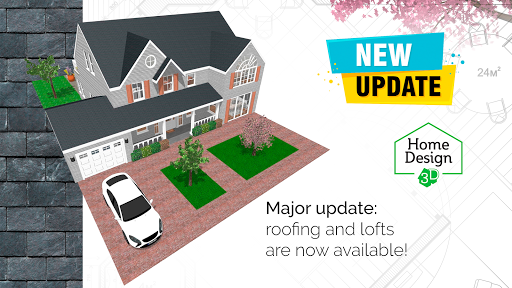
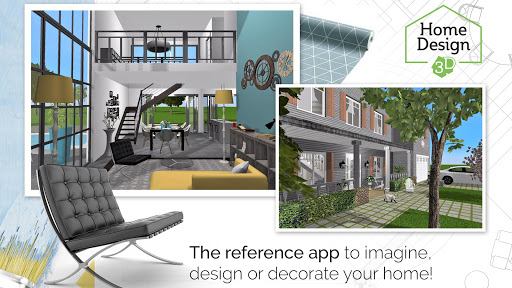
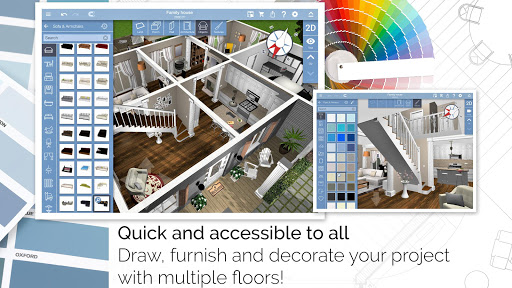
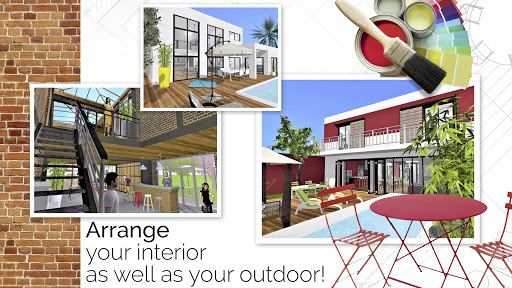
New Update: Discover dormer windows and over 600 new textures.
Visit your Home Design 3D projects in virtual reality through VR export.
With Home Design 3D, designing and remodeling your house in 3D has never been so quick and intuitive!
Accessible to everyone, Home Design 3D is the reference interior design application for a professional result at your fingertips!
Build your multi-story house now!
Unlimited number of floors with GOLD PLUS version (depends on your device's capacity).
CREATE, DESIGN, FURNISH AND DECORATE EASILY YOUR HOME AND SHARE IT WITH A COMMUNITY OF MORE THAN 90 MILLION OF USERS WORLDWIDE!
Whether you want to decorate, design or create the house of your dreams, Home Design 3D is the perfect app for you:
1.DESIGN YOUR FLOORPLAN
- In 2D and 3D, draw your plot, rooms, dividers
- Change the height or the thickness of the walls, create corners
- Add doors and windows with fully-resizable pieces of joinery
2. FURNISH AND DECORATE
- Design and decorate both the interior and outdoor of your home
- Make your choice from over a thousand of pieces of furniture and accessories, customize your decoration and express your style, from the most classical to the trendiest!
- Edit any object, by changing its size, color, position and altitude on the walls
- Duplicate your favorite items thanks to the copy/paste function
- Use the undo/redo feature at anytime if you want to go back
- Use the eye dropper to find an existing color in the plan
- You can also import picture as texture and apply them everywhere
3. VISUALIZE AND VISIT YOUR CREATION
- Visit your creation in real-time 3D as if you were inside it thanks to our brand new photo-realistic 3D rendering
- Discover your home, your outdoor and even your neighborhood
- Admire the result day and night, the compass function will show you where exactly the light will fall at different times of the day
4. IMPORT/EXPORT AND SHARE
- Import any plan and display it on the background of the project
- Export and continue your projects on your other devices thanks to the cross-platform compatibility
- Share your projects via e-mail, Dropbox, OneDrive and many more file hosting services!
- Share your best creations with the Home Design 3D community on www.homedesign3d.net!
No internet connection required
Illustrated tutorial available
Calling all professionals! We can make it possible to see your products in Home Design 3D, or develop a unique version of the app for your needs. Contact us at pro@anuman-interactive.com
_________________________________________
Follow us on Twitter @homedesign3d
Join us on facebook.com/homedesign3d
Get inspired on our Pinterest boards/homedesign3d/
Follow us on Instagram @homedesign3d_off
مزید دکھائیں

1. MEmu انسٹالر ڈاؤن لوڈ کریں اور سیٹ اپ مکمل کریں

2. MEmu شروع کریں اسکے بعد ڈیسکٹاپ پر Google Play کھولیں

3. Google Play میں Home Design 3D تلاش کریں
Install
4. Home Design 3D ڈاؤن لوڈ کریں اور انسٹال کریں
5. انسٹال مکمل ہونے کے بعد سٹارٹ کرنے کے لیے آئیکن پر کلک کریں

6. MEmu کے ساتھ پی سی پر Home Design 3D کھیلنے کا لطف لیں
MEmu پلے بہترین اینڈرائڈ ایمولیٹر ہے اور 100 ملین لوگ اس کے زبردست اینڈرائڈ گیمنگ تجربہ سے لطف اندوز ہو رہے ہیں۔ MEmu کی ورچولائزیشن ٹیکنالوجی آپ کو اپنے PC پر ہزاروں اینڈرائڈ گیمز یہاں تک کہ انتہائی گرافک والے گیمز باسہولت کھیلنے کی طاقت دیتی ہے۔
بہتر گرافکس کے ساتھ بڑی اسکرین؛ طویل دورانیہ، بیٹری یا لامحدود موبائل ڈیٹا کے بغیر۔
کی بورڈ اور ماؤس یا گیم پیڈ کے عین مطابق کنٹرول کے لیے کی میپنگ کا پورا سپورٹ۔
کثیر مثالی منیجر کے ساتھ بیک وقت ایک پی سی پر متعدد گیم اکاؤنٹس یا ٹاسکس۔
پی سی پر درج ذیل مراحل پر عمل کرتے ہوئے پر Home Design 3D استعمال کریں: u003c/p>