Home Design 3D
อัปเดตเมื่อ
เวอร์ชันปัจจุบัน
5.3.2
ให้บริการโดย

เมื่อใช้ Home Design 3D บนโทรศัพท์ของคุณไม่ต้องกังวลกับการชาร์จไฟมากเกินไปปลดปล่อยตัวคุณเองจากหน้าจอขนาดเล็กและสนุกกับการใช้แอพนี้บนหน้าจอขนาดใหญ่ จากนี้ไปรับประสบการณ์เต็มหน้าจอของแอปพลิเคชันของคุณด้วยคีย์บอร์ดและเมาส์ MEmu มีคุณสมบัติที่น่าแปลกใจที่คุณคาดหวัง: การติดตั้งที่รวดเร็วและการตั้งค่าที่ง่ายควบคุมได้ง่ายไม่ จำกัด แบตเตอรี่ข้อมูลมือถือและการโทรที่รบกวน MEmu 9 ใหม่ล่าสุดเป็นตัวเลือกที่ดีที่สุดสำหรับการใช้ Meitu – โปรแกรมแก้ไขภาพแนวธรรมชาติ บนคอมพิวเตอร์ของคุณ ด้วยรหัสการดูดซึมของเราผู้จัดการหลายอินสแตนซ์ทำให้สามารถเปิดบัญชี 2 บัญชีขึ้นไปในเวลาเดียวกันได้ และที่สำคัญที่สุดเอ็นจิ้นจำลองพิเศษของเราสามารถปลดปล่อยศักยภาพของPCของคุณและทำให้ทุกอย่างราบรื่นและสนุกสนาน
แสดงเพิ่มเติม
ดาวน์โหลด Home Design 3D บน PC ด้วย MEmu Android Emulator สนุกกับการเล่นบนหน้าจอขนาดใหญ่ New Update: Discover dormer windows and over 600 new textures.
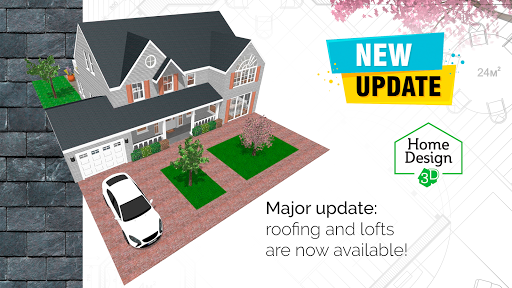
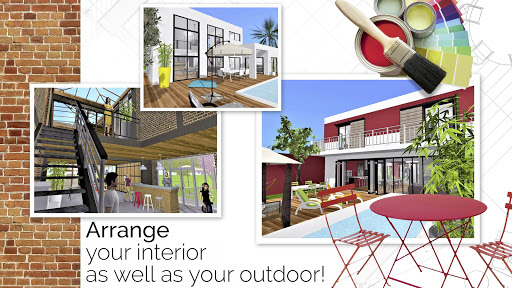
New Update: Discover dormer windows and over 600 new textures.
Visit your Home Design 3D projects in virtual reality through VR export.
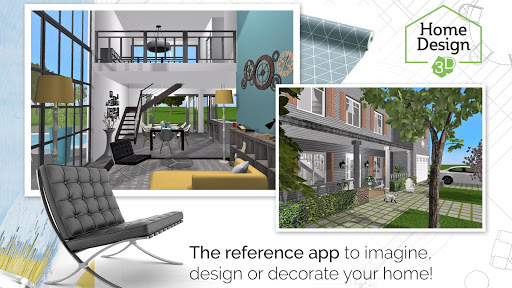
With Home Design 3D, designing and remodeling your house in 3D has never been so quick and intuitive!
Accessible to everyone, Home Design 3D is the reference interior design application for a professional result at your fingertips!
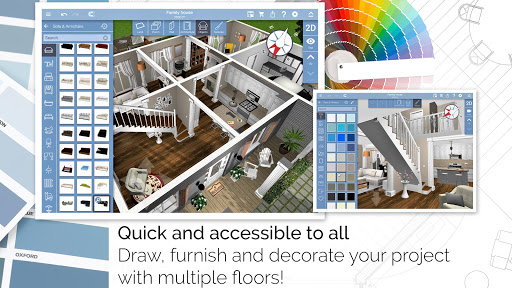
Build your multi-story house now!
Unlimited number of floors with GOLD PLUS version (depends on your device's capacity).
CREATE, DESIGN, FURNISH AND DECORATE EASILY YOUR HOME AND SHARE IT WITH A COMMUNITY OF MORE THAN 90 MILLION OF USERS WORLDWIDE!
Whether you want to decorate, design or create the house of your dreams, Home Design 3D is the perfect app for you:
1.DESIGN YOUR FLOORPLAN
- In 2D and 3D, draw your plot, rooms, dividers
- Change the height or the thickness of the walls, create corners
- Add doors and windows with fully-resizable pieces of joinery
2. FURNISH AND DECORATE
- Design and decorate both the interior and outdoor of your home
- Make your choice from over a thousand of pieces of furniture and accessories, customize your decoration and express your style, from the most classical to the trendiest!
- Edit any object, by changing its size, color, position and altitude on the walls
- Duplicate your favorite items thanks to the copy/paste function
- Use the undo/redo feature at anytime if you want to go back
- Use the eye dropper to find an existing color in the plan
- You can also import picture as texture and apply them everywhere
3. VISUALIZE AND VISIT YOUR CREATION
- Visit your creation in real-time 3D as if you were inside it thanks to our brand new photo-realistic 3D rendering
- Discover your home, your outdoor and even your neighborhood
- Admire the result day and night, the compass function will show you where exactly the light will fall at different times of the day
4. IMPORT/EXPORT AND SHARE
- Import any plan and display it on the background of the project
- Export and continue your projects on your other devices thanks to the cross-platform compatibility
- Share your projects via e-mail, Dropbox, OneDrive and many more file hosting services!
- Share your best creations with the Home Design 3D community on www.homedesign3d.net!
No internet connection required
Illustrated tutorial available
Calling all professionals! We can make it possible to see your products in Home Design 3D, or develop a unique version of the app for your needs. Contact us at pro@anuman-interactive.com
_________________________________________
Follow us on Twitter @homedesign3d
Join us on facebook.com/homedesign3d
Get inspired on our Pinterest boards/homedesign3d/
Follow us on Instagram @homedesign3d_off
แสดงเพิ่มเติม

1. ดาวน์โหลดตัวติดตั้ง MEmu และสิ้นสุดการติดตั้ง

2. เริ่ม MEmu จากนั้นเปิด Google Play บนหน้าแรก

3. ค้นหา Home Design 3D ใน Google Play
Install
4. ดาวน์โหลดและติดตั้ง Home Design 3D
5. เมื่อติดตั้งเสร็จให้คลิกที่ไอคอนเพื่อเริ่มใช้งาน

6. ใช้ MEmu เพื่อสัมผัสประสบการณ์ Home Design 3D บนคอมพิวเตอร์ของคุณ
MEmu Play คือโปรแกรมจำลอง Android ที่ดีที่สุด มีผู้ใช้มากกว่า 50 ล้านคน มอบประสบการณ์การใช้งานแอป Android ขั้นสุดยอดให้กับคุณ เทคโนโลยีจำลองเสมือนของ MEmu ช่วยให้คุณรันแอป Android หลายพันแอปบนคอมพิวเตอร์ได้อย่างราบรื่น แม้แอปที่กินทรัพยากรเครื่องสูงที่สุด
จอใหญ่และกราฟฟิกสวยกว่า; เล่นได้นาน, ไม่ต้องใช้แบตเตอรี่โทรศัพท์หรือเน็ตโทรศัพท์.
ระบบปรับแต่งปุ่มคีย์บอร์ดและเม้าส์ตามที่คุณเลือก
เล่นมากกว่าหนึ่งเกมบน PC ในเวลาเดียวกันด้วยระบบหลายจอหรือ Multi-Instance manager.
Use Home Design 3D on PC by following steps: