MeeAww - AI Photo Enhancer
تازہ کاری
موجودہ ورژن
1.2.3
پیشکش بذریعہ

اپنے موبائل فون پر MeeAww - AI Photo Enhancer کا استعمال کرتے وقت زیادہ چارج ہونے کی فکر نہ کریں، خود کو چھوٹی اسکرین سے آزاد کریں اور ایپ کو زیادہ بڑے ڈسپلے پر استعمال کرنے کا لطف اٹھائیں۔ اس کے بعد سے کی بورڈ اور ماؤس کے ساتھ اپنے ایپ کا فل اسکرین کا تجربہ حاصل کریں۔ MEmu آپ کو وہ تمام حیران کن خصوصیات پیش کرتا ہے جن کی آپ کو توقع کرتے ہیں: فوری انسٹال اور آسان سیٹ اپ، وجدانی کنٹرول، مزید بیٹری، موبائل ڈیٹا کی کوئی حد نہیں اور اب مزید پریشان کن کالز نہیں۔ نئے برانڈ کا MEmu 9 آپ کے کمپیوٹر پر MeeAww - AI Photo Enhancer استعمال کرنے کے لیے بہترین اختیار ہے۔ MEmu کثیر نظیری منیجر بیک وقت 2 یا اس سے زیادہ اکاؤنٹس کھولنا ممکن بناتا ہے۔ اور سب اہم بات، ہمارا خصوصی ایمولیشن انجن آپ کے پی سی کی پوری طاقت ریلیز کرتے ہوئے ہر چیز ہموار اور قابل تفریح بناتا ہے۔
مزید دکھائیں
Download MeeAww - AI Photo Enhancer on PC with MEmu Android Emulator. Enjoy playing on big screen. Transform your old photos, low-resolution images, and blurry or damaged pictures into sharp, high-quality images with just one touch!
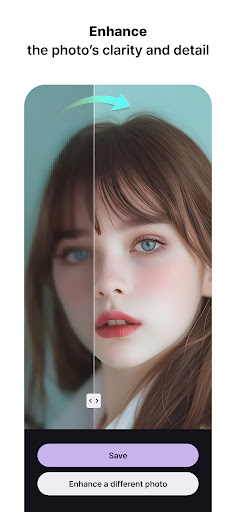
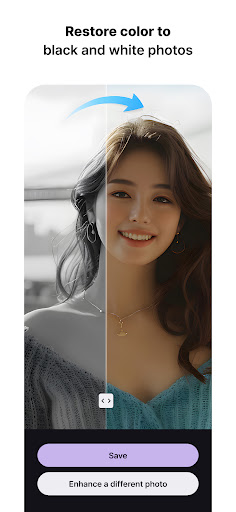
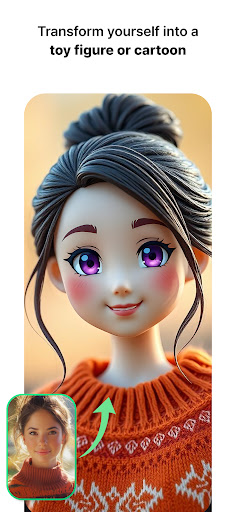
Transform your old photos, low-resolution images, and blurry or damaged pictures into sharp, high-quality images with just one touch!
MeeAww is an advanced photo restoration tool that harnesses the power of cutting-edge AI technology to enhance and revive your photos. Bring your cherished memories back to life with stunning, high-resolution clarity.
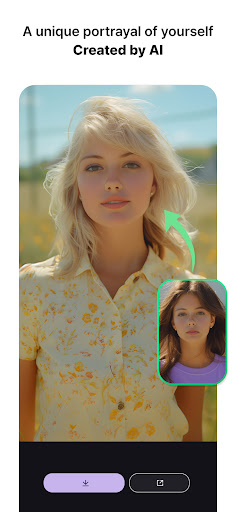
In addition to restoring images, MeeAww makes it effortless to create high-quality AI-generated profile pictures. Unlike other photo enhancement tools, MeeAww automatically detects and corrects photo imperfections, ensuring a polished final product.
Whether you need simple brightness adjustments or complex restoration of vintage photos, MeeAww offers a variety of AI tools to meet your editing needs. Want to restore old memories and enhance their quality? MeeAww is here to help!
Quickly and easily create clean, beautiful photos that look professionally edited. Experience the difference with MeeAww today!
--- Key Features of MeeAww ---
- ENHANCE Photo Quality Improvement: Restore low-quality images to be clean and sharp. Remove noise, improve lighting and colors, and provide greater detail, especially in portrait photos.
When removing noise from photos, details can often be lost. However, MeeAww’s AI technology ensures that details are preserved while eliminating all noise and artifacts, resulting in clear and pristine images. It strikes the perfect balance between sharpness and quality.
Did you capture an important moment, but the photo came out blurry? Blurry images typically become useless, but with MeeAww’s motion blur removal feature, you can restore them to clarity and cleanliness.
- Colorization: Transform black-and-white photos into vibrant color images, making your old memories feel closer and more lifelike. The AI guesses the colors of the original scene and applies them to the black-and-white photo, which can then be enhanced with MeeAww’s ENHANCE feature for even greater quality and clarity. Your old photos will feel as if they were just taken.
- Brightness Enhancement: Photos taken in poor lighting conditions can be naturally brightened using MeeAww’s advanced AI technology. The improvement in brightness and clarity makes it difficult to notice that the photo was originally dark.
- AI Filter: MeeAww's AI filters transform your photos into creative and unique styles, offering a truly special experience.
From toy figures to cartoons, dolls, and animations, we turn everyday moments into original works of art.
With our AI filters, even the most ordinary photos are reimagined in fun and refreshing ways.
- AI Profile: Create your own AI photo album with the highest quality using MeeAww. Experience premium studio-quality images in seconds without the expensive costs of a professional studio. Easily generate professional-looking portrait photos, change outfits, or alter backgrounds. With just one touch, you can create top-tier profile pictures.
This feature is perfect for those who want to stand out on dating apps, have fun creating new styles, or need a fresh profile picture. Utilizing Gen AI technology, MeeAww provides high-quality studio-level photos without the need for professional assistance.
- AI Wallpaper: Enjoy unique and diverse wallpapers generated by AI for free. Decorate your phone’s background with fresh and fun designs that are updated daily.
Save time with MeeAww and effortlessly experience top-quality photo AI features!
If you encounter any issues or have suggestions for improvement while using the app, please feel free to contact us at support@countdn.ai.
We are committed to enhancing the app through your valuable feedback!
مزید دکھائیں

1. MEmu انسٹالر ڈاؤن لوڈ کریں اور سیٹ اپ مکمل کریں

2. MEmu شروع کریں اسکے بعد ڈیسکٹاپ پر Google Play کھولیں

3. Google Play میں MeeAww - AI Photo Enhancer تلاش کریں
Install
4. MeeAww - AI Photo Enhancer ڈاؤن لوڈ کریں اور انسٹال کریں
5. انسٹال مکمل ہونے کے بعد سٹارٹ کرنے کے لیے آئیکن پر کلک کریں

6. MEmu کے ساتھ پی سی پر MeeAww - AI Photo Enhancer کھیلنے کا لطف لیں
MEmu پلے بہترین اینڈرائڈ ایمولیٹر ہے اور 100 ملین لوگ اس کے زبردست اینڈرائڈ گیمنگ تجربہ سے لطف اندوز ہو رہے ہیں۔ MEmu کی ورچولائزیشن ٹیکنالوجی آپ کو اپنے PC پر ہزاروں اینڈرائڈ گیمز یہاں تک کہ انتہائی گرافک والے گیمز باسہولت کھیلنے کی طاقت دیتی ہے۔
بہتر گرافکس کے ساتھ بڑی اسکرین؛ طویل دورانیہ، بیٹری یا لامحدود موبائل ڈیٹا کے بغیر۔
کی بورڈ اور ماؤس یا گیم پیڈ کے عین مطابق کنٹرول کے لیے کی میپنگ کا پورا سپورٹ۔
کثیر مثالی منیجر کے ساتھ بیک وقت ایک پی سی پر متعدد گیم اکاؤنٹس یا ٹاسکس۔
پی سی پر درج ذیل مراحل پر عمل کرتے ہوئے پر MeeAww - AI Photo Enhancer استعمال کریں: u003c/p>