VN Video Editor Lite
تازہ کاری
موجودہ ورژن
1.15.1
پیشکش بذریعہ

اپنے موبائل فون پر VN Video Editor Lite کا استعمال کرتے وقت زیادہ چارج ہونے کی فکر نہ کریں، خود کو چھوٹی اسکرین سے آزاد کریں اور ایپ کو زیادہ بڑے ڈسپلے پر استعمال کرنے کا لطف اٹھائیں۔ اس کے بعد سے کی بورڈ اور ماؤس کے ساتھ اپنے ایپ کا فل اسکرین کا تجربہ حاصل کریں۔ MEmu آپ کو وہ تمام حیران کن خصوصیات پیش کرتا ہے جن کی آپ کو توقع کرتے ہیں: فوری انسٹال اور آسان سیٹ اپ، وجدانی کنٹرول، مزید بیٹری، موبائل ڈیٹا کی کوئی حد نہیں اور اب مزید پریشان کن کالز نہیں۔ نئے برانڈ کا MEmu 9 آپ کے کمپیوٹر پر VN Video Editor Lite استعمال کرنے کے لیے بہترین اختیار ہے۔ MEmu کثیر نظیری منیجر بیک وقت 2 یا اس سے زیادہ اکاؤنٹس کھولنا ممکن بناتا ہے۔ اور سب اہم بات، ہمارا خصوصی ایمولیشن انجن آپ کے پی سی کی پوری طاقت ریلیز کرتے ہوئے ہر چیز ہموار اور قابل تفریح بناتا ہے۔
مزید دکھائیں
Download VN Video Editor Lite on PC with MEmu Android Emulator. Enjoy playing on big screen. VN, Best FREE HD Video Editor and Video Maker with all features, trim & cut video/movie/footage, blur the background and crop add music, sticker, multi-layer timeline, chroma key, green screen and video effects!
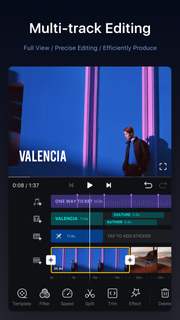
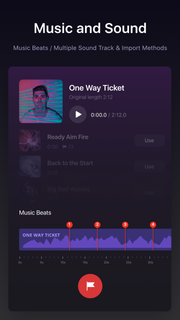
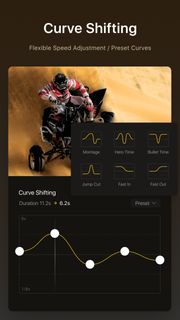
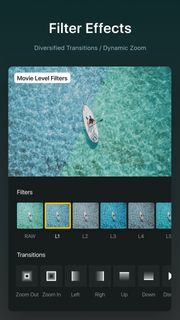
VN, Best FREE HD Video Editor and Video Maker with all features, trim & cut video/movie/footage, blur the background and crop add music, sticker, multi-layer timeline, chroma key, green screen and video effects! Simple, but powerful as a desktop editor, VN is suitable for both beginners and professional users. VN - top movie maker and HD pro video editor with music, helps you create a video with ease, edit video for YouTube, Instagram, Tik Tok, Facebook, Messenger, Whatsapp, Twitter, etc.Features:Easy* Zoom in/out the timeline* Tap to split, drag, delete, and duplicate video clips* Save draft whenever you need a breakProfessional* multi-layer timeline* Curve speed* Green Screen/Chroma key* Keyframe Animation* MaskCustomize Background Music/Soundtrack* Add your own music into VN* Mark the music rhythm* Support multiple soundtracks and adjust the duration;* Free Diverse style musicCool Video Effects* Supports changing video speed freely* 21 transitions between video clips* More than 60 filtersPowerful Subtitle Tool* Add title slides, text overlays in the timeline* Change font, color, size of subtitles* Adjust the subtitle durationEasily Share and Save Original Video* Save your original videos to your camera roll* Instantly sharing to YouTube, Twitter, Facebook, and others with a weblinkVN Video Editor helps you easily make the video and share a better life.If you have any questions, please contact us via the following methods.YouTube: https://www.youtube.com/c/vnvideoeditorappDiscord: https://discord.com/channels/727359554928771092Instagram: @vnvideoeditorFacebook: @vnvideoeditorappEmail: [email protected]Telegram: @vnvideoeditorappOfficial website: https://vlognow.me/
مزید دکھائیں

1. MEmu انسٹالر ڈاؤن لوڈ کریں اور سیٹ اپ مکمل کریں

2. MEmu شروع کریں اسکے بعد ڈیسکٹاپ پر Google Play کھولیں

3. Google Play میں VN Video Editor Lite تلاش کریں
Install
4. VN Video Editor Lite ڈاؤن لوڈ کریں اور انسٹال کریں
5. انسٹال مکمل ہونے کے بعد سٹارٹ کرنے کے لیے آئیکن پر کلک کریں

6. MEmu کے ساتھ پی سی پر VN Video Editor Lite کھیلنے کا لطف لیں
MEmu پلے بہترین اینڈرائڈ ایمولیٹر ہے اور 100 ملین لوگ اس کے زبردست اینڈرائڈ گیمنگ تجربہ سے لطف اندوز ہو رہے ہیں۔ MEmu کی ورچولائزیشن ٹیکنالوجی آپ کو اپنے PC پر ہزاروں اینڈرائڈ گیمز یہاں تک کہ انتہائی گرافک والے گیمز باسہولت کھیلنے کی طاقت دیتی ہے۔
بہتر گرافکس کے ساتھ بڑی اسکرین؛ طویل دورانیہ، بیٹری یا لامحدود موبائل ڈیٹا کے بغیر۔
کی بورڈ اور ماؤس یا گیم پیڈ کے عین مطابق کنٹرول کے لیے کی میپنگ کا پورا سپورٹ۔
کثیر مثالی منیجر کے ساتھ بیک وقت ایک پی سی پر متعدد گیم اکاؤنٹس یا ٹاسکس۔
پی سی پر درج ذیل مراحل پر عمل کرتے ہوئے پر VN Video Editor Lite استعمال کریں: u003c/p>