Monese - A banking alternative
تازہ کاری
موجودہ ورژن
9.11.0.28172
پیشکش بذریعہ

اپنے موبائل فون پر Monese - A banking alternative کا استعمال کرتے وقت زیادہ چارج ہونے کی فکر نہ کریں، خود کو چھوٹی اسکرین سے آزاد کریں اور ایپ کو زیادہ بڑے ڈسپلے پر استعمال کرنے کا لطف اٹھائیں۔ اس کے بعد سے کی بورڈ اور ماؤس کے ساتھ اپنے ایپ کا فل اسکرین کا تجربہ حاصل کریں۔ MEmu آپ کو وہ تمام حیران کن خصوصیات پیش کرتا ہے جن کی آپ کو توقع کرتے ہیں: فوری انسٹال اور آسان سیٹ اپ، وجدانی کنٹرول، مزید بیٹری، موبائل ڈیٹا کی کوئی حد نہیں اور اب مزید پریشان کن کالز نہیں۔ نئے برانڈ کا MEmu 9 آپ کے کمپیوٹر پر Monese - A banking alternative استعمال کرنے کے لیے بہترین اختیار ہے۔ MEmu کثیر نظیری منیجر بیک وقت 2 یا اس سے زیادہ اکاؤنٹس کھولنا ممکن بناتا ہے۔ اور سب اہم بات، ہمارا خصوصی ایمولیشن انجن آپ کے پی سی کی پوری طاقت ریلیز کرتے ہوئے ہر چیز ہموار اور قابل تفریح بناتا ہے۔
مزید دکھائیں
Download Monese - A banking alternative on PC with MEmu Android Emulator. Enjoy playing on big screen. Monese is the banking alternative you’ve been waiting for.
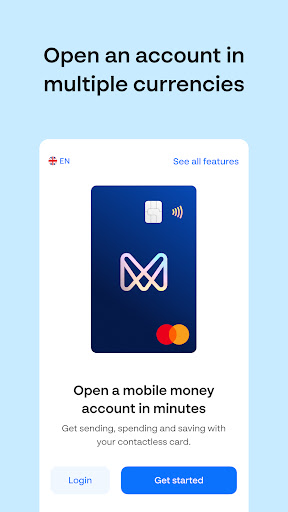
Monese is the banking alternative you’ve been waiting for.
We’re the money app that helps you budget smartly, spend wisely and switch between currencies in a flash.
Whether you need a GBP, EUR or RON account (or all 3!), you’ll be able to manage your money straight from your phone and enjoy the flexibility to live, work, travel, study and thrive wherever life takes you. We even have business accounts!
Join over 2 million people and open a Monese mobile money account today.
It’s simple, fuss-free and easy – so how does it work?
• Open a GBP, EUR or RON account, straight from your phone
• Easily switch between currencies and manage your money all in one place
• Get a contactless Mastercard debit card you can use globally – online, in-store or at ATMs
• Spend abroad with no extra fees on card spending and ATM withdrawals
• Quickly send and receive money locally and internationally in multiple currencies
• Create a virtual card and pay online or in-store for an extra layer of security
• Open a joint account to easily spend, share and save with a loved one, roommate or friend
With our feature-rich smartphone app, you’ll also get:
• Real-time notifications: Instant updates whenever you use your account
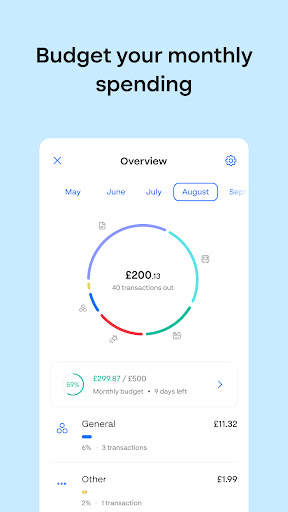
• A detailed spending overview: Full transparency around your transactions
• Savings pots: Put money aside for something special
• Google Pay: A fast, easy and secure way to pay with your Google Pay
• Automatic Direct Debits and recurring payments: the easy way to pay for things like mobile phone contracts, rent, or gym memberships
Plus, you can also:
• Build your credit score: Use Credit Builder to grow your credit history and savings at the same time (UK only)
• Link your PayPal account: Manage your PayPal balance and transactions from Monese, and add your Monese card to your PayPal wallet
• Enjoy state-of-the art security features: 3D Secure, card locking, strong encryption and biometric login
• Get instant account statements in PDF or XLS whenever you need
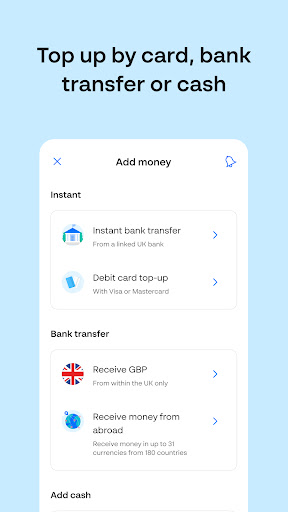
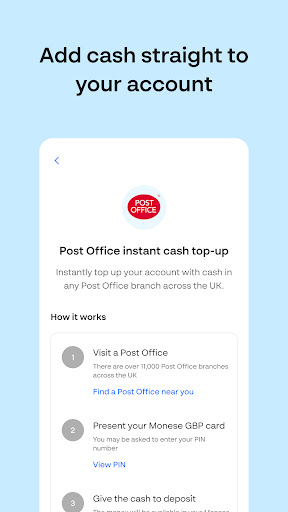
Enjoy the convenience of being able to send and receive money straight from your phone, get your salary paid in, set up Direct Debits and recurring payments, all while maintaining a complete overview of your earning, spending and saving. Withdraw cash from ATMs worldwide for free, within generous allowances, and add money to your account by bank transfer, debit card, or with cash at over 84,000 locations in the UK, Austria, Belgium, Bulgaria, France, Luxembourg, the Netherlands, Poland, Portugal or Spain.
You can open an account with us regardless of your citizenship or financial history, as long as you’re at least 18 years old and live in the European Economic Area (EEA).
مزید دکھائیں

1. MEmu انسٹالر ڈاؤن لوڈ کریں اور سیٹ اپ مکمل کریں

2. MEmu شروع کریں اسکے بعد ڈیسکٹاپ پر Google Play کھولیں

3. Google Play میں Monese - A banking alternative تلاش کریں
Install
4. Monese - A banking alternative ڈاؤن لوڈ کریں اور انسٹال کریں
5. انسٹال مکمل ہونے کے بعد سٹارٹ کرنے کے لیے آئیکن پر کلک کریں

6. MEmu کے ساتھ پی سی پر Monese - A banking alternative کھیلنے کا لطف لیں
MEmu پلے بہترین اینڈرائڈ ایمولیٹر ہے اور 100 ملین لوگ اس کے زبردست اینڈرائڈ گیمنگ تجربہ سے لطف اندوز ہو رہے ہیں۔ MEmu کی ورچولائزیشن ٹیکنالوجی آپ کو اپنے PC پر ہزاروں اینڈرائڈ گیمز یہاں تک کہ انتہائی گرافک والے گیمز باسہولت کھیلنے کی طاقت دیتی ہے۔
بہتر گرافکس کے ساتھ بڑی اسکرین؛ طویل دورانیہ، بیٹری یا لامحدود موبائل ڈیٹا کے بغیر۔
کی بورڈ اور ماؤس یا گیم پیڈ کے عین مطابق کنٹرول کے لیے کی میپنگ کا پورا سپورٹ۔
کثیر مثالی منیجر کے ساتھ بیک وقت ایک پی سی پر متعدد گیم اکاؤنٹس یا ٹاسکس۔
پی سی پر درج ذیل مراحل پر عمل کرتے ہوئے پر Monese - A banking alternative استعمال کریں: u003c/p>