MyFitnessPal: Calorie Counter
تازہ کاری
موجودہ ورژن
1733863155
پیشکش بذریعہ

اپنے موبائل فون پر MyFitnessPal: Calorie Counter کا استعمال کرتے وقت زیادہ چارج ہونے کی فکر نہ کریں، خود کو چھوٹی اسکرین سے آزاد کریں اور ایپ کو زیادہ بڑے ڈسپلے پر استعمال کرنے کا لطف اٹھائیں۔ اس کے بعد سے کی بورڈ اور ماؤس کے ساتھ اپنے ایپ کا فل اسکرین کا تجربہ حاصل کریں۔ MEmu آپ کو وہ تمام حیران کن خصوصیات پیش کرتا ہے جن کی آپ کو توقع کرتے ہیں: فوری انسٹال اور آسان سیٹ اپ، وجدانی کنٹرول، مزید بیٹری، موبائل ڈیٹا کی کوئی حد نہیں اور اب مزید پریشان کن کالز نہیں۔ نئے برانڈ کا MEmu 9 آپ کے کمپیوٹر پر MyFitnessPal: Calorie Counter استعمال کرنے کے لیے بہترین اختیار ہے۔ MEmu کثیر نظیری منیجر بیک وقت 2 یا اس سے زیادہ اکاؤنٹس کھولنا ممکن بناتا ہے۔ اور سب اہم بات، ہمارا خصوصی ایمولیشن انجن آپ کے پی سی کی پوری طاقت ریلیز کرتے ہوئے ہر چیز ہموار اور قابل تفریح بناتا ہے۔
مزید دکھائیں
Download MyFitnessPal: Calorie Counter on PC with MEmu Android Emulator. Enjoy playing on big screen. Track progress toward your health, nutrition, fitness, and weight loss goals with MyFitnessPal.
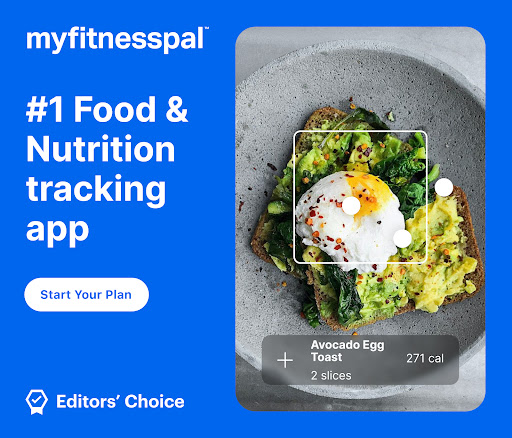
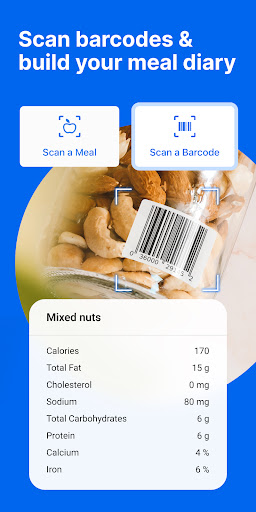
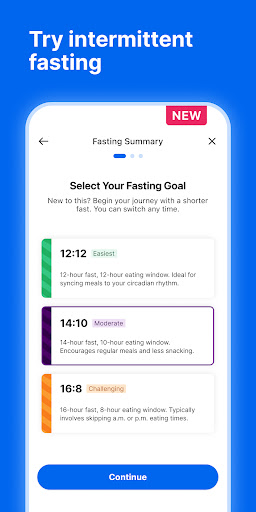
Track progress toward your health, nutrition, fitness, and weight loss goals with MyFitnessPal. This all-in-one food tracker, calorie counter, macro tracker, and fitness tracker is like having a nutrition coach, meal planner, fitness tracker & food diary with you every day.
MyFitnessPal is a health and nutrition app that helps you learn about your food habits, monitor your diet and conquer your health goals.
Download our health and nutrition app and start your free 30-day Premium trial to gain access to exclusive food & intermittent fasting tracker and fitness logging tools, expert guidance, and the calorie counter. You’ll soon discover why MyFitnessPal is the #1 nutrition, weight loss and food tracker in the U.S and has been featured in the New York Times, Wall Street Journal, the Today Show, and U.S. News & World Report.
MORE THAN A CALORIE
COUNTER & DIET JOURNAL
MyFitnessPal, the leading health and nutrition app, is like having a fitness tracker, macros counter, diet planner, and nutrition coach at your fingertips.
■ Log Food – Easy-to-use planner tools that makes food tracking quick and simple
■ Track Activity – Add workouts and steps with the fitness tracker and planner
■ Customize Your Health & Fitness Goals – Weight loss, weight gain, weight maintenance, nutrition & fitness
■ See Your Fitness Progress – Track at a glance, or analyze your diet & macros in detail
■ Learn From a Registered Dietitian – Meal Plans customized for your target calories and macros, whether you’re into weight loss or weight gain —with access to our Meal Planner, macro tracker, and Calorie Counter tools
■ Stay Inspired – 500+ healthy recipes for a healthy diet and 50 workouts keep fitness routines fresh and fun
■ Connect with the MyFitnessPal Community – Find friends and motivation in our active MyFitnessPal forums
A CLOSER LOOK AT FEATURES & BENEFITS
Gain Valuable Health Insights Through Food Logging
It’s not just a calorie counter for weight loss, diet trends, or a fast route to fat loss—it’s a health & nutrition app and planner that helps you hold yourself accountable.
■ One of the Largest Food Databases – Calorie Counter for over 14 million foods (including restaurant dishes)
■ Fast & Easy Food Tracker & Planner Tools – Type to search, add foods from your history, or scan a barcode or entire meal with your phone’s camera
■ Calorie Counter – Follow your food intake with the calorie counter and see your daily progress
■ Macro Tracker – See carbs, fat & protein breakdown by gram or percentage—no need for a separate carb tracker!
■ Nutrition Tracker and Insights – Analyze nutrition intake and set specific goals for macros, cholesterol, sodium, fiber & more
■ Water Tracker – Make sure you’re staying hydrated
Customize Your App Experience
Choose your settings and achieve your goals with MyFitnessPal
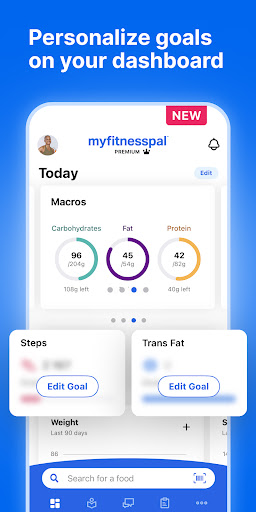
■ Custom Goals – Follow your energy intake by meal or day with the calorie counter, set goals with the macro tracker & more
■ Personalized Dashboards – Pick health, fitness, and diet stats you want to see at a glance
■ Net Carbs Mode/Carb Tracker – To simplify a low-carb or keto diet, view net (not total) carbs
■ Protein and Calorie Counter – Set your protein goals and track how much you eat during the day
■ Add Your Own Meals/Food Tracker – Save recipes and meals for quick logging and keep tabs on your diet
■ Count Calories From Exercise – Decide how your activities, workouts, fitness and diet affect daily calorie goals
■ Connect 50+ Apps & Devices – From smartwatch, fitness trackers and other health and fitness apps
■ Track With Wear OS – A calorie counter, water tracker, and macro tracker on your watch. Add complications to the home screen for faster logging, and the tile for tracking different nutrients at-a-glance.
View our terms & conditions and privacy policy: https://www.myfitnesspal.com/privacy-and-terms
مزید دکھائیں

1. MEmu انسٹالر ڈاؤن لوڈ کریں اور سیٹ اپ مکمل کریں

2. MEmu شروع کریں اسکے بعد ڈیسکٹاپ پر Google Play کھولیں

3. Google Play میں MyFitnessPal: Calorie Counter تلاش کریں
Install
4. MyFitnessPal: Calorie Counter ڈاؤن لوڈ کریں اور انسٹال کریں
5. انسٹال مکمل ہونے کے بعد سٹارٹ کرنے کے لیے آئیکن پر کلک کریں

6. MEmu کے ساتھ پی سی پر MyFitnessPal: Calorie Counter کھیلنے کا لطف لیں
MEmu پلے بہترین اینڈرائڈ ایمولیٹر ہے اور 100 ملین لوگ اس کے زبردست اینڈرائڈ گیمنگ تجربہ سے لطف اندوز ہو رہے ہیں۔ MEmu کی ورچولائزیشن ٹیکنالوجی آپ کو اپنے PC پر ہزاروں اینڈرائڈ گیمز یہاں تک کہ انتہائی گرافک والے گیمز باسہولت کھیلنے کی طاقت دیتی ہے۔
بہتر گرافکس کے ساتھ بڑی اسکرین؛ طویل دورانیہ، بیٹری یا لامحدود موبائل ڈیٹا کے بغیر۔
کی بورڈ اور ماؤس یا گیم پیڈ کے عین مطابق کنٹرول کے لیے کی میپنگ کا پورا سپورٹ۔
کثیر مثالی منیجر کے ساتھ بیک وقت ایک پی سی پر متعدد گیم اکاؤنٹس یا ٹاسکس۔
پی سی پر درج ذیل مراحل پر عمل کرتے ہوئے پر MyFitnessPal: Calorie Counter استعمال کریں: u003c/p>