Parental Control - KidsLink
تازہ کاری
موجودہ ورژن
Parent_Os_241122701
پیشکش بذریعہ

اپنے موبائل فون پر Parental Control - KidsLink کا استعمال کرتے وقت زیادہ چارج ہونے کی فکر نہ کریں، خود کو چھوٹی اسکرین سے آزاد کریں اور ایپ کو زیادہ بڑے ڈسپلے پر استعمال کرنے کا لطف اٹھائیں۔ اس کے بعد سے کی بورڈ اور ماؤس کے ساتھ اپنے ایپ کا فل اسکرین کا تجربہ حاصل کریں۔ MEmu آپ کو وہ تمام حیران کن خصوصیات پیش کرتا ہے جن کی آپ کو توقع کرتے ہیں: فوری انسٹال اور آسان سیٹ اپ، وجدانی کنٹرول، مزید بیٹری، موبائل ڈیٹا کی کوئی حد نہیں اور اب مزید پریشان کن کالز نہیں۔ نئے برانڈ کا MEmu 9 آپ کے کمپیوٹر پر Parental Control - KidsLink استعمال کرنے کے لیے بہترین اختیار ہے۔ MEmu کثیر نظیری منیجر بیک وقت 2 یا اس سے زیادہ اکاؤنٹس کھولنا ممکن بناتا ہے۔ اور سب اہم بات، ہمارا خصوصی ایمولیشن انجن آپ کے پی سی کی پوری طاقت ریلیز کرتے ہوئے ہر چیز ہموار اور قابل تفریح بناتا ہے۔
مزید دکھائیں
Download Parental Control - KidsLink on PC with MEmu Android Emulator. Enjoy playing on big screen. KidsLink Parental Control App helps parents keep track of their child’s location, monitor phone usage time, check app downloads, and see who they’re communicating with.
KidsLink Parental Control App helps parents keep track of their child’s location, monitor phone usage time, check app downloads, and see who they’re communicating with. This supports your child’s safety and encourages healthy device habits.
Why choose KidsLink Parental Control:
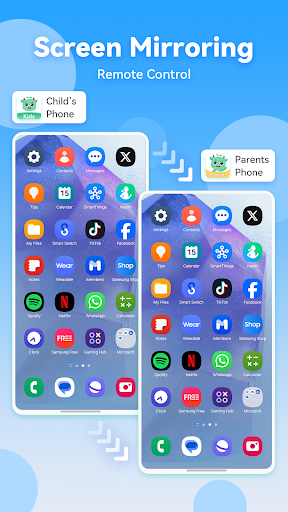
◆ Real-time monitoring & Remote Control - Mirror your child’s device screen to your phone in real-time to see what apps they use at school and how often, helping to prevent phone addiction.You can remotely control your child’s device through your own phone, helping them use the device responsibly.
◆ Sync app notification - The real-time sync feature lets you monitor your child’s social media chats on platforms like Facebook, Instagram, Messenger, and more, helping to protect them from cyberbullying and online scams.
◆ Screen time - Set up a screen time schedule to ensure your child uses their phone during appropriate times.
◆Blocksite & App Blocker App Blocker helps steer your child towards age-appropriate content by filtering unsuitable websites and blocking adult apps like porn, dating apps, and some gaming apps.
◆ GPS location tracker - You can monitor your child’s location on the map and view their daily travel history. This ensures your child’s safety and helps prevent them from visiting high-risk areas.
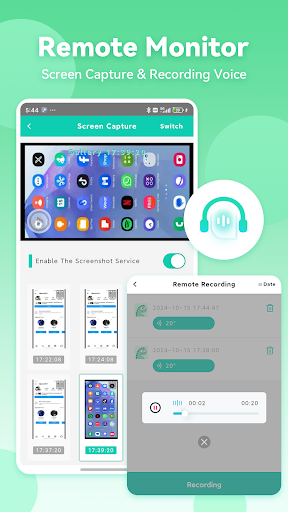
◆ Screen Capture - Parents can remotely capture their children's screenshots to monitor and enforce appropriate phone usage.
◆ One-Way Audio – You can record the sounds around your child’s device to ensure their safety when they are away.
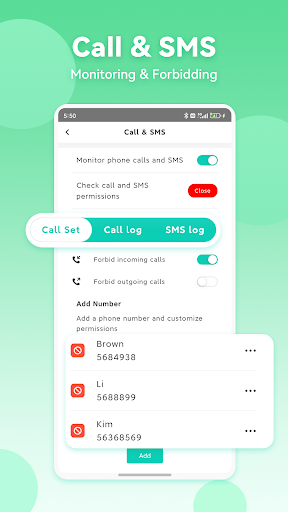
◆ Calls & Messages Monitoring Stay updated by keeping track of your child’s calls and texts, with keyword detection to help protect them from potential risks.
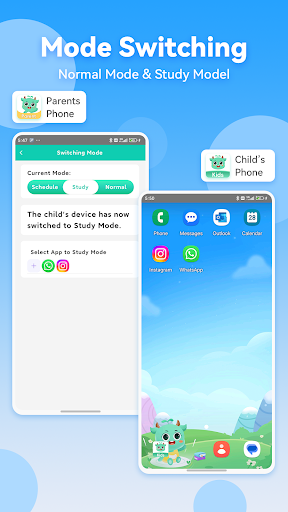
◆ Mode Switching Switch between Normal Mode and Study Mode. In Study Mode, only the apps you specify can be seen or used, ensuring that your child accesses only learning-related apps while studying. This reduces distractions and enhances focus on their studies.
To start protecting your child
1.Download the Parental Control App – KidsLink on your phone.
2.Download KidsLink Kids on your child’s phone.
3.Bind your child’s device by scanning a QR code or entering a code to complete the process.
A paid parent account can bind more than 5 children's devices at the same time, and parents can be added for co-parenting.
KidsLink does not contain any advertisement.
KidsLink Parental Control app offers a 3-day free trial of all Premium features. When the trial is over, access to features requires a subscription, with discounts for longer commitments.
---POLICIES & TERMS OF USE---
Privacy Policy: https://ossfiles.kidslink.info/mp-configs/SXB/htmls/privacy.html
Terms of Use: https://ossfiles.kidslink.info/mp-configs/SXB/htmls/user.html
Website: https://www.kidslink.info/
Contact US: support@kidslink.info
مزید دکھائیں

1. MEmu انسٹالر ڈاؤن لوڈ کریں اور سیٹ اپ مکمل کریں

2. MEmu شروع کریں اسکے بعد ڈیسکٹاپ پر Google Play کھولیں

3. Google Play میں Parental Control - KidsLink تلاش کریں
Install
4. Parental Control - KidsLink ڈاؤن لوڈ کریں اور انسٹال کریں
5. انسٹال مکمل ہونے کے بعد سٹارٹ کرنے کے لیے آئیکن پر کلک کریں

6. MEmu کے ساتھ پی سی پر Parental Control - KidsLink کھیلنے کا لطف لیں
MEmu پلے بہترین اینڈرائڈ ایمولیٹر ہے اور 100 ملین لوگ اس کے زبردست اینڈرائڈ گیمنگ تجربہ سے لطف اندوز ہو رہے ہیں۔ MEmu کی ورچولائزیشن ٹیکنالوجی آپ کو اپنے PC پر ہزاروں اینڈرائڈ گیمز یہاں تک کہ انتہائی گرافک والے گیمز باسہولت کھیلنے کی طاقت دیتی ہے۔
بہتر گرافکس کے ساتھ بڑی اسکرین؛ طویل دورانیہ، بیٹری یا لامحدود موبائل ڈیٹا کے بغیر۔
کی بورڈ اور ماؤس یا گیم پیڈ کے عین مطابق کنٹرول کے لیے کی میپنگ کا پورا سپورٹ۔
کثیر مثالی منیجر کے ساتھ بیک وقت ایک پی سی پر متعدد گیم اکاؤنٹس یا ٹاسکس۔
پی سی پر درج ذیل مراحل پر عمل کرتے ہوئے پر Parental Control - KidsLink استعمال کریں: u003c/p>