BeBlocky: Kids Code Easy
Đã cập nhật
Phiên bản hiện tại
5.00
Cung cấp bởi

Với tất cả niềm đam mê chơi BeBlocky: Kids Code Easy, đôi tay của bạn sẽ không còn bị giới hạn trên một màn hình nhỏ của điện thoại. Trải nghiệm chơi như một người chuyên nghiệp và kiểm soát hoàn toàn trò chơi của bạn bằng bàn phím và chuột. MEmu cung cấp cho bạn tất cả những điều mà bạn đang mong đợi. Tải xuống và chơi BeBlocky: Kids Code Easy trên PC. Miễn là bạn muốn chơi, bởi nó không còn giới hạn về pin, dữ liệu di động và các cuộc gọi làm phiền. MEmu 9 hoàn toàn là sự lựa chọn tốt nhất để chơi BeBlocky: Kids Code Easy trên PC. Với sự chuẩn bị về chuyên môn của chúng tôi, hệ thống sơ đồ bàn phím tinh tế làm cho BeBlocky: Kids Code Easy trở thành một trò chơi thực sự trên PC. Trình Quản lý đa năng, đã được chăm chút bởi sự tiếp thu của chúng tôi, có thể phát 2 hoặc nhiều tài khoản trên cùng một thiết bị. Và điều quan trọng nhất, công cụ mô phỏng độc quyền của chúng tôi có thể phát huy toàn bộ tiềm năng PC của bạn, giúp mọi thứ hoạt động trơn tru nhất có thể. Chúng tôi biết rằng quá trình tận hưởng hạnh phúc ở mỗi trò chơi cũng là mong muốn của mỗi game thủ, vì vậy các bạn chỉ cần chơi thôi hãy để chúng tôi quan tâm đến tất cả trải nghiệm đó.
Nhiều hơn
Tải BeBlocky: Kids Code Easy trên PC với Trình giả lập Android MEmu. Tận hưởng trải nghiệm chơi game trên màn hình lớn BeBlocky is a revolutionary app for kids that makes learning computer programming interactive and fun.
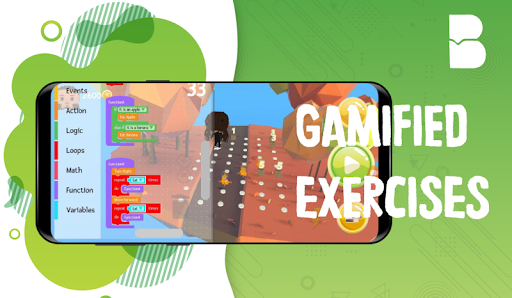
BeBlocky is a revolutionary app for kids that makes learning computer programming interactive and fun. It requires no coding knowledge or experience thus is perfect for any child that’s just starting out.
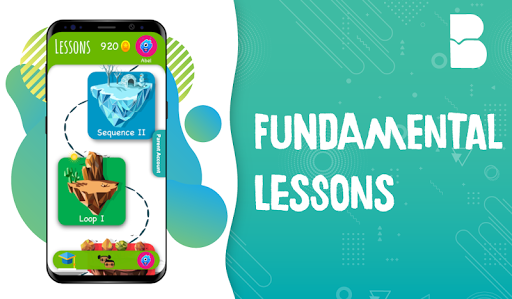
Inspired by the popular Scratch Programming Language used by millions around the world, BeBlocky uses graphical programming blocks to introduce kids to coding in an interactive manner. Children combine these coding blocks to help their character, Blockys, solve different game puzzles all while learning to code. BeBlocky's interactive use of the curriculum makes it possible for your child to learn at their own pace. Coding tutorials are also available as your child unlocks new lessons.
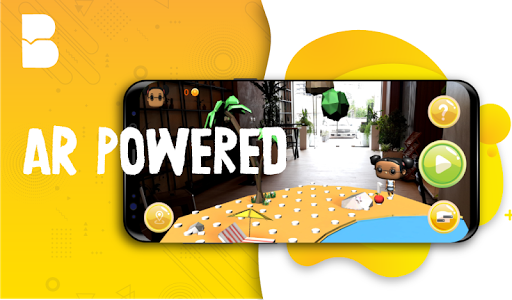
To make the app more interactive and fun, BeBlocky leverages the cutting edge Augmented Reality Technology to bring the entire game environment to the real world. As they work on their puzzles, the kids can go around the environment to have a better look at the puzzles and experience a new learning new.
With BeBlocky, kids learn the basics of programming like sequencing, loops, conditionals, functions and variables with coding games. In this app, there are 80+ challenging levels that help your child build a good foundation. As they finish each level they will be rewarded with virtual coins depending on their performance which they can later use to buy new Blockys. Blockys are game characters with oversized head, large beautiful eyes and disproportionately small body. Their cutesy design make them look very child friendly and fun to play with.
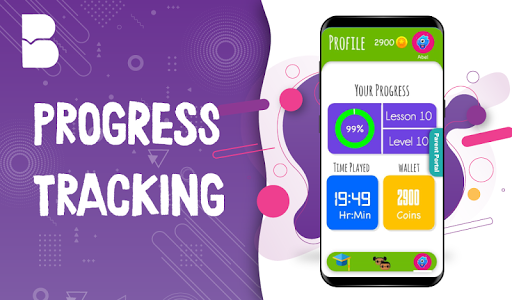
Parents can easily track their kids progress as children can have their own account making it easier for the app to automatically tracks their achievements as they work through lessons and activities. From your Parent Dashboard, you can view your children’s progress through the courses, the levels completed, time spent on the app and the concepts they’ve covered. Parent Dashboard also allows you to set the screen time to control your kids playing time. Parents can purchase virtual coins from the in-app store and distribute it to your child’s wallet so that they can buy new Blockys.
In creating BeBlocky, we have tried to work on an interface, lesson material and character profile so as to create a child-friendly platform by carefully integrating features that match children's cognitive, personal, social, and emotional development.
In the process of learning to code, BeBlocky enables children to pick up invaluable skills as problem solving and logical thinking. The app nurtures sequencing skills and the use of math as well as language in a meaningful context. With that, BeBlocky supports the development of early-childhood numeracy and literacy. And these are all foundations for later academic success.
At BeBlocky, we believe coding is the new literacy. Just as reading and writing help us comprehend the world we live in, the same holds true for coding as part of the current digital age. It is known that coding was thought to be a difficult task in the past; unimaginable for many and far-fetched for most. Well now is the time to take it to the fore-front and make it accessible for everyone.
With BeBlocky, children aren't just learning to code, they are coding to learn.
Terms of Use: http://www.BeBlocky.com/Terms-of-use.
Nhiều hơn

1. Tải trình cài đặt MEmu và hoàn tất cài đặt

2. Khởi động MEmu, sau đó mở Google Play trên trang chủ

3. Tìm kiếm BeBlocky: Kids Code Easy trong Google Play
Install
4. Tải và Cài Đặt BeBlocky: Kids Code Easy
5. Khi cài đặt hoàn tất, nhấp vào biểu tượng để bắt đầu

6. Tận hưởng chơi BeBlocky: Kids Code Easy trên PC với MEmu
MEmu App Player là trình mô phỏng Android miễn phí tốt nhất và 50 triệu người đã tận hưởng trải nghiệm chơi trò chơi tuyệt vời trên Android của mình. Công nghệ ảo hóa MEmu trao quyền cho bạn để chơi hàng ngàn trò chơi Android mượt mà trên PC của bạn, ngay cả những trò chơi chuyên sâu nhất.
Màn hình lớn hơn cùng với đồ hoạ tốt hơn; thời lượng dài, không giới hạn về pin hoặc dữ liệu di động
Hỗ trợ đầy đủ Keymapping cho việc kiểm soát chính xác bàn phím và chuột hoặc gamepad
Nhiều tài khoản trò chơi hoặc tác vụ cùng lúc trên một PC với Quản lý Đa năng
Play BeBlocky: Kids Code Easy on PC by following steps: