MindsEye
Đã cập nhật
Phiên bản hiện tại
Cung cấp bởi

Với tất cả niềm đam mê chơi MindsEye, đôi tay của bạn sẽ không còn bị giới hạn trên một màn hình nhỏ của điện thoại. Trải nghiệm chơi như một người chuyên nghiệp và kiểm soát hoàn toàn trò chơi của bạn bằng bàn phím và chuột. MEmu cung cấp cho bạn tất cả những điều mà bạn đang mong đợi. Tải xuống và chơi MindsEye trên PC. Miễn là bạn muốn chơi, bởi nó không còn giới hạn về pin, dữ liệu di động và các cuộc gọi làm phiền. MEmu 9 hoàn toàn là sự lựa chọn tốt nhất để chơi MindsEye trên PC. Với sự chuẩn bị về chuyên môn của chúng tôi, hệ thống sơ đồ bàn phím tinh tế làm cho MindsEye trở thành một trò chơi thực sự trên PC. Trình Quản lý đa năng, đã được chăm chút bởi sự tiếp thu của chúng tôi, có thể phát 2 hoặc nhiều tài khoản trên cùng một thiết bị. Và điều quan trọng nhất, công cụ mô phỏng độc quyền của chúng tôi có thể phát huy toàn bộ tiềm năng PC của bạn, giúp mọi thứ hoạt động trơn tru nhất có thể. Chúng tôi biết rằng quá trình tận hưởng hạnh phúc ở mỗi trò chơi cũng là mong muốn của mỗi game thủ, vì vậy các bạn chỉ cần chơi thôi hãy để chúng tôi quan tâm đến tất cả trải nghiệm đó.
Nhiều hơn
Tải MindsEye trên PC với Trình giả lập Android MEmu. Tận hưởng trải nghiệm chơi game trên màn hình lớn MindsEye is a narrative-driven, single-player action-adventure thriller set in the not-too-distant future, in the fictional desert city of Redrock, where artificial intelligence and human greed collide to bring Earth to the precipice of collapse.
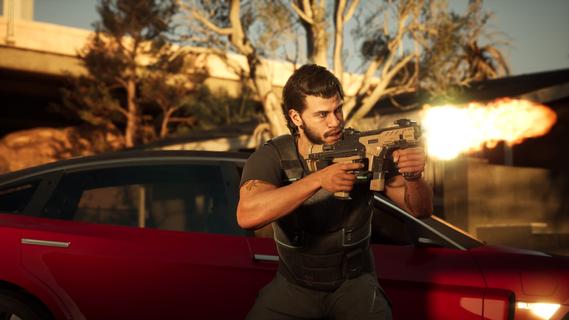



MindsEye is a narrative-driven, single-player action-adventure thriller set in the not-too-distant future, in the fictional desert city of Redrock, where artificial intelligence and human greed collide to bring Earth to the precipice of collapse. Developed by Build A Rocket Boy and published by IOI Partners, this game, spearheaded by legendary game director Leslie Benzies, promises an exceptional experience with its best-in-class cinematics, high-octane driving, and explosive combat. MindsEye is slated for release in the Summer of 2025 for PlayStation 5, Xbox Series X/S, and PC via Steam and Epic Games Store. Players step into the shoes of Jacob Diaz, a former soldier haunted by flashbacks of a covert mission that changed his life forever. Fitted with a mysterious neural implant known as the MindsEye, Jacob is plagued by fragmented memories and is desperate to uncover the truth about his past. His quest for answers leads him to Redrock, hoping to discover more about the company responsible for creating his implant. However, Jacob's personal journey quickly evolves into something much larger as he realizes he isn't the only one searching for the truth. Forces working in the shadows, potentially more powerful and dangerous than he ever imagined, are also seeking answers. Along the way, Jacob will encounter a diverse cast of characters, each with their own motivations, secrets, and impact on his story. Some will help him, while others may betray him, adding layers of intrigue and complexity to the narrative. Redrock, the backdrop of MindsEye, is a city where advanced technology is an inescapable part of daily life. AI, robotics, and neural implants have reshaped society, bringing both new opportunities and risks. As players progress through the story, they will witness how technology has transformed the everyday life of its citizens. Automated systems manage many aspects of the city, and the lines between corporate power and government control have blurred, raising important questions about who’s really in charge. This world isn’t just a backdrop; it’s filled with stories, perspectives, and hidden truths waiting to be uncovered. As Jacob progresses, he’ll learn how to adapt and use these new technologies in his missions. MindsEye delivers intense encounters on foot, behind the wheel, and in the air, where every decision can mean the difference between survival and defeat. As Jacob Diaz, players will face a variety of enemies with distinct tactics and behaviors. To keep the advantage, players will need to think fast and use their surroundings to outmaneuver their opponents. Taking cover, finding the right vantage points, and turning environmental elements into tools to survive are crucial, whether it’s a well-timed gas canister explosion or using enemy weapons to your advantage. Enemies won’t hold back, working together to flush players out of cover, flank their position, or swarm them with sheer numbers. The combat system is designed to be fluid, dynamic, and rewarding for players who adapt their approach to each encounter. To even the odds, players can activate their companion drone to provide support as they progress through missions. The game also features exhilarating high-speed chases that punctuate Jacob’s journey, pushing his driving skills to the limit. These sequences take players through diverse environments – from bustling cityscapes to remote industrial sites, trailer parks, and deserts – immersing them in a world that feels alive and constantly in motion. MindsEye promises a richly detailed world, where players uncover hidden conspiracies while navigating a deeply personal and high-stakes narrative. It's a world constantly under threat where players will explore themes of artificial intelligence, human greed, and the battle for control, bringing Earth to the precipice of collapse. With its compelling story, strategic combat, high-octane driving, and a world shaped by technology and power, MindsEye aims to push cinematic adventure to the next level, offering players an immersive and unforgettable gaming experience.
Nhiều hơn

1. Tải trình cài đặt MEmu và hoàn tất cài đặt

2. Khởi động MEmu, sau đó mở Google Play trên trang chủ

3. Tìm kiếm MindsEye trong Google Play
Install
4. Tải và Cài Đặt MindsEye
5. Khi cài đặt hoàn tất, nhấp vào biểu tượng để bắt đầu

6. Tận hưởng chơi MindsEye trên PC với MEmu
MEmu App Player là trình mô phỏng Android miễn phí tốt nhất và 50 triệu người đã tận hưởng trải nghiệm chơi trò chơi tuyệt vời trên Android của mình. Công nghệ ảo hóa MEmu trao quyền cho bạn để chơi hàng ngàn trò chơi Android mượt mà trên PC của bạn, ngay cả những trò chơi chuyên sâu nhất.
Màn hình lớn hơn cùng với đồ hoạ tốt hơn; thời lượng dài, không giới hạn về pin hoặc dữ liệu di động
Hỗ trợ đầy đủ Keymapping cho việc kiểm soát chính xác bàn phím và chuột hoặc gamepad
Nhiều tài khoản trò chơi hoặc tác vụ cùng lúc trên một PC với Quản lý Đa năng
Play MindsEye on PC by following steps: