90 Day Challenge
Đã cập nhật
Phiên bản hiện tại
4.6.1
Cung cấp bởi

Bạn không cần phải lo lắng về việc sạc quá mức khi sử dụng 90 Day Challenge trên điện thoại của bạn, không phải sử dụng trên màn hình nhỏ bé và tận hưởng ứng dụng trên màn hình lớn hơn rất nhiều. Từ bây giờ, bạn hãy trải nghiệm ứng dụng của bạn toàn màn hình bằng bàn phím và chuột. MEmu cung cấp cho bạn tất cả các tính năng đáng ngạc nhiên mà bạn mong đợi: cài đặt nhanh, cài đặt dễ dàng, điều khiển trực quan, không còn giới hạn về pin, dữ liệu di động và các cuộc gọi làm phiền. MEmu 9 hoàn toàn mới là sự lựa chọn tốt nhất để sử dụng 90 Day Challenge trên máy tính của bạn. Được mã hóa với sự hợp nhất của chúng tôi, trình quản lý multi-instance giúp mở 2 tài khoản trở lên cùng một lúc. Và điều quan trọng nhất là, công cụ mô phỏng độc quyền của chúng tôi có thể tận dụng hết toàn bộ tiềm năng trên PC của bạn, giúp mọi thứ vận hành trơn tru và thú vị.
Nhiều hơn
Tải 90 Day Challenge trên PC với Trình giả lập Android MEmu. Tận hưởng trải nghiệm chơi game trên màn hình lớn The 90 Day Challenge App is the perfect workout tool in your pocket and provides you with everything you need to start your own fitness journey.
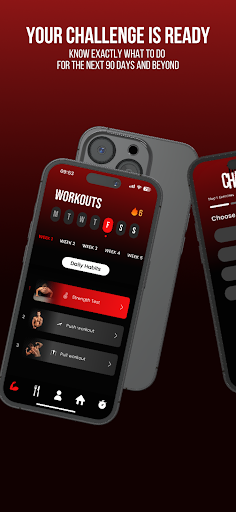
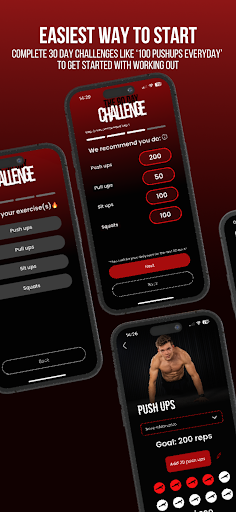
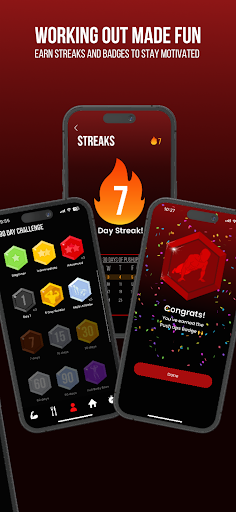
The 90 Day Challenge App is the perfect workout tool in your pocket and provides you with everything you need to start your own fitness journey. Get your own 90 day programs based on your goals, level, and training style.
Stan Browney has done many 90-day transformations with family, friends, and strangers. After seeing their results, so many people requested to help them with their fitness journey. Because it would be impossible to guide everybody personally, we designed this app. Now, you will be able to have your own 90 Day Transformation!
Start your 7-Day Free Trial now.
UNLIMITED 90 DAY PROGRAMS FOR ALL OF YOUR GOALS
With the 90 Day Challenge App you can get your own 90 day programs that are based on your goals. It doesn’t matter if you want to workout at home, in a gym, or in a park, we’ve got you covered. You can get programs with weights (or machines), bodyweight programs, weighted bodyweight programs, home workout programs, or combine different training styles into one 90 day program. You can also specify if you want to build muscle or gain strength, lose weight or gain weight, and get a program tailored towards your goals. The 90 Day Challenge App has programs for every level ranging from beginners with zero experience to advanced people that are training for years! When you finish your 90 day program, you can set new goals, change training styles, and get a new 90 day program to continue to make gains!
TRACK YOUR PROGRESS
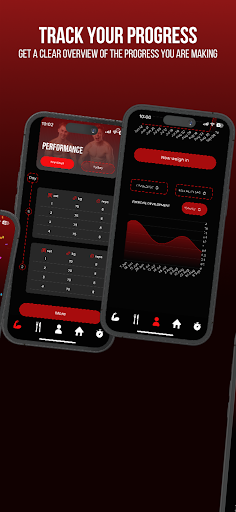
The 90 Day Challenge App has a complete in-app tracking system that allows you to track your weight, reps, personal records, everything! You can easily see your progress for every exercise to know you’re on track to reach your goals. For every 90 day program, you will have monthly strength tests to see the progress you make each month. Additionally, there are fun weekly challenges to keep you active but also help you to see yourself get stronger over time!
SEE YOUR BODY CHANGING
Within the 90 Day Challenge App, you can take progress pictures with the in-app progress picture tool. You can also create your own “Before and After” that you can share with others. Besides visual changes, you will be able to track your weight, and see your weight changing over time.
CHALLENGE OTHERS!
Working out can even be more fun when you do it together with a friend. That is why the 90 Day Challenge App has a built-in feature where you can challenge others to join the exact program that you have. This way you can workout together and keep each other accountable to keep hitting your workouts!
CALCULATOR
The 90 Day Challenge also has you covered when it comes to diet! With the in-app calorie calculator, you can calculate your calorie needs for losing weight, maintaining weight, or gaining weight. You can also determine your macronutrient split and form your own diet goals.
RECIPES
Within the app, there is an entire library of recipes that are both healthy and delicious that will help you to build muscle and lose fat! These recipes are explained in great detail including the ingredient list and the cooking instructions.
LEARN EVERYTHING ABOUT FOOD AND FITNESS
When joining the 90 Day Challenge App, you will get access to a library filled with high quality videos explaining everything about working out, recovery, losing or gaining weight, tracking calories, and more!
DOWNLOAD NOW FOR A 7-DAY FREE TRIAL
Start your own fitness journey with the 90 Day Challenge App. Download now and get your first 7 days for free.
Start your 90 Day Challenge today!
By creating an account you agree to the Terms of Service which can be found here: https://the90dc.com/terms-of-service
Nhiều hơn

1. Tải trình cài đặt MEmu và hoàn tất cài đặt

2. Khởi động MEmu, sau đó mở Google Play trên trang chủ

3. Tìm kiếm 90 Day Challenge trong Google Play
Install
4. Tải và Cài Đặt 90 Day Challenge
5. Khi cài đặt hoàn tất, nhấp vào biểu tượng để bắt đầu

6. Trải nghiệm 90 Day Challenge trên PC của bạn bằng MEmu
MEmu Play là trình giả lập Android miễn phí tốt nhất, với 50 triệu người dùng trải nghiệm ứng dụng Android tuyệt vời. Công nghệ ảo hóa của MEmu cho phép bạn chạy mượt mà hàng ngàn ứng dụng Android trên máy tính, ngay cả những ứng dụng đòi hỏi cấu hình cao nhất.
Màn hình lớn hơn cùng với đồ hoạ tốt hơn; thời lượng dài, không giới hạn về pin hoặc dữ liệu di động
Hỗ trợ đầy đủ Keymapping cho việc kiểm soát chính xác bàn phím và chuột hoặc gamepad
Nhiều tài khoản trò chơi hoặc tác vụ cùng lúc trên một PC với Quản lý Đa năng
Use 90 Day Challenge on PC by following steps: