
Advanced LT for KIA
Đã cập nhật
Phiên bản hiện tại
2.0
Cung cấp bởi

Bạn không cần phải lo lắng về việc sạc quá mức khi sử dụng Advanced LT for KIA trên điện thoại của bạn, không phải sử dụng trên màn hình nhỏ bé và tận hưởng ứng dụng trên màn hình lớn hơn rất nhiều. Từ bây giờ, bạn hãy trải nghiệm ứng dụng của bạn toàn màn hình bằng bàn phím và chuột. MEmu cung cấp cho bạn tất cả các tính năng đáng ngạc nhiên mà bạn mong đợi: cài đặt nhanh, cài đặt dễ dàng, điều khiển trực quan, không còn giới hạn về pin, dữ liệu di động và các cuộc gọi làm phiền. MEmu 9 hoàn toàn mới là sự lựa chọn tốt nhất để sử dụng Advanced LT for KIA trên máy tính của bạn. Được mã hóa với sự hợp nhất của chúng tôi, trình quản lý multi-instance giúp mở 2 tài khoản trở lên cùng một lúc. Và điều quan trọng nhất là, công cụ mô phỏng độc quyền của chúng tôi có thể tận dụng hết toàn bộ tiềm năng trên PC của bạn, giúp mọi thứ vận hành trơn tru và thú vị.
Nhiều hơn
Tải Advanced LT for KIA trên PC với Trình giả lập Android MEmu. Tận hưởng trải nghiệm chơi game trên màn hình lớn Monitor specific KIA parameters in real-time, including engine and automatic transmission advanced sensor data by adding this plugin to Torque Pro.
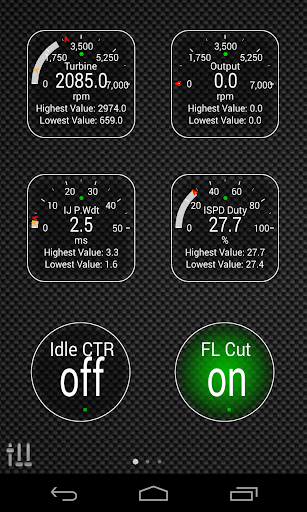
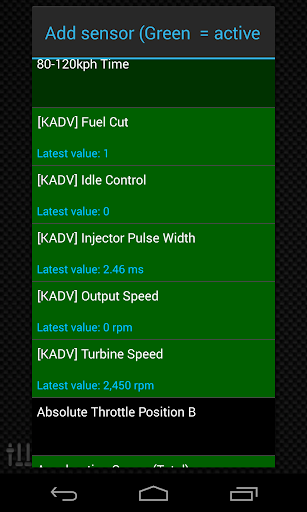
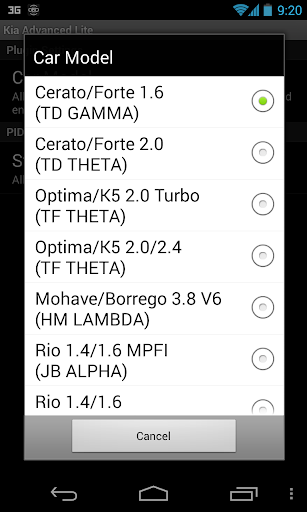
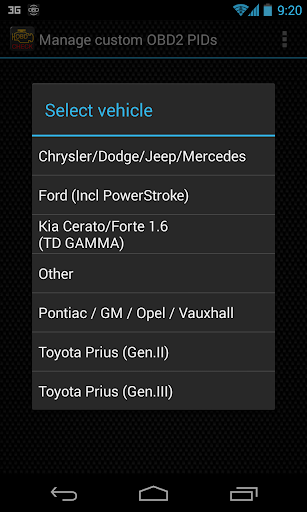
Monitor specific KIA parameters in real-time, including engine and automatic transmission advanced sensor data by adding this plugin to Torque Pro.
Advanced LT is a plugin for Torque Pro, extending the PID/Sensor list with specific parameters from KIA vehicles, allowing you to try the plugin with limited sensors before buying. This version does not include calculated sensors like Injector Duty Cycle (%) or HIVEC mode.
*PLEASE NOTE* that other KIA models/engines may be supported, but the plugin was tested only on the following models/engines:
* Carnival/Sedona 3.8 V6
* Carnival/Sedona 2.7 V6
* Carnival/Sedona 2.2 CRDI
* Cee'd 1.4/1.6 MPI
* Cee'd 2.0 MPI
* Cee'd 1.4/1.6 CRDI
* Cee'd 2.0 CRDI
* Cee'd 1.6 GDI
* Cerato/Forte 1.6 MPI
* Cerato/Forte 1.8 MPI/GDI
* Cerato/Forte 2.0 MPI/GDI
* Optima/K5 2.0 Turbo
* Optima/K5 2.0/2.4 GDI
* Mohave/Borrego 3.8 V6
* Mohave/Borrego 3.0 CRDI
* Rio 1.4/1.6 MPI
* Rio 1.2 MPI
* Soul 1.6 MPI
* Soul 2.0 MPI
* Sorento 2.4 GDI
* Sorento 3.5 V6
* Sorento 2.0/2.2 CRDI
* Spectra/Cerato 1.6 MPI
* Spectra/Cerato 2.0 MPI
* Sportage 2.0 MPI
* Sportage 2.7 V6
* Sportage 2.0 CRDI
* Sportage 1.6 MPI
* Sportage 2.0/2.4 MPI/GDI
* Venga 1.4/1.6 MPI
* Venga 1.4/1.6 CRDI
The plugin also includes an ECU Scanner which is very useful for searching specific sensors on KIA engines that are not yet supported by the plugin. You just need to record at least 1000 samples and send the logs to the developer.
Advanced LT requires the latest version of Torque Pro installed in order to function. This is *NOT* a standalone application and will *NOT* work without Torque Pro.
Plugin Installation
-------------------------
1) After downloading the plugin on Google Play, make sure that you see the plugin listed on your Android device installed applications list.
2) Launch Torque Pro and click on the "Advanced LT" icon
3) Select the appropriate engine type and return to Torque Pro main screen
4) Go to Torque Pro "Settings"
5) Make sure that you can see the plugin listed also on Torque Pro by clicking "Settings" > "Plugins"> "Installed Plugins".
6) Scroll down to "Manage extra PIDs/Sensors"
7) Usually this screen will not display any entries, unless you have added any pre-defined or custom PIDs in the past.
8) From the menu, choose "Add predefined set"
9) You may see predefined sets for other KIA engine types, so make sure you pick the right one.
10) After clicking on the entry from the previous step, you should see additional entries on the Extra PIDs/Sensors list.
Adding Displays
------------------------
1) After adding the additional sensors, go to the Realtime Information/Dashboard.
2) Press the menu key and then click on "Add Display"
3) Select the appropriate display type (Dial, Bar, Graph, Digital Display, etc)
4) Select the appropriate sensor from the list. Sensors provided by Advanced LT begins with "[KADV]" and should be listed right after the time sensors in the top of the list.
More features/parameters will be added in further releases. If you have comments and/or suggestions please just let me know.
Nhiều hơn

1. Tải trình cài đặt MEmu và hoàn tất cài đặt

2. Khởi động MEmu, sau đó mở Google Play trên trang chủ

3. Tìm kiếm Advanced LT for KIA trong Google Play
Install
4. Tải và Cài Đặt Advanced LT for KIA
5. Khi cài đặt hoàn tất, nhấp vào biểu tượng để bắt đầu

6. Trải nghiệm Advanced LT for KIA trên PC của bạn bằng MEmu
MEmu Play là trình giả lập Android miễn phí tốt nhất, với 50 triệu người dùng trải nghiệm ứng dụng Android tuyệt vời. Công nghệ ảo hóa của MEmu cho phép bạn chạy mượt mà hàng ngàn ứng dụng Android trên máy tính, ngay cả những ứng dụng đòi hỏi cấu hình cao nhất.
Màn hình lớn hơn cùng với đồ hoạ tốt hơn; thời lượng dài, không giới hạn về pin hoặc dữ liệu di động
Hỗ trợ đầy đủ Keymapping cho việc kiểm soát chính xác bàn phím và chuột hoặc gamepad
Nhiều tài khoản trò chơi hoặc tác vụ cùng lúc trên một PC với Quản lý Đa năng
Use Advanced LT for KIA on PC by following steps: