Always On Display AOD Plus
Đã cập nhật
Phiên bản hiện tại
7.1.8
Cung cấp bởi

Bạn không cần phải lo lắng về việc sạc quá mức khi sử dụng Always On Display AOD Plus trên điện thoại của bạn, không phải sử dụng trên màn hình nhỏ bé và tận hưởng ứng dụng trên màn hình lớn hơn rất nhiều. Từ bây giờ, bạn hãy trải nghiệm ứng dụng của bạn toàn màn hình bằng bàn phím và chuột. MEmu cung cấp cho bạn tất cả các tính năng đáng ngạc nhiên mà bạn mong đợi: cài đặt nhanh, cài đặt dễ dàng, điều khiển trực quan, không còn giới hạn về pin, dữ liệu di động và các cuộc gọi làm phiền. MEmu 9 hoàn toàn mới là sự lựa chọn tốt nhất để sử dụng Always On Display AOD Plus trên máy tính của bạn. Được mã hóa với sự hợp nhất của chúng tôi, trình quản lý multi-instance giúp mở 2 tài khoản trở lên cùng một lúc. Và điều quan trọng nhất là, công cụ mô phỏng độc quyền của chúng tôi có thể tận dụng hết toàn bộ tiềm năng trên PC của bạn, giúp mọi thứ vận hành trơn tru và thú vị.
Nhiều hơn
Tải Always On Display AOD Plus trên PC với Trình giả lập Android MEmu. Tận hưởng trải nghiệm chơi game trên màn hình lớn Always on AMOLED display clock screen saver is used to display clock on screen.
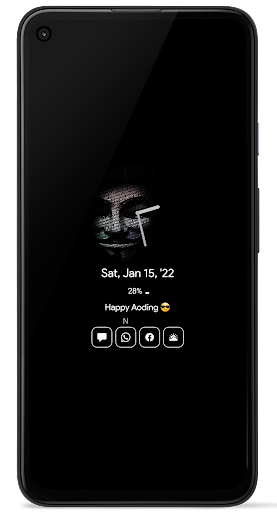
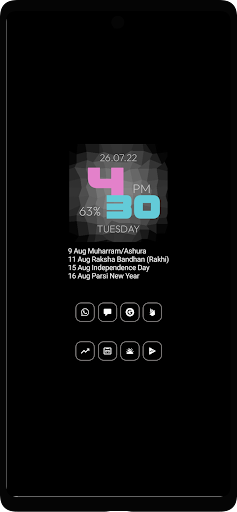
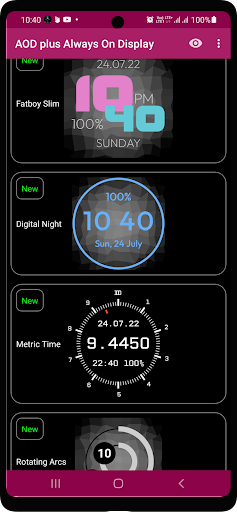
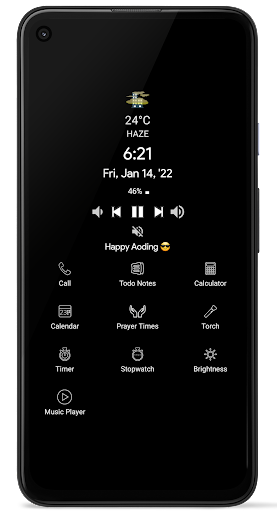
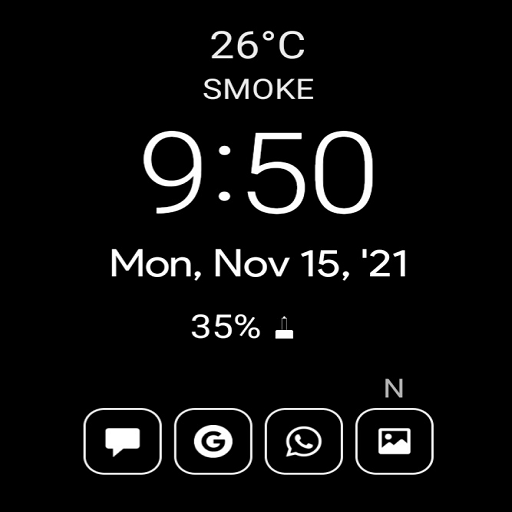
Always on AMOLED display clock screen saver is used to display clock on screen. This lock screen clock widget have both Analog clocks and LED digital clock templates. To display on lock screen clock download this amazing time widget app.
Download photo clock wallpaper app that provides information about date, time and notification on super amoled screen clock widget. If you have LED digital clock widget app you don’t even need to touch your phone screen to see whats going on in your mobile. This analog clock widget is design to show basic info on Super AMOLED screen.
All information on picture clock wallpaper won’t disappear from the screen. Even if you have password-protected your screen and it is locked all the info like date, time will be displayed on a lock screen with customized text clock on screen. If you are in search of stylish clock or customized text clock or you want to display quote on screen this photo clock wallpaper will meet your needs.
Why AOD plus ?
All pro features are free.
The only always on display with sense weather animations
Unique swipe gesture menu
Reply to all chats like sms. watsapp, facebook right from the always on display
direct call your favorite contacts right from the always on display
photo clock a unique clock with customization
weather clock
calculator with history
To do notes with server synchronization can be used with multiple devices
Timer
Stopwatch
Full landscape mode
last Notification badge (the most recent)
Prayer Times
iSilent mode(one click silent make your phone like iphone, blackberry with or without scheduled)
Full weather info
See full notification details like status bar.
Comparatively consumes less power than any other Always on display in the market.
Real burn in protection it revolves through entire screen not just a few pixels
No more brightness issue like in stock AOD
Take advantage of your AMOLED display to see notification details, weather and much more without unlocking the phone
Features
Date n time
Unlimited notification icons with badges
Tap to see full notification details like status bar. Swipe left/right to dismiss
Low pixel engine helps reducing power consumption
In built burn protection
Volume rocker to mute/unmute phone like BB
Live Brightness Press n hold on clock widget to adjust brightness
Tap on hold on date to see calendar events(this will give you a quick glance of upcoming events for two months period)
Music controls
Miss call reminder
And much more
Nhiều hơn

1. Tải trình cài đặt MEmu và hoàn tất cài đặt

2. Khởi động MEmu, sau đó mở Google Play trên trang chủ

3. Tìm kiếm Always On Display AOD Plus trong Google Play
Install
4. Tải và Cài Đặt Always On Display AOD Plus
5. Khi cài đặt hoàn tất, nhấp vào biểu tượng để bắt đầu

6. Trải nghiệm Always On Display AOD Plus trên PC của bạn bằng MEmu
MEmu Play là trình giả lập Android miễn phí tốt nhất, với 50 triệu người dùng trải nghiệm ứng dụng Android tuyệt vời. Công nghệ ảo hóa của MEmu cho phép bạn chạy mượt mà hàng ngàn ứng dụng Android trên máy tính, ngay cả những ứng dụng đòi hỏi cấu hình cao nhất.
Màn hình lớn hơn cùng với đồ hoạ tốt hơn; thời lượng dài, không giới hạn về pin hoặc dữ liệu di động
Hỗ trợ đầy đủ Keymapping cho việc kiểm soát chính xác bàn phím và chuột hoặc gamepad
Nhiều tài khoản trò chơi hoặc tác vụ cùng lúc trên một PC với Quản lý Đa năng
Use Always On Display AOD Plus on PC by following steps: