ANT BMS
Đã cập nhật
Phiên bản hiện tại
1.0.54
Cung cấp bởi

Bạn không cần phải lo lắng về việc sạc quá mức khi sử dụng ANT BMS trên điện thoại của bạn, không phải sử dụng trên màn hình nhỏ bé và tận hưởng ứng dụng trên màn hình lớn hơn rất nhiều. Từ bây giờ, bạn hãy trải nghiệm ứng dụng của bạn toàn màn hình bằng bàn phím và chuột. MEmu cung cấp cho bạn tất cả các tính năng đáng ngạc nhiên mà bạn mong đợi: cài đặt nhanh, cài đặt dễ dàng, điều khiển trực quan, không còn giới hạn về pin, dữ liệu di động và các cuộc gọi làm phiền. MEmu 9 hoàn toàn mới là sự lựa chọn tốt nhất để sử dụng ANT BMS trên máy tính của bạn. Được mã hóa với sự hợp nhất của chúng tôi, trình quản lý multi-instance giúp mở 2 tài khoản trở lên cùng một lúc. Và điều quan trọng nhất là, công cụ mô phỏng độc quyền của chúng tôi có thể tận dụng hết toàn bộ tiềm năng trên PC của bạn, giúp mọi thứ vận hành trơn tru và thú vị.
Nhiều hơn
Tận hưởng trải nghiệm tuyệt vời khi sử dụng ANT BMS trên PC với MEmu Play. Đây là trình giả lập Android miễn phí mạnh mẽ, cung cấp cho bạn hàng ngàn ứng dụng Android trên máy tính. Thỏa sức kết nối với bạn bè và hoàn thiện công việc với hiệu suất cao hơn! ANT BMS – Smart Battery Monitoring & Vehicle Control.
ANT BMS – Smart Battery Monitoring & Vehicle Control
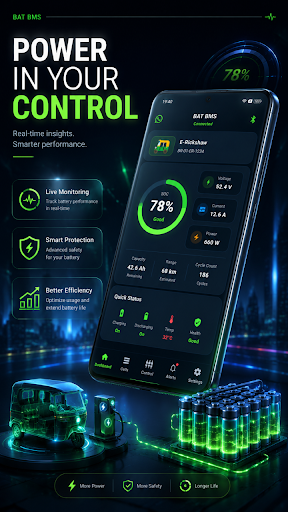
Take complete control of your battery management system and vehicle with ANT BMS. Monitor battery health, track live performance, manage your vehicle remotely, and receive instant safety alerts—all from one powerful app.
Designed for smart battery systems and electric vehicles, ANT BMS provides real-time information to help you improve performance, enhance safety, and stay informed wherever you are.
Key Features
Real-Time Battery Monitoring
View battery status instantly
Monitor voltage, current, power, and capacity
Check remaining battery percentage (SOC)
Track battery health and performance
Advanced BMS Information
View BMS model and hardware details
Firmware version information
Rated and peak current
System diagnostics
Serial number and manufacturing details
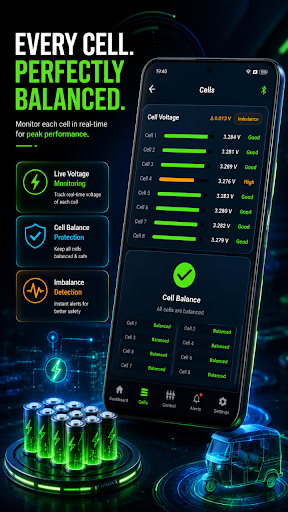
Live Cell Monitoring
Monitor individual cell voltages
Detect cell imbalance instantly
View cell balance status
Improve battery efficiency and lifespan
Vehicle Information
Vehicle details and controller status
Current speed monitoring
Maximum speed limit
GPS status
Trip distance
Total odometer reading
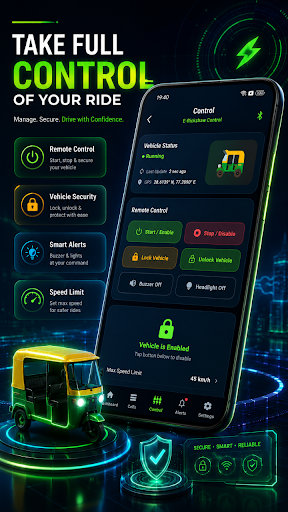
Remote Vehicle Control
Enable or disable vehicle remotely
Lock and unlock vehicle
Control buzzer and headlights*
Manage supported vehicle functions
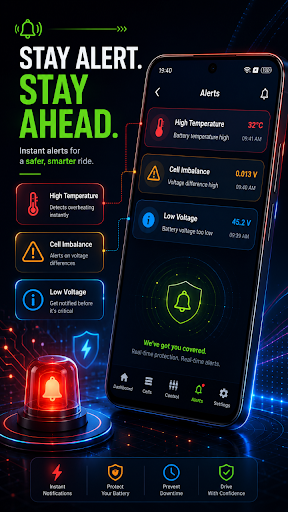
Instant Smart Alerts
Receive notifications for important battery and vehicle events including:
High temperature
Low voltage
Cell imbalance
Battery protection events
Other supported system alerts
Enhanced Safety
Real-time battery protection
Early warning notifications
Continuous system monitoring
Reliable diagnostics
Performance Insights
Battery efficiency monitoring
Energy usage information
System performance overview
Live operational data
Customizable Settings
Unit preferences
Display options
Alert settings
Geofencing support*
Security settings
Why Choose ANT BMS?
Fast and responsive interface
Real-time monitoring
Easy-to-read dashboard
Secure communication
Modern dark theme
Reliable battery insights
Designed for everyday monitoring
Disclaimer
ANT BMS is designed exclusively for use with supported ANT BMS hardware and compatible devices. The app is not intended to connect to or operate with third-party Battery Management Systems (BMS), batteries, or unsupported hardware.
The information displayed in the app is received from the connected ANT BMS device. Users are responsible for ensuring that the hardware is installed and operated according to the manufacturer's instructions.
ANT BMS is intended to assist with battery and vehicle monitoring and control. It should not be used as the sole basis for safety-critical or emergency decisions. Always follow proper operating procedures and safety guidelines when using your battery system or vehicle.
Nhiều hơn

1. Tải trình cài đặt MEmu và hoàn tất cài đặt

2. Khởi động MEmu, sau đó mở Google Play trên trang chủ

3. Tìm kiếm ANT BMS trong Google Play
Install
4. Tải và Cài Đặt ANT BMS
5. Khi cài đặt hoàn tất, nhấp vào biểu tượng để bắt đầu

6. Trải nghiệm ANT BMS trên PC của bạn bằng MEmu
MEmu Play là trình giả lập Android miễn phí tốt nhất, với 50 triệu người dùng trải nghiệm ứng dụng Android tuyệt vời. Công nghệ ảo hóa của MEmu cho phép bạn chạy mượt mà hàng ngàn ứng dụng Android trên máy tính, ngay cả những ứng dụng đòi hỏi cấu hình cao nhất.
Màn hình lớn hơn cùng với đồ hoạ tốt hơn; thời lượng dài, không giới hạn về pin hoặc dữ liệu di động
Hỗ trợ đầy đủ Keymapping cho việc kiểm soát chính xác bàn phím và chuột hoặc gamepad
Nhiều tài khoản trò chơi hoặc tác vụ cùng lúc trên một PC với Quản lý Đa năng
Use ANT BMS on PC by following steps: