
Fortum
Đã cập nhật
Phiên bản hiện tại
1.24.1
Cung cấp bởi

Bạn không cần phải lo lắng về việc sạc quá mức khi sử dụng Fortum trên điện thoại của bạn, không phải sử dụng trên màn hình nhỏ bé và tận hưởng ứng dụng trên màn hình lớn hơn rất nhiều. Từ bây giờ, bạn hãy trải nghiệm ứng dụng của bạn toàn màn hình bằng bàn phím và chuột. MEmu cung cấp cho bạn tất cả các tính năng đáng ngạc nhiên mà bạn mong đợi: cài đặt nhanh, cài đặt dễ dàng, điều khiển trực quan, không còn giới hạn về pin, dữ liệu di động và các cuộc gọi làm phiền. MEmu 9 hoàn toàn mới là sự lựa chọn tốt nhất để sử dụng Fortum trên máy tính của bạn. Được mã hóa với sự hợp nhất của chúng tôi, trình quản lý multi-instance giúp mở 2 tài khoản trở lên cùng một lúc. Và điều quan trọng nhất là, công cụ mô phỏng độc quyền của chúng tôi có thể tận dụng hết toàn bộ tiềm năng trên PC của bạn, giúp mọi thứ vận hành trơn tru và thú vị.
Nhiều hơn
Tải Fortum trên PC với Trình giả lập Android MEmu. Tận hưởng trải nghiệm chơi game trên màn hình lớn Smarter, faster – and prettier!
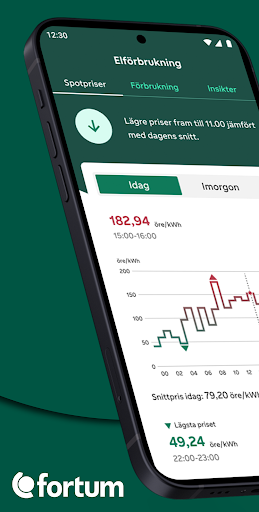
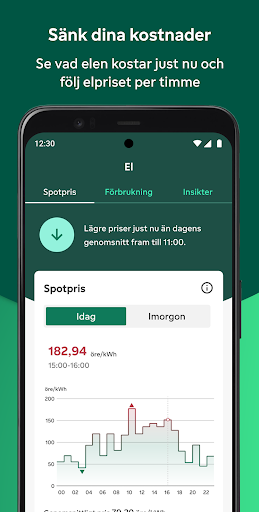
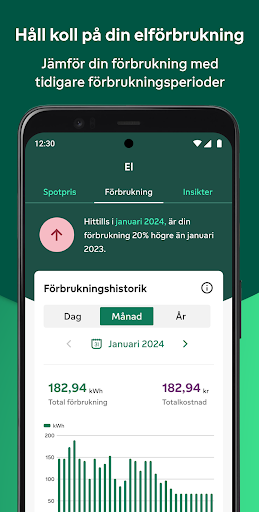
Smarter, faster – and prettier! The new Fortum app makes it easy to keep track of your electricity. In the app you will find everything about your electricity in one place and you can, among other things:
- See analysis and insights about your electricity usage so you can lower your electricity costs
- Follow the electricity price in real time and plan your electricity use
- Update your contact and invoice details
- If you are a producer, you can also follow your surplus production
- If you have an hourly rate agreement, you will also see accrued costs
Features:
In the consumption view, you can see the history of your electricity use, either per year, month, week or day. To see the usage per week, day or hour, you need an hourly metered facility. Contact customer service and you will get help.
Another function is that you can follow the electricity price, the so-called spot price, for the current day and tomorrow. You who have a variable electricity price or hourly price can use it as support to control your electricity use to cheaper hours of the day.
You can also create a household profile and through the profile you get an analysis of your electricity use. The information is used to compare electricity use with similar households and you can see how your household compares. If you have been a customer with us for a long time, you will also be able to see what in your household uses the most electricity.
Good to know:
To be able to use the app, you need to be a customer of Fortum and create an account. You can do this easily by identifying yourself with mobile BankID. You can also choose to log in with mobile BankID, but then we cannot keep you logged in and you will have to log in every time. In return, you don't have to remember usernames and passwords.
The app will be continuously updated with new functions. What features would you like to see? Feel free to contact us via the feedback form in the app. We read everything and take it to heart. It's easy to be a customer with us at Fortum. Download the Fortum app to get full control of your electricity.
Nhiều hơn

1. Tải trình cài đặt MEmu và hoàn tất cài đặt

2. Khởi động MEmu, sau đó mở Google Play trên trang chủ

3. Tìm kiếm Fortum trong Google Play
Install
4. Tải và Cài Đặt Fortum
5. Khi cài đặt hoàn tất, nhấp vào biểu tượng để bắt đầu

6. Trải nghiệm Fortum trên PC của bạn bằng MEmu
MEmu Play là trình giả lập Android miễn phí tốt nhất, với 50 triệu người dùng trải nghiệm ứng dụng Android tuyệt vời. Công nghệ ảo hóa của MEmu cho phép bạn chạy mượt mà hàng ngàn ứng dụng Android trên máy tính, ngay cả những ứng dụng đòi hỏi cấu hình cao nhất.
Màn hình lớn hơn cùng với đồ hoạ tốt hơn; thời lượng dài, không giới hạn về pin hoặc dữ liệu di động
Hỗ trợ đầy đủ Keymapping cho việc kiểm soát chính xác bàn phím và chuột hoặc gamepad
Nhiều tài khoản trò chơi hoặc tác vụ cùng lúc trên một PC với Quản lý Đa năng
Use Fortum on PC by following steps: