HACK for Hacker News Tech
Đã cập nhật
Phiên bản hiện tại
34.0
Cung cấp bởi

Bạn không cần phải lo lắng về việc sạc quá mức khi sử dụng HACK for Hacker News Tech trên điện thoại của bạn, không phải sử dụng trên màn hình nhỏ bé và tận hưởng ứng dụng trên màn hình lớn hơn rất nhiều. Từ bây giờ, bạn hãy trải nghiệm ứng dụng của bạn toàn màn hình bằng bàn phím và chuột. MEmu cung cấp cho bạn tất cả các tính năng đáng ngạc nhiên mà bạn mong đợi: cài đặt nhanh, cài đặt dễ dàng, điều khiển trực quan, không còn giới hạn về pin, dữ liệu di động và các cuộc gọi làm phiền. MEmu 9 hoàn toàn mới là sự lựa chọn tốt nhất để sử dụng HACK for Hacker News Tech trên máy tính của bạn. Được mã hóa với sự hợp nhất của chúng tôi, trình quản lý multi-instance giúp mở 2 tài khoản trở lên cùng một lúc. Và điều quan trọng nhất là, công cụ mô phỏng độc quyền của chúng tôi có thể tận dụng hết toàn bộ tiềm năng trên PC của bạn, giúp mọi thứ vận hành trơn tru và thú vị.
Nhiều hơn
Tải HACK for Hacker News Tech trên PC với Trình giả lập Android MEmu. Tận hưởng trải nghiệm chơi game trên màn hình lớn HACK for Hacker News is the most beautiful and easy way to read about the latest programming, startup, science, technology, engineering and mathematics news.
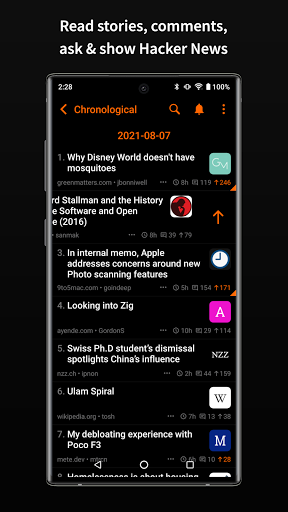
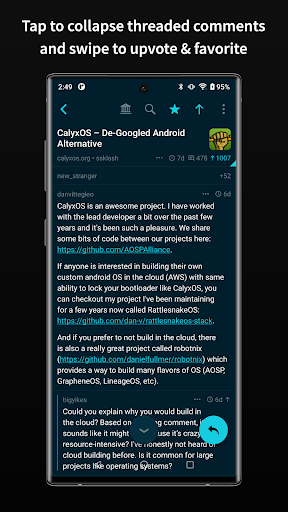
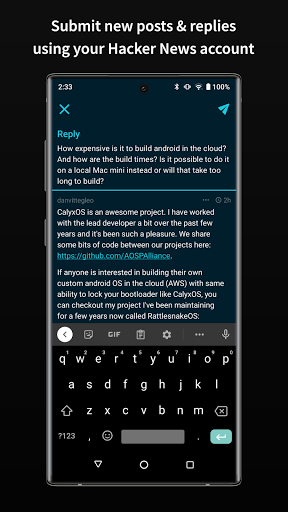
HACK for Hacker News is the most beautiful and easy way to read about the latest programming, startup, science, technology, engineering and mathematics news. With ability to vote, favorite, comment, submit new posts and receive push notifications for replies, HACK is highly customizable with the best features you would expect in a top quality client.
- Login or Register your Hacker News account
- PUSH NOTIFICATIONS for Hacker News replies to comment or post
- Swipe to upvote, favorite, reply and hide stories & comments
- Comments are presented in nested threads. Tap a comment to collapse that thread
- Reply to posts & comments
- Submit new link or text posts including drafts
- Long press a story, link or comment to share
- No Ads. No subscriptions
- Landscape and Portrait support
- Hide read posts from the feed
- Tap the bottom button to scroll to the next root comment in the thread. Long press it to go to the previous one.
- All known hacker news endpoints - News, Ask HN, Show HN, Show HN Newest, trending, second chance pool, classic, active, best stories, best comments, new stories, new comments, noob stories, noob comments, jobs, over 100-500 points etc
- Submit posts, reply, comment using your HN account
- Browse top 100 leader accounts
- Browse stories from a specific site, user or date
- Archive support: View an archive of the post website. archive.is, archive.org & google cache.
- Search in comments and usernames! Search is case and diacritic insensitive and ignores punctuations.
- Select / highlight the comment/post title text for lookup/copy/translate
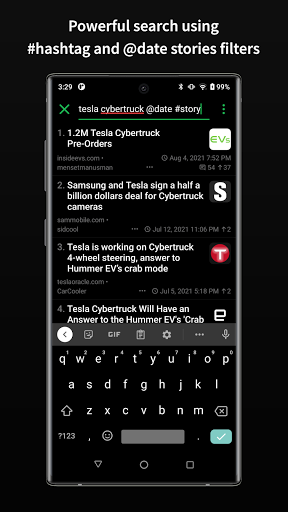
- Powerful search (powered by Algolia API) - use @date to sort by date, #story to filter for stories, #comments to filter for comments, #author_username to filter by user etc. These tags can be separated by commas. Refer to https://hn.algolia.com/api for more tags.
- Dark mode - both pure black and gray mode and many other color choices
- Low contrast text mode to make the text not be pure white #FFFFFF
- Many theme color choices for customization
- Font choices & sizes to make the design exactly to your liking
- Share comment as image
- Threaded comments with color bar to maintain visual orientation
- Articles open in built in webview with Reader Mode. Ability to use other browsers too.
- Play articles as audio with Text to Speech.
- Tap the domain in a story to see all stories from that site
- Tap the username in a story or comment to go to the user profile
- Browse your submitted stories and comments, favorited stories and comments, upvoted stories and comments, hidden stories
- High quality favicons for articles as HN doesn't provide any images. I run my own server for this so if you would like to help me support server costs, please buy the small one time in app purchase. It also unlocks custom fonts, themes, settings customizations and supports future update development.
All stories and comments are via Algolia API and Hacker News API:
https://news.ycombinator.com/
https://hn.algolia.com/api
https://github.com/HackerNews/API
https://news.ycombinator.com/newsguidelines.html
Profile picture robots lovingly delivered by Robohash.org
I offer an ad and analytics free and beautiful app for the absolute best experience for my users. If you are enjoying the app, please leave me a positive rating on the play store as that helps get the word out to others. If you would like to support development and buy me a coffee, please purchase the one time in app purchase. No subscriptions. Thank you for your support!
Send any feedback or feature requests to Pran at:
pran@pranapps.com
HACK for Hacker News is not affiliated with Y Combinator.
NOTE: This app is not meant to hack anything. This app is meant for reading articles on Hacker News website. Do not download this app thinking it will help you hack something.
Nhiều hơn

1. Tải trình cài đặt MEmu và hoàn tất cài đặt

2. Khởi động MEmu, sau đó mở Google Play trên trang chủ

3. Tìm kiếm HACK for Hacker News Tech trong Google Play
Install
4. Tải và Cài Đặt HACK for Hacker News Tech
5. Khi cài đặt hoàn tất, nhấp vào biểu tượng để bắt đầu

6. Trải nghiệm HACK for Hacker News Tech trên PC của bạn bằng MEmu
MEmu Play là trình giả lập Android miễn phí tốt nhất, với 50 triệu người dùng trải nghiệm ứng dụng Android tuyệt vời. Công nghệ ảo hóa của MEmu cho phép bạn chạy mượt mà hàng ngàn ứng dụng Android trên máy tính, ngay cả những ứng dụng đòi hỏi cấu hình cao nhất.
Màn hình lớn hơn cùng với đồ hoạ tốt hơn; thời lượng dài, không giới hạn về pin hoặc dữ liệu di động
Hỗ trợ đầy đủ Keymapping cho việc kiểm soát chính xác bàn phím và chuột hoặc gamepad
Nhiều tài khoản trò chơi hoặc tác vụ cùng lúc trên một PC với Quản lý Đa năng
Use HACK for Hacker News Tech on PC by following steps: