
My Track
Đã cập nhật
Phiên bản hiện tại
7.2.2
Cung cấp bởi

Bạn không cần phải lo lắng về việc sạc quá mức khi sử dụng My Track trên điện thoại của bạn, không phải sử dụng trên màn hình nhỏ bé và tận hưởng ứng dụng trên màn hình lớn hơn rất nhiều. Từ bây giờ, bạn hãy trải nghiệm ứng dụng của bạn toàn màn hình bằng bàn phím và chuột. MEmu cung cấp cho bạn tất cả các tính năng đáng ngạc nhiên mà bạn mong đợi: cài đặt nhanh, cài đặt dễ dàng, điều khiển trực quan, không còn giới hạn về pin, dữ liệu di động và các cuộc gọi làm phiền. MEmu 9 hoàn toàn mới là sự lựa chọn tốt nhất để sử dụng My Track trên máy tính của bạn. Được mã hóa với sự hợp nhất của chúng tôi, trình quản lý multi-instance giúp mở 2 tài khoản trở lên cùng một lúc. Và điều quan trọng nhất là, công cụ mô phỏng độc quyền của chúng tôi có thể tận dụng hết toàn bộ tiềm năng trên PC của bạn, giúp mọi thứ vận hành trơn tru và thú vị.
Nhiều hơn
Tải My Track trên PC với Trình giả lập Android MEmu. Tận hưởng trải nghiệm chơi game trên màn hình lớn My Track is a small and powerful application to keep track of your route while you go around.
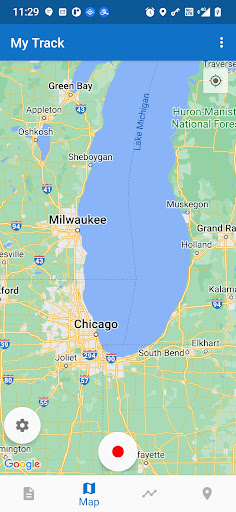
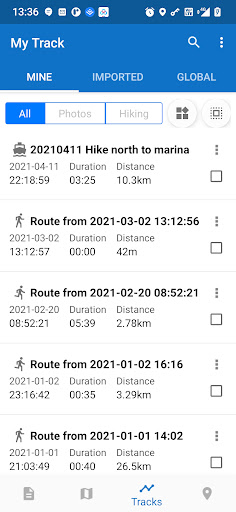
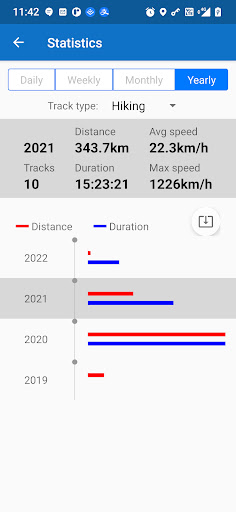
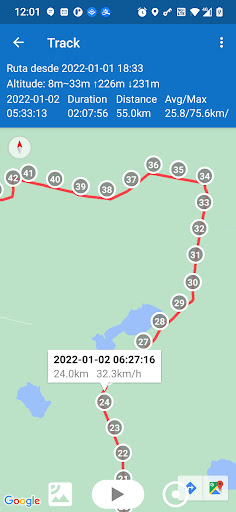
My Track is a small and powerful application to keep track of your route while you go around. The quite complex functionality hides behind a very clear user interface which is easy to understand.
My Track can be very useful for all of your outdoor activities like hiking, bicycle and motorcycle touring, boating, skiing, climbing or sheer driving fun, it can also be used for business.
Have a look at all of these fancy features:
1. Record a route
1.1 show current location on Google Map, along with time, duration and distance. even with latitude and longitude.
1.2 dynamic chart about speed and altitude.
1.3 route recording, pausing, resuming, saving and listing.
1.4 photos joining with a route automatically, whatever app you use to take photos.
1.5 voice report at predefined frequency of time or distance when recording
1.6 export routes to GPX/KML/KMZ files, or import from your phone or Google Drive.
1.7 sync and restore from Google Drive.
1.8 do stats.
1.9 show multi routes on the map.
1.10 print a route with the map.
2. Share a route
2.1 create a group and invite friends to join this group, you and your friends can share routes in this group.
2.2 share a route globally in this app.
2.3 share a route via web url to social medias, like WhatsApp, FaceBook, Gmail, etc.
2.4 select photos to share with a route.
3. Follow a route
3.1 follow your own route.
3.2 follow others’ shared route.
3.3 follow planned route.
3.4 fly your imagination: share a route in a group, friends in this group can follow this route.
4. Plan a route
4.1 plan a route(driving, bicycling and walking) among multi markers, the planed route can be followed on the map.
5. Markers
5.1 tap on the map to insert a marker, move the map to put the marker on proper position.
5.2 select markers to show on the map.
5.3 markers can be remembered to show next time when you open the app.
5.4 markers can be shared or exported within a route.
5.5 export markers to a KML file.
6. More
6.1 Live broadcast your locations to friends.
6.2 download offline map.
6.3 add map layer, and auto load this layer when the app starts.
6.4 click the map to measure distance, measure area, or to connect points to design a route line.
The app needs such permissions:
1. Storage permission for route saving.
2. Photo permission for joining photos with a route.
3. Location permission for route recording.
4. Internet permission for route sharing.
Attention:
1. Google Play and Google Maps should be installed first.
2. All basic features are free forever.
3. After 15 days you may see ads, you can pay to remove ads forever.
4. After 60 days you may subscribe to advanced features, or watch a video to get one time's feature permission.
Nhiều hơn

1. Tải trình cài đặt MEmu và hoàn tất cài đặt

2. Khởi động MEmu, sau đó mở Google Play trên trang chủ

3. Tìm kiếm My Track trong Google Play
Install
4. Tải và Cài Đặt My Track
5. Khi cài đặt hoàn tất, nhấp vào biểu tượng để bắt đầu

6. Trải nghiệm My Track trên PC của bạn bằng MEmu
MEmu Play là trình giả lập Android miễn phí tốt nhất, với 50 triệu người dùng trải nghiệm ứng dụng Android tuyệt vời. Công nghệ ảo hóa của MEmu cho phép bạn chạy mượt mà hàng ngàn ứng dụng Android trên máy tính, ngay cả những ứng dụng đòi hỏi cấu hình cao nhất.
Màn hình lớn hơn cùng với đồ hoạ tốt hơn; thời lượng dài, không giới hạn về pin hoặc dữ liệu di động
Hỗ trợ đầy đủ Keymapping cho việc kiểm soát chính xác bàn phím và chuột hoặc gamepad
Nhiều tài khoản trò chơi hoặc tác vụ cùng lúc trên một PC với Quản lý Đa năng
Use My Track on PC by following steps: