Name days
Đã cập nhật
Phiên bản hiện tại
4.34.001
Cung cấp bởi

Bạn không cần phải lo lắng về việc sạc quá mức khi sử dụng Name days trên điện thoại của bạn, không phải sử dụng trên màn hình nhỏ bé và tận hưởng ứng dụng trên màn hình lớn hơn rất nhiều. Từ bây giờ, bạn hãy trải nghiệm ứng dụng của bạn toàn màn hình bằng bàn phím và chuột. MEmu cung cấp cho bạn tất cả các tính năng đáng ngạc nhiên mà bạn mong đợi: cài đặt nhanh, cài đặt dễ dàng, điều khiển trực quan, không còn giới hạn về pin, dữ liệu di động và các cuộc gọi làm phiền. MEmu 9 hoàn toàn mới là sự lựa chọn tốt nhất để sử dụng Name days trên máy tính của bạn. Được mã hóa với sự hợp nhất của chúng tôi, trình quản lý multi-instance giúp mở 2 tài khoản trở lên cùng một lúc. Và điều quan trọng nhất là, công cụ mô phỏng độc quyền của chúng tôi có thể tận dụng hết toàn bộ tiềm năng trên PC của bạn, giúp mọi thứ vận hành trơn tru và thú vị.
Nhiều hơn
Tải Name days trên PC với Trình giả lập Android MEmu. Tận hưởng trải nghiệm chơi game trên màn hình lớn Application for notifying you of name days, birthdays and other dates with unique features and amazing customization options.
Application for notifying you of name days, birthdays and other dates with unique features and amazing customization options.
The funcionality of the free testing version is limited, it is intended for testing purposes before you buy Name days Pro.
- application won 3rd place in the competition Android Code 2016 in the "Slovak applications" category
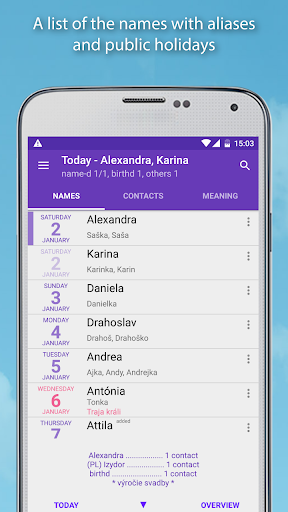
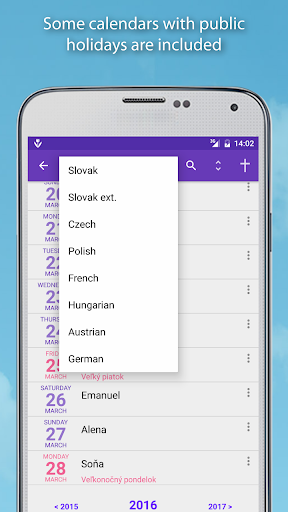
- Slovak, expanded Slovak, Czech, Hungarian, Polish, German, Austrian and French calendars with public holidays
- simultaneously evaluates two calendars, for example Slovak and Czech
- Slovak and Czech calendars contain homely names of first names too (called aliases in application)
- choice of contacts for evaluation by accounts/groups
- you can add your own aliases to first names
- you can add names into calendar
- meaning and characteristics of Slovak first names from base SK calendar, for Czech names application can show meaning and characteristics of the Slovak equivalents
- you can insert other relevant dates into calendar (wedding anniversary, ...)
- a unique function "Not found contacts" is included. The application searches for the contacts which it cannot find name days for. By adding an alias or added name it solves the problem.
- when the application finds the name day of contact incorrectly, you can mark it as incorrectly found for the specific calendar, date and name
- notification of events in the status bar
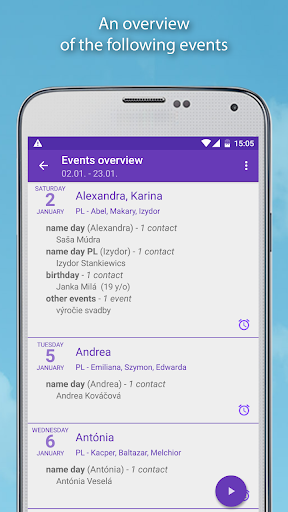
- an overview of the following events
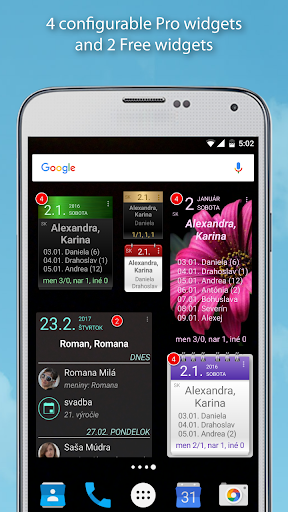
- 6 types of widgets, four of them with amazing customization options + 1 widget for thoughts for the heart
- material design, 12 optional colours of application, light and dark theme
- adjusted for mobile and tablet screens in both orientations
- predefined wishes (in Slovak, Czech and English language). You can add your own wishes.
- sending wishes by text message, email or chat. You can directly call the contact or create a calendar event.
- thoughts for the heart (quotations). They are displayed on tab NAMES and new configurable widget.
- localization in Slovak, Czech, English and German language
- new version 4 runs on Android 4.1 and higher
!!! Although the app has access to sensitive data on your device, it does not have any permission to send that data from your device !!!
A detailed description and manual can be found on the application website http://www.ipndata.sk/mam (for now only in Slovak language, we will translate it)
!!! The application is available only on Google Play store. If you install it from other sources, you risk an attack by malicious code !!!
Nhiều hơn

1. Tải trình cài đặt MEmu và hoàn tất cài đặt

2. Khởi động MEmu, sau đó mở Google Play trên trang chủ

3. Tìm kiếm Name days trong Google Play
Install
4. Tải và Cài Đặt Name days
5. Khi cài đặt hoàn tất, nhấp vào biểu tượng để bắt đầu

6. Trải nghiệm Name days trên PC của bạn bằng MEmu
MEmu Play là trình giả lập Android miễn phí tốt nhất, với 50 triệu người dùng trải nghiệm ứng dụng Android tuyệt vời. Công nghệ ảo hóa của MEmu cho phép bạn chạy mượt mà hàng ngàn ứng dụng Android trên máy tính, ngay cả những ứng dụng đòi hỏi cấu hình cao nhất.
Màn hình lớn hơn cùng với đồ hoạ tốt hơn; thời lượng dài, không giới hạn về pin hoặc dữ liệu di động
Hỗ trợ đầy đủ Keymapping cho việc kiểm soát chính xác bàn phím và chuột hoặc gamepad
Nhiều tài khoản trò chơi hoặc tác vụ cùng lúc trên một PC với Quản lý Đa năng
Use Name days on PC by following steps: