
LOVOO: App Hẹn Hò & Trò Chuyện
Đã cập nhật
Phiên bản hiện tại
1
Cung cấp bởi

Bạn không cần phải lo lắng về việc sạc quá mức khi sử dụng LOVOO: App Hẹn Hò & Trò Chuyện trên điện thoại của bạn, không phải sử dụng trên màn hình nhỏ bé và tận hưởng ứng dụng trên màn hình lớn hơn rất nhiều. Từ bây giờ, bạn hãy trải nghiệm ứng dụng của bạn toàn màn hình bằng bàn phím và chuột. MEmu cung cấp cho bạn tất cả các tính năng đáng ngạc nhiên mà bạn mong đợi: cài đặt nhanh, cài đặt dễ dàng, điều khiển trực quan, không còn giới hạn về pin, dữ liệu di động và các cuộc gọi làm phiền. MEmu 9 hoàn toàn mới là sự lựa chọn tốt nhất để sử dụng LOVOO: App Hẹn Hò & Trò Chuyện trên máy tính của bạn. Được mã hóa với sự hợp nhất của chúng tôi, trình quản lý multi-instance giúp mở 2 tài khoản trở lên cùng một lúc. Và điều quan trọng nhất là, công cụ mô phỏng độc quyền của chúng tôi có thể tận dụng hết toàn bộ tiềm năng trên PC của bạn, giúp mọi thứ vận hành trơn tru và thú vị.
Nhiều hơn
Tải LOVOO: App Hẹn Hò & Trò Chuyện trên PC với Trình giả lập Android MEmu. Tận hưởng trải nghiệm chơi game trên màn hình lớn LOVOO.
LOVOO...
- will pique your interest.
- will value your individuality.
- will put your needs first.
- will allow you to meet people in lots of different ways.
- will help you to make friends.
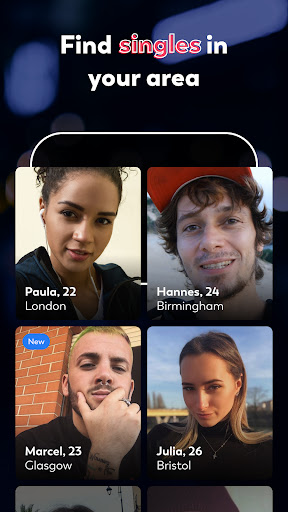
- will introduce you to singles in your area.
- will simplify your date planning.
- will prioritize your safety when dating.
- will allow you to discover love in all its forms.
- will be a loyal guide on your adventure.
- is not pronounced "lofoo" or "louwou" but "lovou." Kind of sounds like "love you," right?
There are millions of matches each month on LOVOO! Keep an open mind and make the first move.
// Your route to getting a date:
More than just a photo. Show your personality in your flirting profile. Charming, honest, and funny profile questions make chatting and flirting easier.
// Personal recommendations – Best Picks:
Matches with meaning. We use Best Picks to introduce you to new people who you have things in common with every day.
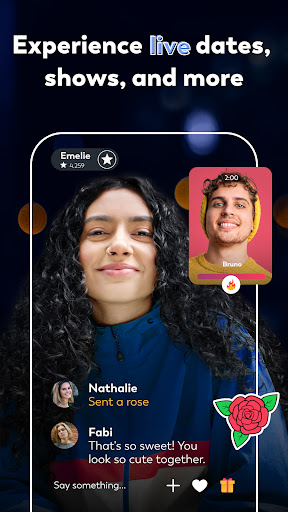
// Dating from your couch on Live's video chat:
Meet your matches without interruption on video chat for your first date and see if it's a good fit.
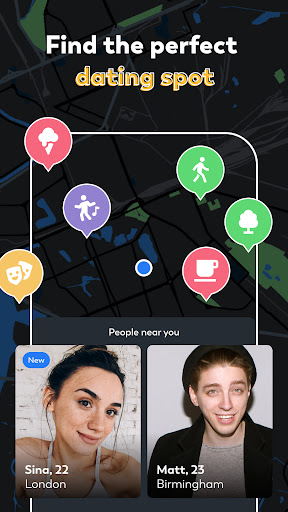
// We're reinventing the radar—the map for your date planning:
Discover singles in your area, find suitable locations for your first date, share meeting points with matches, and take advantage of special deals.
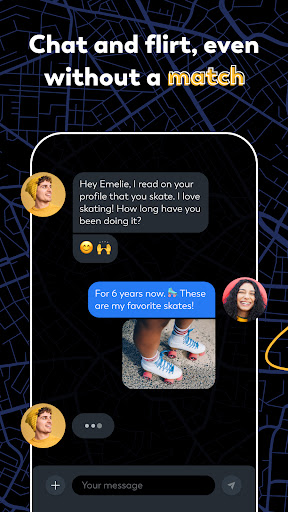
// Get chatting: matches, chats, and icebreakers
Do you play Match and discover singles who excite you? The icebreaker feature allows you to write to new people instantly and easily, without a match.
// Flirting at a glance:
Check out the flirting gallery and see who likes you or has visited your profile.
// Go on a Live video date today:
More than a traditional dating app. Start speed dating with next|date and decide whether it's a match or you want to move on to the next date. On Blind Date you can impress with your personality, humor, and voice before seeing each other in the chat or as a match.
// Better than TV—LOVOO Live:
Meet different kinds of people on live streams and in live chats. Send entertaining streamers virtual gifts or put yourself out there. People have also made friends and met lovers this way.
// A safe place for carefree flirting. Fake profiles and scams have no place on LOVOO. Our guidelines and measures help to keep you safe while you meet people. You can report inappropriate behavior, questionable profiles, and the like to us at any time.
What the press has to say:
"One of the apps on which far more women than men are registered." – Tagesspiegel
"The app is well-designed and has great features." – Cosmopolitan
"Lovoo is the perfect dating app for those who want to meet new people, are open-minded, and don't take life too seriously." – Glamour
LOVOO Premium:
You can download and use LOVOO for free. The Premium packages offer you all the benefits—swipe without restriction, be displayed more often in Match, send 3 icebreakers a day, and so much more.
Nhiều hơn

1. Tải trình cài đặt MEmu và hoàn tất cài đặt

2. Khởi động MEmu, sau đó mở Google Play trên trang chủ

3. Tìm kiếm LOVOO: App Hẹn Hò & Trò Chuyện trong Google Play
Install
4. Tải và Cài Đặt LOVOO: App Hẹn Hò & Trò Chuyện
5. Khi cài đặt hoàn tất, nhấp vào biểu tượng để bắt đầu

6. Trải nghiệm LOVOO: App Hẹn Hò & Trò Chuyện trên PC của bạn bằng MEmu
MEmu Play là trình giả lập Android miễn phí tốt nhất, với 50 triệu người dùng trải nghiệm ứng dụng Android tuyệt vời. Công nghệ ảo hóa của MEmu cho phép bạn chạy mượt mà hàng ngàn ứng dụng Android trên máy tính, ngay cả những ứng dụng đòi hỏi cấu hình cao nhất.
Màn hình lớn hơn cùng với đồ hoạ tốt hơn; thời lượng dài, không giới hạn về pin hoặc dữ liệu di động
Hỗ trợ đầy đủ Keymapping cho việc kiểm soát chính xác bàn phím và chuột hoặc gamepad
Nhiều tài khoản trò chơi hoặc tác vụ cùng lúc trên một PC với Quản lý Đa năng
Use LOVOO: App Hẹn Hò & Trò Chuyện on PC by following steps: