Oura
Đã cập nhật
Phiên bản hiện tại
6.1.3
Cung cấp bởi

Bạn không cần phải lo lắng về việc sạc quá mức khi sử dụng Oura trên điện thoại của bạn, không phải sử dụng trên màn hình nhỏ bé và tận hưởng ứng dụng trên màn hình lớn hơn rất nhiều. Từ bây giờ, bạn hãy trải nghiệm ứng dụng của bạn toàn màn hình bằng bàn phím và chuột. MEmu cung cấp cho bạn tất cả các tính năng đáng ngạc nhiên mà bạn mong đợi: cài đặt nhanh, cài đặt dễ dàng, điều khiển trực quan, không còn giới hạn về pin, dữ liệu di động và các cuộc gọi làm phiền. MEmu 9 hoàn toàn mới là sự lựa chọn tốt nhất để sử dụng Oura trên máy tính của bạn. Được mã hóa với sự hợp nhất của chúng tôi, trình quản lý multi-instance giúp mở 2 tài khoản trở lên cùng một lúc. Và điều quan trọng nhất là, công cụ mô phỏng độc quyền của chúng tôi có thể tận dụng hết toàn bộ tiềm năng trên PC của bạn, giúp mọi thứ vận hành trơn tru và thú vị.
Nhiều hơn
Tải Oura trên PC với Trình giả lập Android MEmu. Tận hưởng trải nghiệm chơi game trên màn hình lớn Meet the revolutionary smart ring that accurately measures your body’s signals right from your finger.
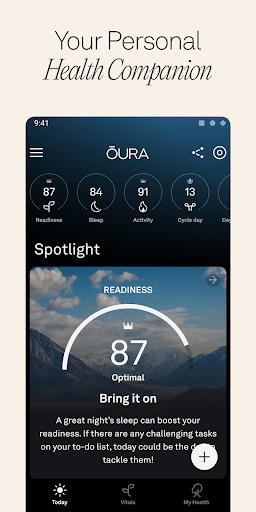
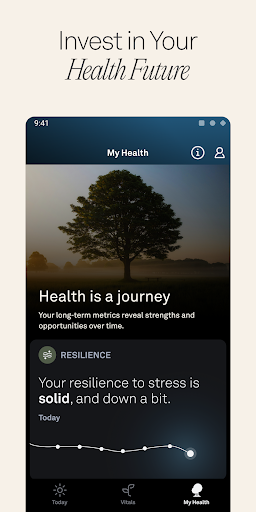
Meet the revolutionary smart ring that accurately measures your body’s signals right from your finger. Oura Ring delivers personal insights and recommendations to empower your choices everyday.
24/7 COMFORT
Oura Ring is lightweight, stylish, and easy to wear while you sleep, workout, or go out. The titanium design is durable, water resistant, and built to last.
ACCURATE BY DESIGN
Your finger provides the most accurate reading for over 30 biometrics like heart rate, body temperature, blood oxygen, and more.
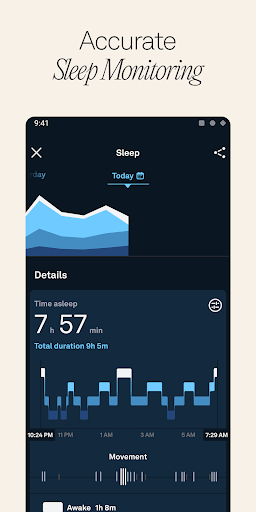
ADVANCED SLEEP MONITORING
Wake up to in-depth analysis of your sleep patterns and personalized tips to optimize your routine to feel more energized every day.
PERSONAL INSIGHTS
Three daily scores — Sleep, Activity, and Readiness — give you a clear understanding of the state of your body with actionable guidance on how to stay balanced.
CYCLE TRACKING
Better understand your body’s cycle patterns or help improve your chances of getting pregnant by tracking daily and monthly body temperature variations.
STRESS RESILIENCE
Understand how daily stress is affecting your body and learn how to be more resilient to stress by finding balance between moments of strain and recovery.
DYNAMIC ACTIVITY PROGRESS
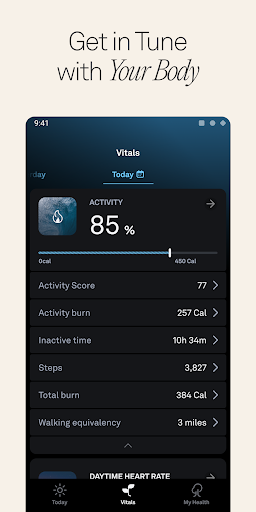
From mountain climbing to meditating, Oura Ring tracks your daily movement while prioritizing balance and rest. Measure your daily activities, calories, steps, and inactive time.
ILLNESS DETECTION
Oura Ring monitors shifts in your body temperature and heart rate so you can tell when you may be getting sick.
RESTING HEART RATE & HRV
Get a clear picture of your recovery by following changes and trends in your nighttime resting heart rate and heart rate variability.
LONG-TERM TRENDS
View your daily, weekly, and monthly trends, and discover how your choices and environment affect your body.
TRACK HABITS WITH TAGS
Customize your experience and test out new habits by adding tags — like "caffeine" or "alcohol" — and discover how your choices affect your sleep and recovery.
The Oura Ring is not a medical device and is not intended to diagnose, treat, cure, monitor, or prevent medical conditions or illnesses. The Oura Ring is only designed for general fitness and wellness purposes. Please do not make any changes to your medication, daily routines, nutrition, sleep schedule, or workouts without first consulting your doctor or another medical professional.
Nhiều hơn

1. Tải trình cài đặt MEmu và hoàn tất cài đặt

2. Khởi động MEmu, sau đó mở Google Play trên trang chủ

3. Tìm kiếm Oura trong Google Play
Install
4. Tải và Cài Đặt Oura
5. Khi cài đặt hoàn tất, nhấp vào biểu tượng để bắt đầu

6. Trải nghiệm Oura trên PC của bạn bằng MEmu
MEmu Play là trình giả lập Android miễn phí tốt nhất, với 50 triệu người dùng trải nghiệm ứng dụng Android tuyệt vời. Công nghệ ảo hóa của MEmu cho phép bạn chạy mượt mà hàng ngàn ứng dụng Android trên máy tính, ngay cả những ứng dụng đòi hỏi cấu hình cao nhất.
Màn hình lớn hơn cùng với đồ hoạ tốt hơn; thời lượng dài, không giới hạn về pin hoặc dữ liệu di động
Hỗ trợ đầy đủ Keymapping cho việc kiểm soát chính xác bàn phím và chuột hoặc gamepad
Nhiều tài khoản trò chơi hoặc tác vụ cùng lúc trên một PC với Quản lý Đa năng
Use Oura on PC by following steps: