PocketBook reader - any books
Đã cập nhật
Phiên bản hiện tại
5.55.0.15550.release
Cung cấp bởi

Bạn không cần phải lo lắng về việc sạc quá mức khi sử dụng PocketBook reader - any books trên điện thoại của bạn, không phải sử dụng trên màn hình nhỏ bé và tận hưởng ứng dụng trên màn hình lớn hơn rất nhiều. Từ bây giờ, bạn hãy trải nghiệm ứng dụng của bạn toàn màn hình bằng bàn phím và chuột. MEmu cung cấp cho bạn tất cả các tính năng đáng ngạc nhiên mà bạn mong đợi: cài đặt nhanh, cài đặt dễ dàng, điều khiển trực quan, không còn giới hạn về pin, dữ liệu di động và các cuộc gọi làm phiền. MEmu 9 hoàn toàn mới là sự lựa chọn tốt nhất để sử dụng PocketBook reader - any books trên máy tính của bạn. Được mã hóa với sự hợp nhất của chúng tôi, trình quản lý multi-instance giúp mở 2 tài khoản trở lên cùng một lúc. Và điều quan trọng nhất là, công cụ mô phỏng độc quyền của chúng tôi có thể tận dụng hết toàn bộ tiềm năng trên PC của bạn, giúp mọi thứ vận hành trơn tru và thú vị.
Nhiều hơn
Tải PocketBook reader - any books trên PC với Trình giả lập Android MEmu. Tận hưởng trải nghiệm chơi game trên màn hình lớn PocketBook Reader is a free app for reading any e-content (books, magazines, textbooks, comic books, etc.
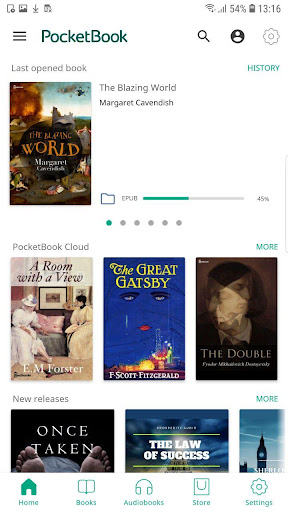
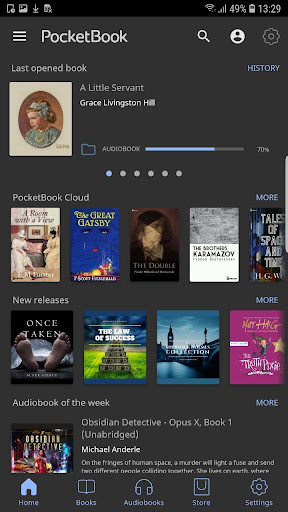
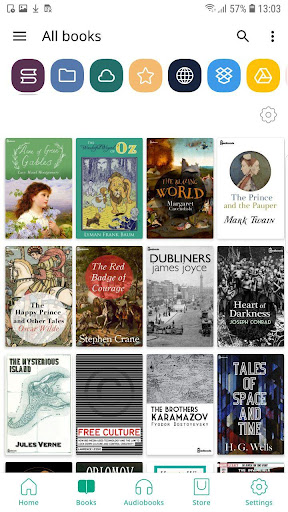
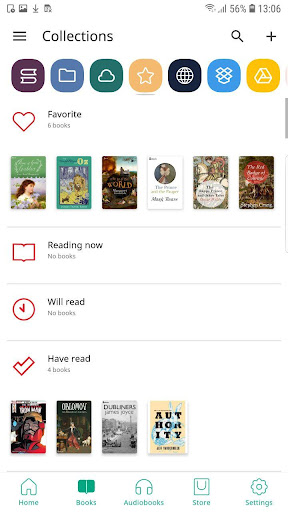
PocketBook Reader is a free app for reading any e-content (books, magazines, textbooks, comic books, etc.) and listening to audiobooks! The application supports 26 book and audio formats, including mobi, epub, fb2, cbz, cbr. Read without ads and with total comfort!
Choose any content - any format!
• Support of 19 book formats, including the most popular - EPUB, FB2, MOBI, PDF, DJVU, DOCX, RTF, TXT, HTML;
• Comic book formats CBR and CBZ;
• Open books protected with Adobe DRM (PDF, EPUB);
• PDF Reflow function (reflow text in PDF files).
Listen to audiobooks!
• You can listen to audiobooks and other audio files in MP3, M4B, and take notes in them;
• Built-in TTS (Text-to-speech) engine for the voicing of the text files. If necessary, you can replace the pre-installed TTS with any other one presented in the Play Market.
Download and sync content easily! The app is a reader and book explorer application;
• Manage file access: Book files stored on your device (such as EPUB) can be conveniently viewed, read and managed in the app. You can choose which locally stored files the app has access to;
• Free PocketBook Cloud service for synchronizing all your books, including audiobooks, as well as reading positions, notes and bookmarks on all your devices;
• Your files from Dropbox, Google Drive, Google Books services are easily connected to the app to create one consolidated library. You can even connect multiple accounts of the same service at the same time;
• Support for OPDS catalogs - get access to network libraries;
• ISBN scanner, for quick search of electronic versions of books by barcode;
• Opportunity to borrow books and periodicals;
• If you have a E Ink e-reader PocketBook, you can easily synchronize all your books and accounts just by scanning a QR code.
Ready to switch from another app? No problem! Getting started with PocketBook Reader is easy! With an intuitive interface, the application provides you with unprecedented freedom – lots of options for settings and no restrictions.
Choose, change, customize, and personalize!
• Intuitive interface, easy navigation, and minimalistic design;
• Opportunity to choose one of the seven interface color themes, reassign the buttons and display areas;
• Two night-reading modes - for better reading comfort anytime;
• You can customize the home screen with widgets, navigation and calling functions;
• Adjust the font style, font size, line spacing, and margin size;
• Customizable animation of turning pages;
• Opportunity to crop margins – make the page look exactly the way you want.
Get fast file access and easy search!
• Create widgets on the home page for quick access to cloud services and libraries in one click. Manage widgets as you like;
• All files are quickly found and instantly opened, even with built-in audio and video fragments;
• Smart search, scanning files on your tablet or smartphone is a matter of seconds. PocketBook Reader will find any file on the device or only file from a specific folder/folders and pull them into the library. Any file or document can be found in a few clicks!
• The app allows you to sort books, create collections, filter and mark files as you like;
Make bookmarks, take notes, add comments!
• You can quickly find all your notes and share them with friends via email or messengers;
• Collect all your notes, bookmarks, and comments into separate files for even greater convenience.
And that’s not all!
• Built-in dictionaries and translator;
• Convenient search in Google and Wikipedia;
• Ability to download custom fonts;
• Quick feedback and prompt assistance in the Play Market, guaranteed help via the User Technical Support Service.
FAQ and old versions
https://pocketbook.ch/en-ch/faq?hide_nav=1
FAQ -video
https://www.youtube.com/playlist?list=PL_YSlYgOUl8QTee46afeeNxECEt7_rgz1
Nhiều hơn

1. Tải trình cài đặt MEmu và hoàn tất cài đặt

2. Khởi động MEmu, sau đó mở Google Play trên trang chủ

3. Tìm kiếm PocketBook reader - any books trong Google Play
Install
4. Tải và Cài Đặt PocketBook reader - any books
5. Khi cài đặt hoàn tất, nhấp vào biểu tượng để bắt đầu

6. Trải nghiệm PocketBook reader - any books trên PC của bạn bằng MEmu
MEmu Play là trình giả lập Android miễn phí tốt nhất, với 50 triệu người dùng trải nghiệm ứng dụng Android tuyệt vời. Công nghệ ảo hóa của MEmu cho phép bạn chạy mượt mà hàng ngàn ứng dụng Android trên máy tính, ngay cả những ứng dụng đòi hỏi cấu hình cao nhất.
Màn hình lớn hơn cùng với đồ hoạ tốt hơn; thời lượng dài, không giới hạn về pin hoặc dữ liệu di động
Hỗ trợ đầy đủ Keymapping cho việc kiểm soát chính xác bàn phím và chuột hoặc gamepad
Nhiều tài khoản trò chơi hoặc tác vụ cùng lúc trên một PC với Quản lý Đa năng
Use PocketBook reader - any books on PC by following steps: