
Pregnancy Wheel
Đã cập nhật
Phiên bản hiện tại
2.12
Cung cấp bởi

Bạn không cần phải lo lắng về việc sạc quá mức khi sử dụng Pregnancy Wheel trên điện thoại của bạn, không phải sử dụng trên màn hình nhỏ bé và tận hưởng ứng dụng trên màn hình lớn hơn rất nhiều. Từ bây giờ, bạn hãy trải nghiệm ứng dụng của bạn toàn màn hình bằng bàn phím và chuột. MEmu cung cấp cho bạn tất cả các tính năng đáng ngạc nhiên mà bạn mong đợi: cài đặt nhanh, cài đặt dễ dàng, điều khiển trực quan, không còn giới hạn về pin, dữ liệu di động và các cuộc gọi làm phiền. MEmu 9 hoàn toàn mới là sự lựa chọn tốt nhất để sử dụng Pregnancy Wheel trên máy tính của bạn. Được mã hóa với sự hợp nhất của chúng tôi, trình quản lý multi-instance giúp mở 2 tài khoản trở lên cùng một lúc. Và điều quan trọng nhất là, công cụ mô phỏng độc quyền của chúng tôi có thể tận dụng hết toàn bộ tiềm năng trên PC của bạn, giúp mọi thứ vận hành trơn tru và thú vị.
Nhiều hơn
Tải Pregnancy Wheel trên PC với Trình giả lập Android MEmu. Tận hưởng trải nghiệm chơi game trên màn hình lớn Pregnancy wheel application is created to replace the traditional pregnancy wheel or obstetric wheel (OB wheel) with a modern user interface.
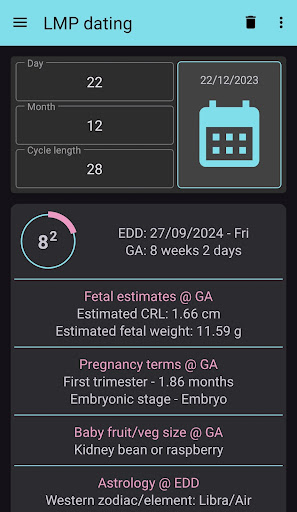
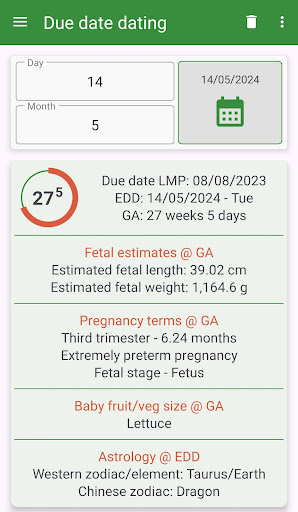
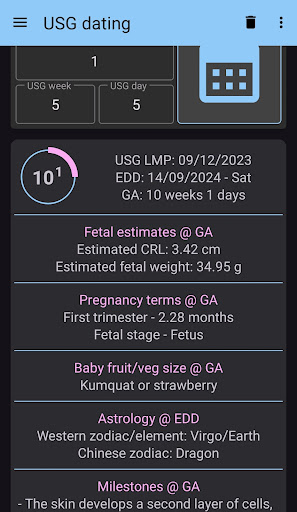
Pregnancy wheel application is created to replace the traditional pregnancy wheel or obstetric wheel (OB wheel) with a modern user interface. There is no year entry/selection for gestational age and due date (estimated delivery date - EDD) calculation, year determination is handled by the application. Therefore, date entry becomes faster. Application has several other features that can be used to create a date timeline and calculate dates from template for indicated gestational weeks, calculate estimated fetal length and estimated fetal weight for respective gestational age. There are several other calculations which include milestones, baby fruit/veg size, zodiac for EDD, and gestational terms.
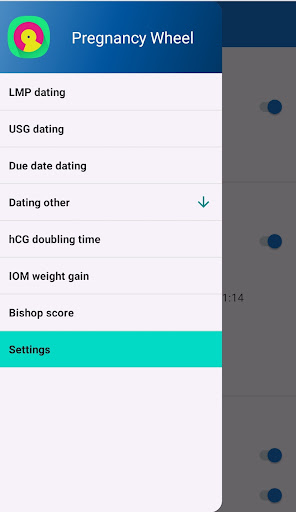
Application starts with the last menstrual period module. Additional modules can be accessed using the navigation menu. In each module besides the due date (estimated delivery date - EDD) and current gestational age, milestones, baby fruit/veg size, zodiac for EDD, gestational terms, predetermined pregnancy weeks and timelines are calculated. Gestational weeks’ and timelines’ templates can be edited in the settings.
Languages supported include English, Spanish, Turkish, German, French, Italian, Portuguese.
Application Modules to calculate due date and gestational age:
1) Last menstrual period: Calculations are based on the last menstrual period.
1) Ultrasound measurements: Ultrasound measurement result as weeks and days used for calculations
2) Crown-rump length (CRL): CRL measurement result as mm used for calculations
3) In-vitro fertilization: Embryo transfer date and the age of the embryo in days used for calculations
4) Due date
5) Head circumference (HC)
6) Symphysis fundal height (SFH)
7) Transcerebellar diameter (TCD)
8) Discrepancy calculation: Calculates the difference and degree of discrepancy between LMP calculated gestational age and calculated gestational age from the ultrasound measurements
9) hCG doubling time
10) Review: Can be used for after delivery retrospective pregnancy weeks and timeline calculation
11) Settings
With other applications like mail or Whats App, the current screen can be shared as a picture through the share icon. Calculations are updated when the parameters changed and done pressed but some people may prefer to use the reset icon to initialize the screen.
App is offline-compatible. Only banner advertisements are present at the top of the window. Calculated results can be text-copied to the clipboard by tapping the result labels.
Nhiều hơn

1. Tải trình cài đặt MEmu và hoàn tất cài đặt

2. Khởi động MEmu, sau đó mở Google Play trên trang chủ

3. Tìm kiếm Pregnancy Wheel trong Google Play
Install
4. Tải và Cài Đặt Pregnancy Wheel
5. Khi cài đặt hoàn tất, nhấp vào biểu tượng để bắt đầu

6. Trải nghiệm Pregnancy Wheel trên PC của bạn bằng MEmu
MEmu Play là trình giả lập Android miễn phí tốt nhất, với 50 triệu người dùng trải nghiệm ứng dụng Android tuyệt vời. Công nghệ ảo hóa của MEmu cho phép bạn chạy mượt mà hàng ngàn ứng dụng Android trên máy tính, ngay cả những ứng dụng đòi hỏi cấu hình cao nhất.
Màn hình lớn hơn cùng với đồ hoạ tốt hơn; thời lượng dài, không giới hạn về pin hoặc dữ liệu di động
Hỗ trợ đầy đủ Keymapping cho việc kiểm soát chính xác bàn phím và chuột hoặc gamepad
Nhiều tài khoản trò chơi hoặc tác vụ cùng lúc trên một PC với Quản lý Đa năng
Use Pregnancy Wheel on PC by following steps: