Speech Central AI Voice Reader
Đã cập nhật
Phiên bản hiện tại
13.6.0
Cung cấp bởi

Bạn không cần phải lo lắng về việc sạc quá mức khi sử dụng Speech Central AI Voice Reader trên điện thoại của bạn, không phải sử dụng trên màn hình nhỏ bé và tận hưởng ứng dụng trên màn hình lớn hơn rất nhiều. Từ bây giờ, bạn hãy trải nghiệm ứng dụng của bạn toàn màn hình bằng bàn phím và chuột. MEmu cung cấp cho bạn tất cả các tính năng đáng ngạc nhiên mà bạn mong đợi: cài đặt nhanh, cài đặt dễ dàng, điều khiển trực quan, không còn giới hạn về pin, dữ liệu di động và các cuộc gọi làm phiền. MEmu 9 hoàn toàn mới là sự lựa chọn tốt nhất để sử dụng Speech Central AI Voice Reader trên máy tính của bạn. Được mã hóa với sự hợp nhất của chúng tôi, trình quản lý multi-instance giúp mở 2 tài khoản trở lên cùng một lúc. Và điều quan trọng nhất là, công cụ mô phỏng độc quyền của chúng tôi có thể tận dụng hết toàn bộ tiềm năng trên PC của bạn, giúp mọi thứ vận hành trơn tru và thú vị.
Nhiều hơn
Tải Speech Central AI Voice Reader trên PC với Trình giả lập Android MEmu. Tận hưởng trải nghiệm chơi game trên màn hình lớn Feature set that exceeds the competition, no subscription for the premium tier with the free tier limited by the quantity not by the quality, that is the reason why you'll love Speech Central.
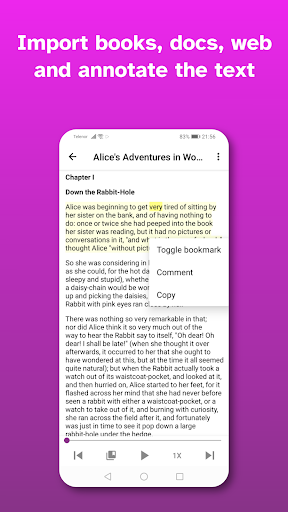
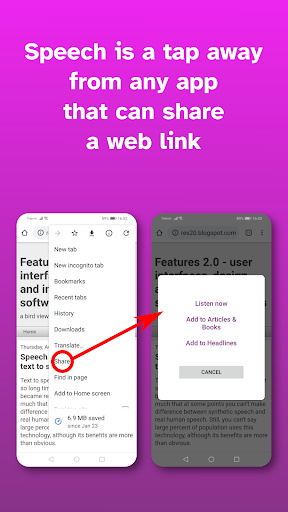
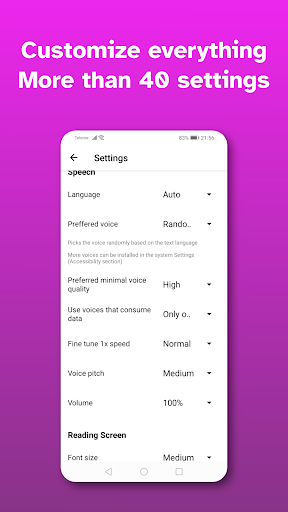
Feature set that exceeds the competition, no subscription for the premium tier with the free tier limited by the quantity not by the quality, that is the reason why you'll love Speech Central.
The app implements state of the art features for voice readers:
◦ The best PDF support in text to speech apps - your reading flow will not be interrupted by footers, headers, footnotes and long web links as they are detected by the advanced artificial intelligence in most cases. You can even read scanned files as OCR is built-in. The best tool for academic (scientific) research papers and college textbooks.
◦ The best web support in text to speech (tts) apps - for the first time you can listen everything as both articles and headlines (including RSS feeds) are supported. Articles can be added from the headlines page for fully uninterrupted flow or from Chrome. And you can send articles from the desktop browser with the Pocket extension. On top of that it support reading of web novels and similar content like fanfic from the single page (on most of such websites).
◦ Microsoft Azure AI voices
◦ The widest support for documents/office and e-book formats.
◦ Knowledge and text annotation tools built-in.
◦ The widest choice of options to customize the voice, appearance and various other parameters.
◦ Export the text with annotations to .docx format
◦ Functions of audio buttons can be customized for high productivity and accessibility. The widest selection of tools to control the speed and browse the text that is read aloud.
◦ The app can be used with dozens of languages that have text-to-speech support on the device with automatic language detection from the content for all major languages.
◦ Export the text to the audio file.
◦ The app is tested to be accessible by legally blind users.
◦ Highest security and privacy standards. No ads and no spyware. Your data stays truly private, we collect only the crash data. Just check required permissions and compare to other apps!
The app is installed on over 250,000 devices and with consistent ratings above 4 stars Speech Central it is one of the leading global text-to-speech brands. It was nominated for the best iOS accessible app in 2020 and 2017 on AppleVis, picked for the Best of Windows Store in 2014.
For many years there was a dream of the easy to use, well made and affordable app that would read the text aloud. And now you can use Speech Central to speechify the text for you!
You can save an hour each day by using the text to speech (tts) while commuting, walking, running, doing the housework, etc. You'll also save eyes for better things while having your battery last significantly longer. Keeping the screen off grants that you won't get into the internet addiction and waste your time on unwanted things, and thus it can also help to people with ADHD. As a bonus, even if your internet connection is unstable you won't notice any interruptions.
The voice reader can be used as an assistive technology and helper for people with visual impairments (eyesight problems) and disabilities like dyslexia.
Supported document types are: PDF (including scanned documents), Microsoft Word (.docx), Microsoft PowerPoint (.pptx), OpenOffice/LibreOffice (.odt, .odp), .html, .txt, .rtf, supported ebook formats are .epub, DAISY and .fb2 and emails in .eml format.
Get the app now and enjoy the most convenient text to speech!
Notes:
- The free version has a daily/monthly limitation in the number of articles/books that you can add to it which is removed by purchasing the Pro add-on.
- The add-on license is valid only for the Android platform.
- DRM protected books (e.g. Kindle books) are locked to their respective vendor apps and cannot be imported into the app.
- AI based features may not work as expected in minority of cases
Nhiều hơn

1. Tải trình cài đặt MEmu và hoàn tất cài đặt

2. Khởi động MEmu, sau đó mở Google Play trên trang chủ

3. Tìm kiếm Speech Central AI Voice Reader trong Google Play
Install
4. Tải và Cài Đặt Speech Central AI Voice Reader
5. Khi cài đặt hoàn tất, nhấp vào biểu tượng để bắt đầu

6. Trải nghiệm Speech Central AI Voice Reader trên PC của bạn bằng MEmu
MEmu Play là trình giả lập Android miễn phí tốt nhất, với 50 triệu người dùng trải nghiệm ứng dụng Android tuyệt vời. Công nghệ ảo hóa của MEmu cho phép bạn chạy mượt mà hàng ngàn ứng dụng Android trên máy tính, ngay cả những ứng dụng đòi hỏi cấu hình cao nhất.
Màn hình lớn hơn cùng với đồ hoạ tốt hơn; thời lượng dài, không giới hạn về pin hoặc dữ liệu di động
Hỗ trợ đầy đủ Keymapping cho việc kiểm soát chính xác bàn phím và chuột hoặc gamepad
Nhiều tài khoản trò chơi hoặc tác vụ cùng lúc trên một PC với Quản lý Đa năng
Use Speech Central AI Voice Reader on PC by following steps: