Vocabulary.com
Đã cập nhật
Phiên bản hiện tại
1.0.0
Cung cấp bởi

Bạn không cần phải lo lắng về việc sạc quá mức khi sử dụng Vocabulary.com trên điện thoại của bạn, không phải sử dụng trên màn hình nhỏ bé và tận hưởng ứng dụng trên màn hình lớn hơn rất nhiều. Từ bây giờ, bạn hãy trải nghiệm ứng dụng của bạn toàn màn hình bằng bàn phím và chuột. MEmu cung cấp cho bạn tất cả các tính năng đáng ngạc nhiên mà bạn mong đợi: cài đặt nhanh, cài đặt dễ dàng, điều khiển trực quan, không còn giới hạn về pin, dữ liệu di động và các cuộc gọi làm phiền. MEmu 9 hoàn toàn mới là sự lựa chọn tốt nhất để sử dụng Vocabulary.com trên máy tính của bạn. Được mã hóa với sự hợp nhất của chúng tôi, trình quản lý multi-instance giúp mở 2 tài khoản trở lên cùng một lúc. Và điều quan trọng nhất là, công cụ mô phỏng độc quyền của chúng tôi có thể tận dụng hết toàn bộ tiềm năng trên PC của bạn, giúp mọi thứ vận hành trơn tru và thú vị.
Nhiều hơn
Tải Vocabulary.com trên PC với Trình giả lập Android MEmu. Tận hưởng trải nghiệm chơi game trên màn hình lớn With its uniquely effective word learning system, the Vocabulary.
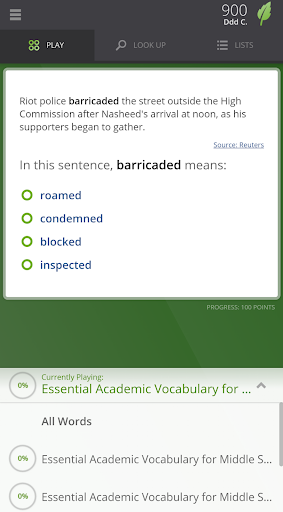
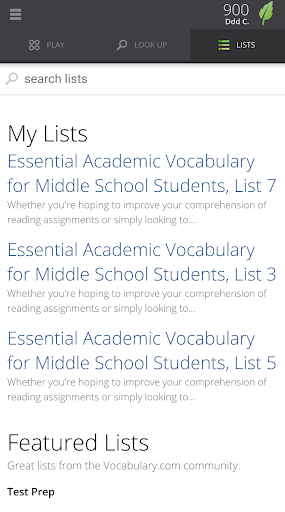
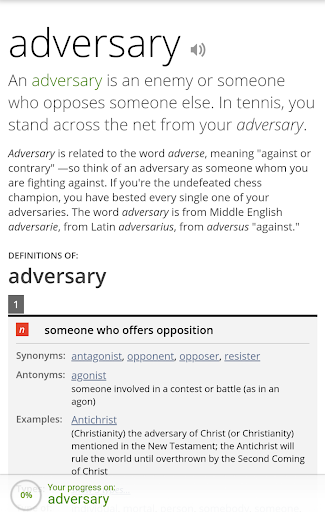
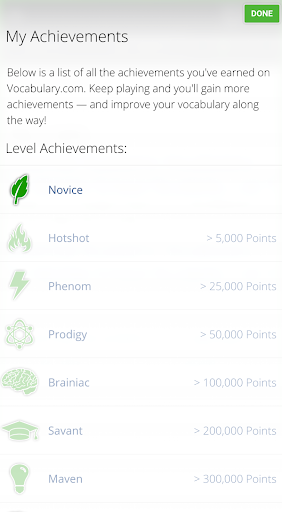
With its uniquely effective word learning system, the Vocabulary.com app helps you master words through a fun and addictive game. And it’s powered by the world's smartest, fastest dictionary. From the makers of the award-winning Vocabulary.com website, this app will expand your vocabulary with lightning speed!
IT’S A SCIENCE...
Vocabulary.com is a comprehensive program for lifelong learning of vocabulary, in which each activity is specially chosen for you.
• We use sophisticated algorithms to help you learn more effectively.
• We start with 235,858 questions that teach 15,914 words.
• We use the science of learning to model how you learn (and retain) new words.
• By comparing your answers to the hundreds of millions of answers given by other Vocabulary.com users, we personalize your learning experience and choose the best question for you at just the right time.
...AND IT’S A GAME
We’ve turned learning vocabulary into an addictive game. You may not even notice that you’re learning along the way.
• Accumulate points, achievements and badges.
• Compete with Vocabulary.com users from throughout the world.
YOU CHOOSE...
Studying for an exam like the SAT, GRE, or TOEFL? We have learnable lists for you, covering everything from standardized tests to breaking news — you name it.
• Choose from one of our 50,000 ready-to-learn lists.
• Or if you see a word in the dictionary that you want to learn, just click "learn this word" and we'll teach it to you.
...OR WE CHOOSE
Don't have a specific word or list in mind? Let our adaptive learning system find the right word for you.
• Just play a few questions, and we'll pinpoint the words that are appropriate for your level.
• We won't waste your time on words that are too easy or too hard.
YOU IMPROVE
Like a good coach, Vocabulary.com won’t give up on you. Whether you pick the words or let us find them for you, we’ll work with you until you've mastered them.
And even after you've achieved mastery, we'll continue to reinforce what you have learned to make sure that it all stays fresh in your memory. Next thing you know, you’ll be expanding your vocabulary and improving your communication, a key to success in school and business.
FINALLY, A DICTIONARY WITH A SOUL
Our dictionary was written for humans, by humans. Look up a word, and you’ll read a friendly explanation that you'll actually remember. It’s as if your favorite teacher were explaining it to you.
We include clever usage tips and thousands of real-world example sentences that'll show you how words live in the wild and will make you more confident about using them yourself.
See a word you’d like to know better? Tap "Learn this Word" and easily add it to your learning program.
WHAT PEOPLE ARE SAYING
"Vocabulary.com is among the quickest and most intelligent ways for students to improve their vocabulary. Regardless of education level or age, Vocabulary.com will help master the words that are essential to academic and business success." —National Education Association
“Educators who are familiar with Vocabulary.com are impressed by the technology. It is a sign, they say, that real progress is finally being made in computer-assisted education.” —The New York Times
“Vocabulary.com could actually make speaking well cool again.” —TIME
“Vocabulary.com boasts a Web-based dashboard bristling with points, levels, progress bars and achievement bonuses, among other attractions.” —USA Today
HONORS AND AWARDS
• TIME’s 50 Best Websites of the Year
• PC Magazine's Top 100 Websites of the Year
• Tech & Learning Award of Excellence
• Webby Awards: Official Honoree in Education
Nhiều hơn

1. Tải trình cài đặt MEmu và hoàn tất cài đặt

2. Khởi động MEmu, sau đó mở Google Play trên trang chủ

3. Tìm kiếm Vocabulary.com trong Google Play
Install
4. Tải và Cài Đặt Vocabulary.com
5. Khi cài đặt hoàn tất, nhấp vào biểu tượng để bắt đầu

6. Trải nghiệm Vocabulary.com trên PC của bạn bằng MEmu
MEmu Play là trình giả lập Android miễn phí tốt nhất, với 50 triệu người dùng trải nghiệm ứng dụng Android tuyệt vời. Công nghệ ảo hóa của MEmu cho phép bạn chạy mượt mà hàng ngàn ứng dụng Android trên máy tính, ngay cả những ứng dụng đòi hỏi cấu hình cao nhất.
Màn hình lớn hơn cùng với đồ hoạ tốt hơn; thời lượng dài, không giới hạn về pin hoặc dữ liệu di động
Hỗ trợ đầy đủ Keymapping cho việc kiểm soát chính xác bàn phím và chuột hoặc gamepad
Nhiều tài khoản trò chơi hoặc tác vụ cùng lúc trên một PC với Quản lý Đa năng
Use Vocabulary.com on PC by following steps: