
Workforce.com: Time Clock
Đã cập nhật
Phiên bản hiện tại
6.2.17
Cung cấp bởi

Bạn không cần phải lo lắng về việc sạc quá mức khi sử dụng Workforce.com: Time Clock trên điện thoại của bạn, không phải sử dụng trên màn hình nhỏ bé và tận hưởng ứng dụng trên màn hình lớn hơn rất nhiều. Từ bây giờ, bạn hãy trải nghiệm ứng dụng của bạn toàn màn hình bằng bàn phím và chuột. MEmu cung cấp cho bạn tất cả các tính năng đáng ngạc nhiên mà bạn mong đợi: cài đặt nhanh, cài đặt dễ dàng, điều khiển trực quan, không còn giới hạn về pin, dữ liệu di động và các cuộc gọi làm phiền. MEmu 9 hoàn toàn mới là sự lựa chọn tốt nhất để sử dụng Workforce.com: Time Clock trên máy tính của bạn. Được mã hóa với sự hợp nhất của chúng tôi, trình quản lý multi-instance giúp mở 2 tài khoản trở lên cùng một lúc. Và điều quan trọng nhất là, công cụ mô phỏng độc quyền của chúng tôi có thể tận dụng hết toàn bộ tiềm năng trên PC của bạn, giúp mọi thứ vận hành trơn tru và thú vị.
Nhiều hơn
Tải Workforce.com: Time Clock trên PC với Trình giả lập Android MEmu. Tận hưởng trải nghiệm chơi game trên màn hình lớn Welcome to Workforce.
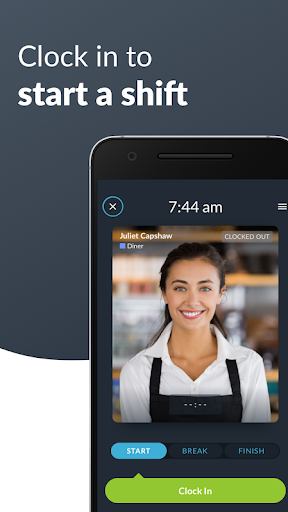
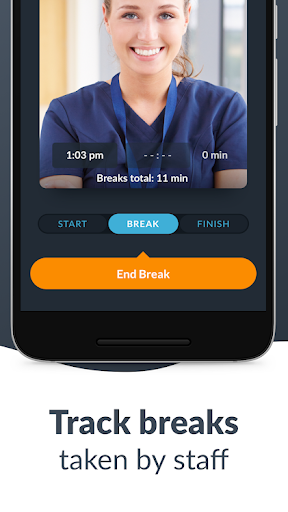
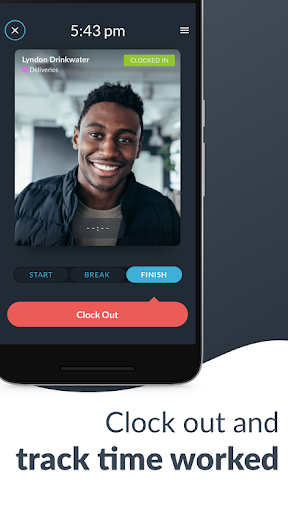
Welcome to Workforce.com, the #1 Time Clock and Workforce Management app. See how easy it is to build schedules, view and approve timesheets, and manage time off & unavailability. We're happy to answer any questions you have.
Create a new account or join an existing team for free using your login or your unique setup code available inside your Workforce.com account.
The app sends clock-ins in real time to your secure online dashboard - accessible from any computer where you can:
- Set up or import additional employees.
- Monitor all employee clock ins.
- Create your employee schedule for the week and SMS/email them to your team.
- Approve timesheets and export them to payroll.
Designed for any business with hourly employees - simply start clocking in and out to generate timesheets which can be exported directly into all popular accounting/payroll systems (Square, Quickbooks, ADP, Xero, Paychex, Excel and more).
Ideal for businesses working from one or more fixed locations. We regularly work with:
- Restaurants, Bars, and Cafes
- Retailers
- Medical Centers and Practices
- Franchise Groups
- Child Care Centers
- Manufacturing and Logistics Businesses
Need to compare against budgets? Build and send your schedules via SMS/email in the app for real-time variance reports and auto checking against shifts worked.
Need to keep track of overtime and keep part-timers within their contracted hours? We’ve got it solved! We build smart templates to automate overtime calculations. Employee time off requests, unavailability and much more can also be managed via the dashboard this app connects to.
Employee attendance tracking and timesheets bundled into one simple app for your business. The Workforce.com Time Clock makes it extremely fast for employees to clock in & out of their work shifts.
Designed for businesses to eliminate the manual entry of timesheets, this app automatically creates employee timesheets from the Time Clock with many export options. Employees can clock in via a PIN code with added photo verification so you always have a record of who clocked in and out.
FEATURES
- Simple clock in/out
- Unlimited number of employees & locations
- Dedicated break buttons
- Team selector
- Portrait, landscape and even upside-down orientation options
- Intuitive clock in buttons
- Smart shift status reporting
- Create online timesheets
- PIN security
- Photo verification
- Facial detection
- Submit vacation/time off requests
- SMS/Email weekly schedule to employees or to the Tanda Mobile App
- Export directly to payroll software or CSV
- Calculate timesheets with multiple pay rates
"It's been a really easy app for me. The employees know how to clock in and clock out really straight forward." - Laura, The Canyon
“The staff are definitely a lot more punctual.” - Blaine, Venue Manager at Beach House Bar & Grill
“We’ve got a Time Clock for each venue and all information is sent back to head office instantly!” - Bianca, HR Officer at rawGROUP Hospitality
"Allowed me to cut down on the processing that I used to have to do for payroll." - Wren, Schneider & Williams,P.C
Nhiều hơn

1. Tải trình cài đặt MEmu và hoàn tất cài đặt

2. Khởi động MEmu, sau đó mở Google Play trên trang chủ

3. Tìm kiếm Workforce.com: Time Clock trong Google Play
Install
4. Tải và Cài Đặt Workforce.com: Time Clock
5. Khi cài đặt hoàn tất, nhấp vào biểu tượng để bắt đầu

6. Trải nghiệm Workforce.com: Time Clock trên PC của bạn bằng MEmu
MEmu Play là trình giả lập Android miễn phí tốt nhất, với 50 triệu người dùng trải nghiệm ứng dụng Android tuyệt vời. Công nghệ ảo hóa của MEmu cho phép bạn chạy mượt mà hàng ngàn ứng dụng Android trên máy tính, ngay cả những ứng dụng đòi hỏi cấu hình cao nhất.
Màn hình lớn hơn cùng với đồ hoạ tốt hơn; thời lượng dài, không giới hạn về pin hoặc dữ liệu di động
Hỗ trợ đầy đủ Keymapping cho việc kiểm soát chính xác bàn phím và chuột hoặc gamepad
Nhiều tài khoản trò chơi hoặc tác vụ cùng lúc trên một PC với Quản lý Đa năng
Use Workforce.com: Time Clock on PC by following steps: