wX
Đã cập nhật
Phiên bản hiện tại
55899
Cung cấp bởi

Bạn không cần phải lo lắng về việc sạc quá mức khi sử dụng wX trên điện thoại của bạn, không phải sử dụng trên màn hình nhỏ bé và tận hưởng ứng dụng trên màn hình lớn hơn rất nhiều. Từ bây giờ, bạn hãy trải nghiệm ứng dụng của bạn toàn màn hình bằng bàn phím và chuột. MEmu cung cấp cho bạn tất cả các tính năng đáng ngạc nhiên mà bạn mong đợi: cài đặt nhanh, cài đặt dễ dàng, điều khiển trực quan, không còn giới hạn về pin, dữ liệu di động và các cuộc gọi làm phiền. MEmu 9 hoàn toàn mới là sự lựa chọn tốt nhất để sử dụng wX trên máy tính của bạn. Được mã hóa với sự hợp nhất của chúng tôi, trình quản lý multi-instance giúp mở 2 tài khoản trở lên cùng một lúc. Và điều quan trọng nhất là, công cụ mô phỏng độc quyền của chúng tôi có thể tận dụng hết toàn bộ tiềm năng trên PC của bạn, giúp mọi thứ vận hành trơn tru và thú vị.
Nhiều hơn
Tải wX trên PC với Trình giả lập Android MEmu. Tận hưởng trải nghiệm chơi game trên màn hình lớn wX is a free, no-ads, and open-source ( GNU GPLv3 ) advanced weather application that is geared towards storm chasers, meteorologists, and weather enthusiasts.
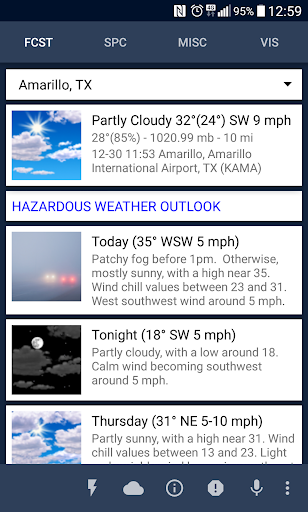
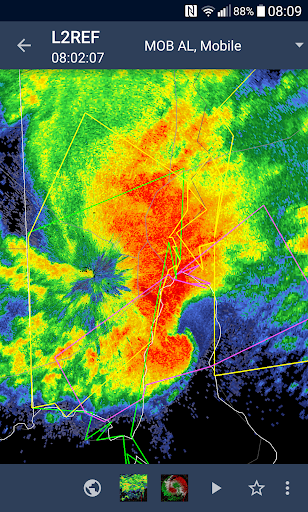
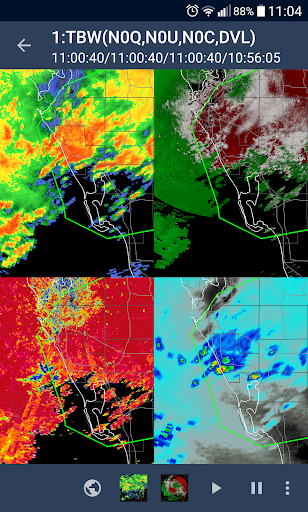
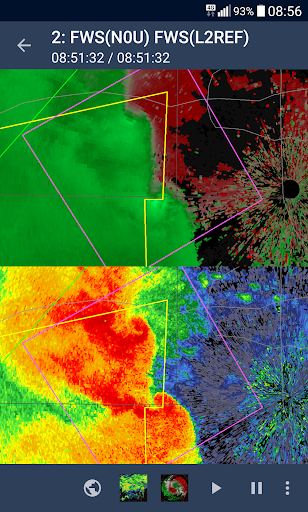
wX is a free, no-ads, and open-source ( GNU GPLv3 ) advanced weather application that is geared towards storm chasers, meteorologists, and weather enthusiasts. NWS ( National Weather Service ) data is optimized for mobile format and provided for divisions not normally covered together in the mobile space: SPC, WPC, NHC, OPC, etc. Level 3 and Level 2 Nexrad radar ( single, dual, quad pane ) are provided and displayed using the mobile variant of OpenGL. This weather app is not affiliated with NOAA or the National Weather Service.
If you *only* need current conditions and your local 7 day forecast then this app is probably more then you need although it will easily provide those 2 things as well. If you are looking for wasted screen real estate or fancy graphics this app is not for you. Given the depth of information covered there is a steep learning curve if you seek to use the program in it's entirety, help information is available and touched on below. Common weather acronyms are used throughout so you should be familiar with those as well. Currently United States locations are supported.
HELP is available from the main menu and by tapping on any text in the settings activities.
- Current forecast, 7 day conditions, sounding data for an unlimited number of locations from NWS.
- Customizable home screen
- (Android only) Tiles can be rearranged by long press and then drag and drop on Tabs: SPC, MISC, and IMAGES
- OpenGL based Nexrad radar interface with numerous options. Level 2 in the lowest tilt for base reflectivity/velocity is also available. 2 pane and 4 pane version also available in MISC tab.
- Optimized text product viewer for easy access to AFD,HWO and others from any NWS WFO.
- Vis/IR/WV/Radar mosaic viewer ( with animations ).
- Widgets ( nexrad radar, radar mosaic, vis, afd/hwo )
- SPC products ( such as Watches/MCDs/Convective Outlooks/Mesoanalysis )
- WPC products
- Weather models
- NHC products
(Android only) Notifications:
- Local alerts
- MCDs impacting your location
- MPDs impacting your location
- Convective outlooks for your location
- US MCD/Watches
- US tornadoes
- US MCD
- US MPD
- NHC Atlantic and EPAC advisories
Requirements: Android 4.1 or higher with 1GB of memory at a minimum ( recommended ).
Access required: App needs access to Your Location, Network Communication, Systems tools ( run at start-up for alerts ).
This app is licensed under the following license available online at ( and in source code zip):
http://www.gnu.org/licenses/gpl-3.0.html
FAQ at:
https://gitlab.com/joshua.tee/wxl23/-/blob/master/doc/FAQ.md
Source code at:
https://gitlab.com/joshua.tee/wx
Release notes at:
https://gitlab.com/joshua.tee/wx/-/blob/master/doc/ChangeLog_User.md
Nhiều hơn

1. Tải trình cài đặt MEmu và hoàn tất cài đặt

2. Khởi động MEmu, sau đó mở Google Play trên trang chủ

3. Tìm kiếm wX trong Google Play
Install
4. Tải và Cài Đặt wX
5. Khi cài đặt hoàn tất, nhấp vào biểu tượng để bắt đầu

6. Trải nghiệm wX trên PC của bạn bằng MEmu
MEmu Play là trình giả lập Android miễn phí tốt nhất, với 50 triệu người dùng trải nghiệm ứng dụng Android tuyệt vời. Công nghệ ảo hóa của MEmu cho phép bạn chạy mượt mà hàng ngàn ứng dụng Android trên máy tính, ngay cả những ứng dụng đòi hỏi cấu hình cao nhất.
Màn hình lớn hơn cùng với đồ hoạ tốt hơn; thời lượng dài, không giới hạn về pin hoặc dữ liệu di động
Hỗ trợ đầy đủ Keymapping cho việc kiểm soát chính xác bàn phím và chuột hoặc gamepad
Nhiều tài khoản trò chơi hoặc tác vụ cùng lúc trên một PC với Quản lý Đa năng
Use wX on PC by following steps: