
Mastram: Web Series & More
更新日期
当前版本
2.0.8
提供者

想体验Mastram: Web Series & More,可是手机屏幕太小,用一会就变烫,怎么办?使用逍遥模拟器,在电脑的大屏幕上畅快体验!在电脑上下载安装Mastram: Web Series & More,不用担心电量问题,想体验多久就多久,顺畅用一天~全新的逍遥模拟器9,绝对是您体验Mastram: Web Series & More电脑版的好选择。完美的按键映射系统让Mastram: Web Series & More如PC端般运行;强大的多开功能可同时使用多个应用;独家虚拟化技术更能彻底发挥电脑效能,保障长时间稳定运作。我们致力于不让设备限制您的体验,用起来轻松高效,畅快无比!
更多
使用逍遙模擬器在電腦上享受Mastram: Web Series & More的卓越體驗。這是一款功能強大的免費安卓模擬器,為您提供數千款安卓應用程式的桌面版本。與好友互動,有效率完成工作,盡情享受! 欢迎来到 Mastram,这是一个基于订阅的 OTT 平台,提供海量的电影和网络连续剧库,以满足不同的品味和偏好。


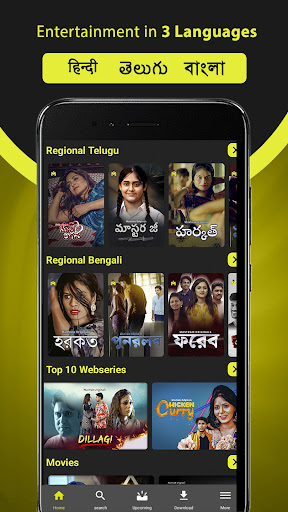

欢迎来到 Mastram,这是一个基于订阅的 OTT 平台,提供海量的电影和网络连续剧库,以满足不同的品味和偏好。我们的平台旨在为用户提供无缝的观看体验,提供高质量的内容和个性化的推荐。
探索我们的内容
- 电影:探索原创电影、永恒经典以及介于两者之间的一切。
- 网络系列:尽情观看您最喜欢的节目,从原创内容到授权系列。我们的网络系列剧集会定期更新,让您尽享娱乐。
订阅计划
我们提供灵活的订阅计划以满足您的观看需求:
- 每周计划:100 卢比(7 天有效)
- 月度计划:200 卢比(30 天内有效)
- 年度计划:400 卢比(365 天有效)
主要特点
- 高品质流媒体:享受高品质无缝流媒体,确保身临其境的观看体验。
- 个性化推荐:根据您的观看历史记录获取建议,帮助您发现适合您口味的新内容。
- 用户友好的界面:我们直观的界面使您可以轻松导航和找到您喜欢的内容。
- 定期更新内容库:定期添加新电影和网络连续剧,确保总有新内容可看。
为什么选择马斯特拉姆?
- 无与伦比的娱乐体验:我们的平台提供电影和网络连续剧的独特融合,迎合不同的品味和偏好。
- 便捷的订阅计划:我们灵活的计划允许您选择适合您需求的订阅期。
- 访问海量内容库:拥有大量电影和网络连续剧,您永远不会用完选择。
开始使用
立即下载 Mastram,解锁娱乐世界。订阅我们的平台,即可无限制地访问我们庞大的电影和网络连续剧库。
更多

1. 下载逍遥安装器并完成设置

2. 启动逍遥后打开位于桌面上的谷歌商店

3. 在谷歌商店中搜索Mastram: Web Series & More
Install
4. 下载并安装Mastram: Web Series & More
5. 下载完成后点击图标来启动

6. 通过逍遥在电脑上享受Mastram: Web Series & More
逍遥安卓是优秀的安卓模拟器,全球超过5000万用户的优先选择。逍遥安卓以虚拟化技术为核心,为用户打造突破手机配置局限的游戏平台!
大屏精细展示;无限待机,超越电池和流量限制
键鼠、手把操作全面支持,操作更精准
用逍遥多开同时运行多个游戏、应用。
Use Mastram: Web Series & More on PC by following steps: