Android Auto
تم التحديث
الإصدار الحالي
1778867632
تقديم

لا داعي للقلق بشأن الشحن الزائد عند استخدام Android Auto على هاتفك. تحرر من قيود الشاشة الصغيرة واستمتع به على شاشة أكبر باستخدام لوحة المفاتيح والفأرة. يوفر MEmu جميع الميزات الرائعة التي تتوقعها: تثبيت سريع، إعداد سهل، أدوات تحكم بديهية، ودون قيود على عمر البطارية، أو استخدام البيانات، أو المكالمات الواردة. يُعد MEmu 9 الجديد الخيار الأمثل لتجربة Android Auto على جهاز الكمبيوتر. بفضل تقنية التشفير الفريدة، يتيح لك مدير الحسابات المتعددة تشغيل حسابين أو أكثر في وقت واحد. والأهم من ذلك، أن محرك المحاكاة الفريد يستغل أداء جهاز الكمبيوتر بالكامل، مما يُحسّن تجربة التطبيق ويجعل كل شيء سلسًا للغاية.
أظهر المزيد
قم بتنزيل Android Auto على الكمبيوتر بإستخدام جهاز مقلد أندروز MEmu.استمتع بمتعة اللعب على الشاشة الكبيرة. Android Auto هو رفيقك الذكي في القيادة الذي يساعدك على الحفاظ على تركيزك وتواصلك واستمتاعك باستخدام مساعد Google.
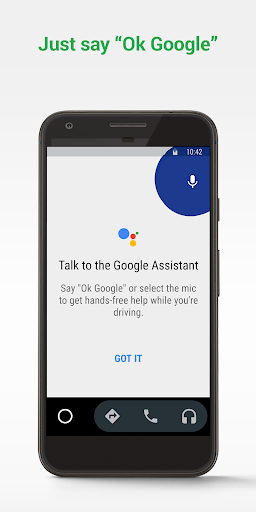
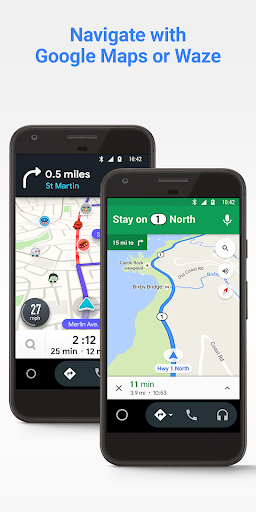
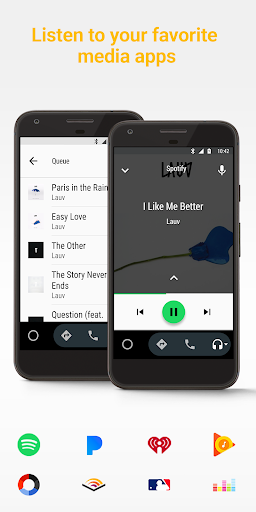
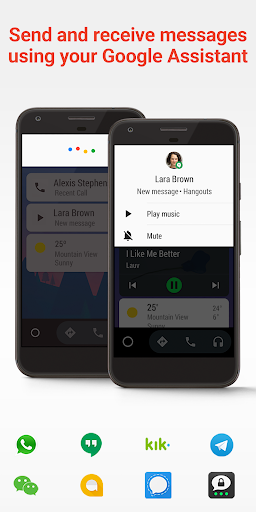
Android Auto هو رفيقك الذكي في القيادة الذي يساعدك على الحفاظ على تركيزك وتواصلك واستمتاعك باستخدام مساعد Google. من خلال واجهة مبسطة وأزرار كبيرة وإجراءات صوتية قوية ، تم تصميم Android Auto لتسهيل استخدام التطبيقات التي تحبها من هاتفك أثناء تنقلك.
فقط قل "Ok Google" لـ ...
• توجه إلى وجهتك التالية باستخدام خرائط Google أو Waze باستخدام نظام تحديد المواقع العالمي (GPS) وتنبيهات المرور في الوقت الفعلي.
• احصل على تحديثات على مسارك ، و ETA ، والمخاطر في الوقت الفعلي.
• اطلب من مساعد Google التحقق من التقويم الخاص بك حتى تعرف المكان الذي تريد أن تكون فيه.
• تعيين التذكيرات والحصول على تحديثات الأخبار والتحقق من نتيجة الليلة الماضية.
• تجنب مصادر التشتيت أثناء القيادة من خلال وضع رسالة مخصصة لا تزعجك أثناء القيادة.
• إجراء مكالمات باستخدام مساعد Google والرد على المكالمات الواردة بنقرة واحدة.
• يمكنك الوصول إلى مجلد جهات الاتصال وإرسال واستقبال الرسائل باستخدام "مساعد Google" باستخدام الرسائل القصيرة و Hangouts و WhatsApp و Skype و Telegram و WeChat و Kik و Google Allo والعديد من تطبيقات المراسلة الأخرى.
• إدارة نظام المعلومات والترفيه الخاص بك كما لم يحدث من قبل. استمع إلى تطبيقات الوسائط المفضلة لديك بما في ذلك Spotify و Pandora و iHeartRadio و Google Play Music و Amazon Music و SiriusXM و TIDAL - High Fidelity Music Streaming و Napster Music و Deezer. يتم أيضًا دعم العديد من تطبيقات الموسيقى والراديو والأخبار والأخبار الرياضية والكتب الصوتية والبودكاست.
يتزايد عدد التطبيقات المتوافقة دائمًا! للحصول على قائمة كاملة بالتطبيقات المتوافقة ، انتقل إلى http://g.co/androidauto
لاستخدام Android Auto ، ستحتاج إلى هاتف يعمل بنظام Android 6.0 أو إصدار أحدث واتصال بيانات نشط.
أكثر من 400 طراز سيارة تدعم الآن Android Auto! لمعرفة ما إذا كانت شاشة عرض سيارتك متوافقة وكيفية تمكينها ، راجع دليل المالك أو اتصل بالشركة المصنعة لسيارتك. بمجرد التمكين ، استخدم كبل USB عالي الجودة لتوصيل هاتفك بسيارتك ، ثم قم بتشغيل Android Auto للبدء!
تعرف على المزيد حول Android Auto والسيارات المتوافقة على http://android.com/auto
للحصول على الدعم: http://support.google.com/androidauto
احصل على المساعدة من مجتمعنا: https://productforums.google.com/forum/#!forum/android-auto
أظهر المزيد

1. قم بتنزيل برنامج MEmu واكمال تثبيته

2. قم بتشغيل برنامج MEmu وفتح Google Play على الصفحة الرئيسية

3. ابح Android Auto في Google Play
Install
4. تنزيل وتثبيت Android Auto
5. انقر على الرمز للتشغيل بعد اكتمال التثبيت

6. استخدم MEmu لتجربة Android Auto على جهاز الكمبيوتر الخاص بك.
تطبيق MEmuهو افضل محاكى اندرويد مجانى وبالفعل 50 مليون شخص يستمتعون حاليا بتجربه اللعب عليه. تمكّنك تقنية MEmu الافتراضية من تشغيل آلاف ألعاب Android بسلاسة على الكمبيوتر الشخصي ، حتى أكثرها استخدامًا للرسومات.
شاشة أكبر وجرافيك افضل ووقت أطول بدون حدود البطارية وباقة التليفون
لوحة مفاتيح كاملة تدعم تحكم كامل عن طريق لوحة المفاتيح و الفأره وجيم باد
عدة العاب وحسابات ومهمات علي جهاز الكمبيوتر في وقت معين عن طريق Memu متعدد النوافذ
Use Android Auto on PC by following steps: