CaloScanAI - Calorie Counter
تم التحديث
الإصدار الحالي
2.5.4
تقديم

لا داعي للقلق بشأن الشحن الزائد عند استخدام CaloScanAI - Calorie Counter على هاتفك. تحرر من قيود الشاشة الصغيرة واستمتع به على شاشة أكبر باستخدام لوحة المفاتيح والفأرة. يوفر MEmu جميع الميزات الرائعة التي تتوقعها: تثبيت سريع، إعداد سهل، أدوات تحكم بديهية، ودون قيود على عمر البطارية، أو استخدام البيانات، أو المكالمات الواردة. يُعد MEmu 9 الجديد الخيار الأمثل لتجربة CaloScanAI - Calorie Counter على جهاز الكمبيوتر. بفضل تقنية التشفير الفريدة، يتيح لك مدير الحسابات المتعددة تشغيل حسابين أو أكثر في وقت واحد. والأهم من ذلك، أن محرك المحاكاة الفريد يستغل أداء جهاز الكمبيوتر بالكامل، مما يُحسّن تجربة التطبيق ويجعل كل شيء سلسًا للغاية.
أظهر المزيد
قم بتنزيل CaloScanAI - Calorie Counter على الكمبيوتر بإستخدام جهاز مقلد أندروز MEmu.استمتع بمتعة اللعب على الشاشة الكبيرة. CaloScanAI - Calorie Counter, your ultimate calorie tracker designed to revolutionize your health and fitness journey.
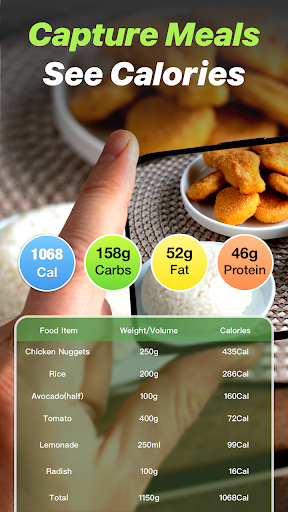
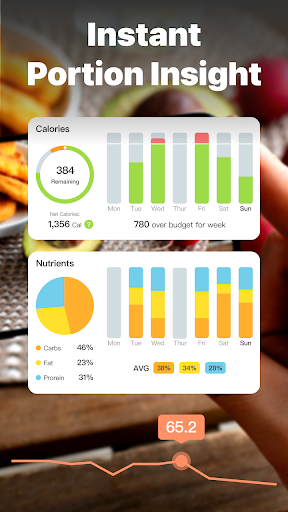

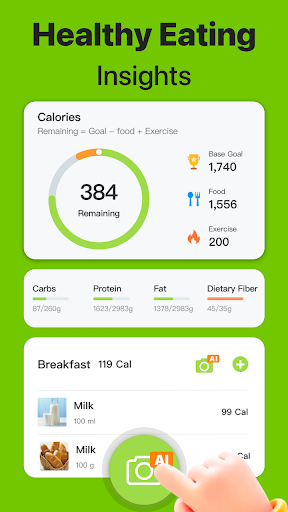
CaloScanAI - Calorie Counter, your ultimate calorie tracker designed to revolutionize your health and fitness journey. This all-in-one food tracker, macro tracker, carb counter and fitness tracker is like having macro calculator, food diary and nutrition tracker with you every day. With CaloScanAI, managing your diet, tracking your calorie intake, and achieving your diet plan weight loss goals has never been easier or more effective.
Calorie Counter & Calorie Tracker by CaloScanAI: Dive into mindful eating with CaloScanAI's advanced calorie counter and food tracker. Our extensive food database allows you to log meals and snacks effortlessly, ensuring precise calorie tracking for optimal weight management.
Macro Tracker & Carb Counter: Balance your diet with CaloScanAI's macro tracker and carb counter. These tools empower you to monitor your intake of proteins, fats, and carbohydrates, aligning perfectly with your fitness goals for weight loss or muscle gain.
Weight Loss Tracker & Personalized Diet Plan weight loss: CaloScanAI offers more than just a calorie counter for free; it's a comprehensive weight loss tracker with customizable diet plans. Set your weight loss and weight gain targets, monitor your progress, and adjust your strategy with CaloScanAI guiding you every step of the way.
Nutrition Tracker & Food Diary: Elevate your dietary habits with our nutrition tracker and food diary. CaloScanAI makes food log every meal simple, offering insights into your nutritional intake to foster informed eating decisions and improve overall health.
Macro Calculator & Tailored Diet: Simplify your nutrition with CaloScanAI's macro calculator. By determining your ideal macronutrient ratios, our app crafts a diet plan that's uniquely yours, aiding your losing weight journey and ensuring long-term success.
CaloScanAI is not just an calorie counter free app; it's your partner in transforming your life through better health and nutrition. Its user-friendly design, personalized approach, and powerful tracking tools make achieving your fitness and wellness goals achievable and enjoyable.
Join the CaloScanAI community today and take the first step towards a healthier, happier you with the support of the most comprehensive Calorie Tracker, Food Tracker, and Macro Tracker available. Choose from our annual plan at just $39.99, our monthly plan for $9.99, or gain lifetime access with a one-time payment of $59.99. With our automated subscription service, you can enjoy uninterrupted access to the full suite of features designed to make calorie tracking as effortless as possible.Subscription Details:
Automatic Renewal: Ensure continuous service with automatic subscription renewal. The renewal will occur unless auto-renew is disabled at least 24 hours before the end of the current period.
Experience the simplicity of having a personal nutritionist in your pocket with the AI Calorie Calculator. Our cutting-edge app offers unparalleled convenience and a smarter way to manage your dietary goals. Subscribe today and transform the way you track your nutrition.
Privacy Policy: https://sites.google.com/view/caloscanaia/privacy-policy
Terms of Use: https://sites.google.com/view/caloscanaia/terms
أظهر المزيد

1. قم بتنزيل برنامج MEmu واكمال تثبيته

2. قم بتشغيل برنامج MEmu وفتح Google Play على الصفحة الرئيسية

3. ابح CaloScanAI - Calorie Counter في Google Play
Install
4. تنزيل وتثبيت CaloScanAI - Calorie Counter
5. انقر على الرمز للتشغيل بعد اكتمال التثبيت

6. استخدم MEmu لتجربة CaloScanAI - Calorie Counter على جهاز الكمبيوتر الخاص بك.
تطبيق MEmuهو افضل محاكى اندرويد مجانى وبالفعل 50 مليون شخص يستمتعون حاليا بتجربه اللعب عليه. تمكّنك تقنية MEmu الافتراضية من تشغيل آلاف ألعاب Android بسلاسة على الكمبيوتر الشخصي ، حتى أكثرها استخدامًا للرسومات.
شاشة أكبر وجرافيك افضل ووقت أطول بدون حدود البطارية وباقة التليفون
لوحة مفاتيح كاملة تدعم تحكم كامل عن طريق لوحة المفاتيح و الفأره وجيم باد
عدة العاب وحسابات ومهمات علي جهاز الكمبيوتر في وقت معين عن طريق Memu متعدد النوافذ
Use CaloScanAI - Calorie Counter on PC by following steps: