CaloScanAI - Calorie Counter
Updated
Current Version
2.5.4
Offered By

Stop worrying about high battery drain when using CaloScanAI - Calorie Counter on your phone. Free yourself from the tiny screen and enjoy the app on a much larger display. From now on, get a full-screen experience of your app with the convenience of a keyboard and mouse. MEmu offers you all the surprising features you’d expect: quick installation and easy setup, intuitive controls, and no more worries about battery life, mobile data, or unexpected calls. The all-new MEmu 9 is the choice for using CaloScanAI - Calorie Counter on your computer. With the MEmu multi-instance manager, you can run two or more accounts at the same time. Most importantly, our exclusive emulation engine unlocks your PC’s full potential, delivering smooth and enjoyable performance.
Show more
Enjoy superb experience of using CaloScanAI - Calorie Counter on PC with MEMU App Player. It's a powerful free Android emulator which provides you with thousands of android apps for their desktop version. Enjoy connecting with friends and polishing your work with higher efficiency! CaloScanAI - Calorie Counter, your ultimate calorie tracker designed to revolutionize your health and fitness journey.
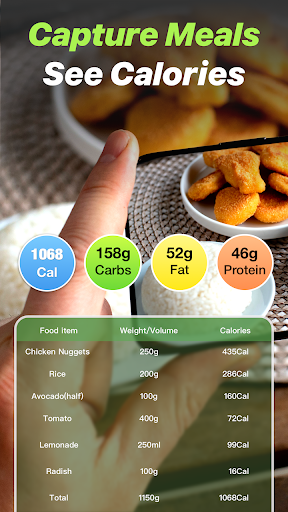
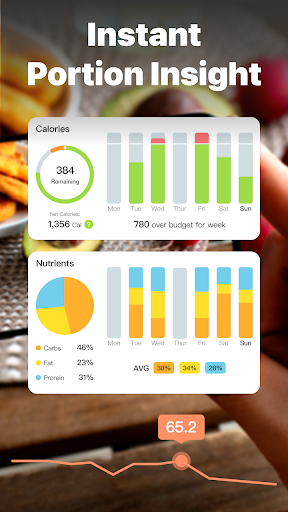
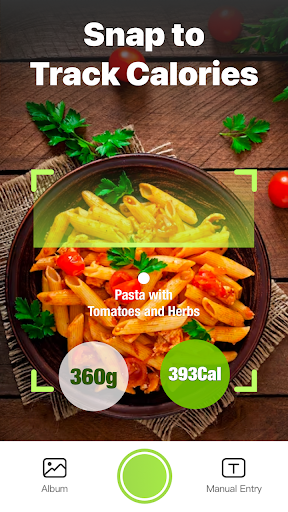
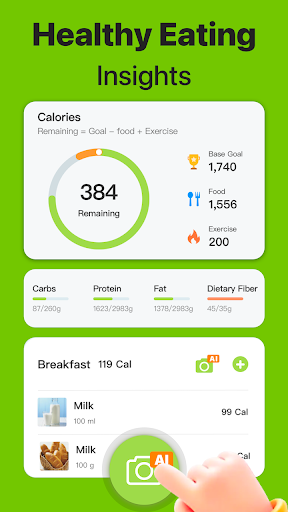
CaloScanAI - Calorie Counter, your ultimate calorie tracker designed to revolutionize your health and fitness journey. This all-in-one food tracker, macro tracker, carb counter and fitness tracker is like having macro calculator, food diary and nutrition tracker with you every day. With CaloScanAI, managing your diet, tracking your calorie intake, and achieving your diet plan weight loss goals has never been easier or more effective.
Calorie Counter & Calorie Tracker by CaloScanAI: Dive into mindful eating with CaloScanAI's advanced calorie counter and food tracker. Our extensive food database allows you to log meals and snacks effortlessly, ensuring precise calorie tracking for optimal weight management.
Macro Tracker & Carb Counter: Balance your diet with CaloScanAI's macro tracker and carb counter. These tools empower you to monitor your intake of proteins, fats, and carbohydrates, aligning perfectly with your fitness goals for weight loss or muscle gain.
Weight Loss Tracker & Personalized Diet Plan weight loss: CaloScanAI offers more than just a calorie counter for free; it's a comprehensive weight loss tracker with customizable diet plans. Set your weight loss and weight gain targets, monitor your progress, and adjust your strategy with CaloScanAI guiding you every step of the way.
Nutrition Tracker & Food Diary: Elevate your dietary habits with our nutrition tracker and food diary. CaloScanAI makes food log every meal simple, offering insights into your nutritional intake to foster informed eating decisions and improve overall health.
Macro Calculator & Tailored Diet: Simplify your nutrition with CaloScanAI's macro calculator. By determining your ideal macronutrient ratios, our app crafts a diet plan that's uniquely yours, aiding your losing weight journey and ensuring long-term success.
CaloScanAI is not just an calorie counter free app; it's your partner in transforming your life through better health and nutrition. Its user-friendly design, personalized approach, and powerful tracking tools make achieving your fitness and wellness goals achievable and enjoyable.
Join the CaloScanAI community today and take the first step towards a healthier, happier you with the support of the most comprehensive Calorie Tracker, Food Tracker, and Macro Tracker available. Choose from our annual plan at just $39.99, our monthly plan for $9.99, or gain lifetime access with a one-time payment of $59.99. With our automated subscription service, you can enjoy uninterrupted access to the full suite of features designed to make calorie tracking as effortless as possible.Subscription Details:
Automatic Renewal: Ensure continuous service with automatic subscription renewal. The renewal will occur unless auto-renew is disabled at least 24 hours before the end of the current period.
Experience the simplicity of having a personal nutritionist in your pocket with the AI Calorie Calculator. Our cutting-edge app offers unparalleled convenience and a smarter way to manage your dietary goals. Subscribe today and transform the way you track your nutrition.
Privacy Policy: https://sites.google.com/view/caloscanaia/privacy-policy
Terms of Use: https://sites.google.com/view/caloscanaia/terms
Show more

1. Download MEmu installer and finish the setup

2. Start MEmu then open Google Play on the desktop

3. Search CaloScanAI - Calorie Counter in Google Play
Install
4. Download and Install CaloScanAI - Calorie Counter
5. On install completion click the icon to start

6. Enjoy using CaloScanAI - Calorie Counter on PC with MEmu
MEmu Play is the best Android emulator, and 100 million users already enjoy its superb Android app experience. Powered by advanced virtualization technology, it lets you enjoy thousands of Android apps smoothly on your PC—including the most graphics-intensive ones.
Bigger screen with better graphics; Long duration, without limitation of battery or mobile data.
Full Keymapping support for precise control of keyboard and mouse or gamepad.
Multiple game accounts or tasks on single PC at one time with Multi-Instance manager.
Use CaloScanAI - Calorie Counter on PC by following steps: