Canopy - Parental Control App
تم التحديث
الإصدار الحالي
40.89
تقديم

لا داعي للقلق بشأن الشحن الزائد عند استخدام Canopy - Parental Control App على هاتفك. تحرر من قيود الشاشة الصغيرة واستمتع به على شاشة أكبر باستخدام لوحة المفاتيح والفأرة. يوفر MEmu جميع الميزات الرائعة التي تتوقعها: تثبيت سريع، إعداد سهل، أدوات تحكم بديهية، ودون قيود على عمر البطارية، أو استخدام البيانات، أو المكالمات الواردة. يُعد MEmu 9 الجديد الخيار الأمثل لتجربة Canopy - Parental Control App على جهاز الكمبيوتر. بفضل تقنية التشفير الفريدة، يتيح لك مدير الحسابات المتعددة تشغيل حسابين أو أكثر في وقت واحد. والأهم من ذلك، أن محرك المحاكاة الفريد يستغل أداء جهاز الكمبيوتر بالكامل، مما يُحسّن تجربة التطبيق ويجعل كل شيء سلسًا للغاية.
أظهر المزيد
قم بتنزيل Canopy - Parental Control App على الكمبيوتر بإستخدام جهاز مقلد أندروز MEmu.استمتع بمتعة اللعب على الشاشة الكبيرة. Canopy empowers you to parent in the digital world.
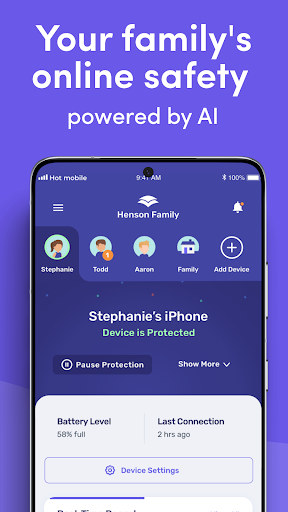
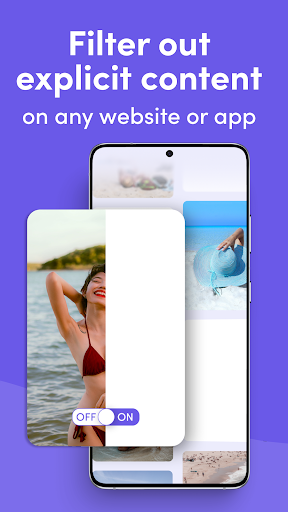
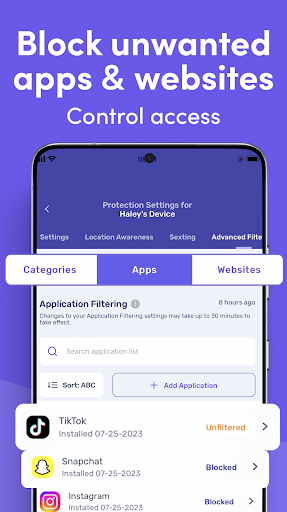
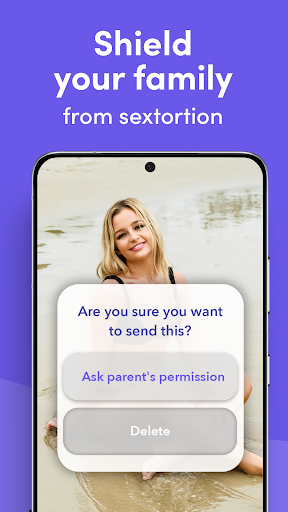
Canopy empowers you to parent in the digital world. Our cutting edge parental control features keep your family safe online. The Canopy system inspects images, videos and websites before they appear on your child’s device and blocks porn and unsafe content in real-time before your child is exposed. Canopy isn’t just for kids – it's designed to provide the entire family with a healthy and positive online experience.
Download Canopy to start your 7-day free trial today!
Take control of your family’s online safety with Canopy:
Real-Time Smart Filter & Porn Blocker
Harness the power of artificial intelligence to seamlessly remove pornographic content (and even partial nudity!) from websites and apps in milliseconds, ensuring a healthy, positive digital experience. Even better, our AI doesn’t block safe content – get the good without the bad!
Sexting Alerts
Monitors the camera on the protected device, preventing your child from sharing inappropriate photos, and notifies you immediately if a risky photo is detected.
Screen Time Management
Set DownTime and screentime limits for the protected device to limit internet use at specific times.
Removal Alerts
Get notified quickly if your child tries to remove or disable Canopy.
Website Management
Create a customized list of blocked or allowed websites to personalize your family's online experience.
Location Awareness
Keep up with your child no matter where life takes them using a detailed real-time GPS map.
App Management
Curate your child’s app collection. Block distracting and inappropriate apps and games.
Easy Monitoring
Receive convenient notifications when Canopy is doing its job of protecting your child online. We’ll notify you when we block inappropriate content or prevent inappropriate behavior from happening. You can adjust Canopy’s settings from your personal device using the Canopy for Parents app or Canopy web dashboard.
Free 7-day trial with every subscription! Subscribe monthly, or on an annual basis for best value.
*Important note: this app is the control app for the Canopy Shield app. You should download Canopy to your personal device. After you create your account, Canopy will lead you through the process for installing Canopy Shield on your child’s Android phone or Chromebook. For Canopy to work, you must install Canopy Shield on your child’s device.
If you are installing Canopy for yourself, you can download both apps on the same device.
Join over 100,000 families worldwide who trust Canopy to provide a safer online experience. Our app not only protects your kids - it also encourages responsible habits, transparency, and trust while creating opportunities for important conversations. Canopy empowers you to parent in the digital world, just like you do in the real one.
If you have any questions, our friendly customer support team is available every day from 12 p.m. to 8 p.m CT via phone or our help center site.
(888) 820-1918 / https://help.canopy.us/
Don't let the risks of the internet hold you back - download Canopy today and experience the digital world safely and positively.
Terms of Use - https://canopy.us/end-user-license-agreement
Privacy Policy - https://canopy.us/privacy
أظهر المزيد

1. قم بتنزيل برنامج MEmu واكمال تثبيته

2. قم بتشغيل برنامج MEmu وفتح Google Play على الصفحة الرئيسية

3. ابح Canopy - Parental Control App في Google Play
Install
4. تنزيل وتثبيت Canopy - Parental Control App
5. انقر على الرمز للتشغيل بعد اكتمال التثبيت

6. استخدم MEmu لتجربة Canopy - Parental Control App على جهاز الكمبيوتر الخاص بك.
تطبيق MEmuهو افضل محاكى اندرويد مجانى وبالفعل 50 مليون شخص يستمتعون حاليا بتجربه اللعب عليه. تمكّنك تقنية MEmu الافتراضية من تشغيل آلاف ألعاب Android بسلاسة على الكمبيوتر الشخصي ، حتى أكثرها استخدامًا للرسومات.
شاشة أكبر وجرافيك افضل ووقت أطول بدون حدود البطارية وباقة التليفون
لوحة مفاتيح كاملة تدعم تحكم كامل عن طريق لوحة المفاتيح و الفأره وجيم باد
عدة العاب وحسابات ومهمات علي جهاز الكمبيوتر في وقت معين عن طريق Memu متعدد النوافذ
Use Canopy - Parental Control App on PC by following steps: