
Adobe Lightroom - Photo Editor & Pro Camera
تم التحديث
الإصدار الحالي
تقديم

لا داعي للقلق بشأن الشحن الزائد عند استخدام Adobe Lightroom - Photo Editor & Pro Camera على هاتفك. تحرر من قيود الشاشة الصغيرة واستمتع به على شاشة أكبر باستخدام لوحة المفاتيح والفأرة. يوفر MEmu جميع الميزات الرائعة التي تتوقعها: تثبيت سريع، إعداد سهل، أدوات تحكم بديهية، ودون قيود على عمر البطارية، أو استخدام البيانات، أو المكالمات الواردة. يُعد MEmu 9 الجديد الخيار الأمثل لتجربة Adobe Lightroom - Photo Editor & Pro Camera على جهاز الكمبيوتر. بفضل تقنية التشفير الفريدة، يتيح لك مدير الحسابات المتعددة تشغيل حسابين أو أكثر في وقت واحد. والأهم من ذلك، أن محرك المحاكاة الفريد يستغل أداء جهاز الكمبيوتر بالكامل، مما يُحسّن تجربة التطبيق ويجعل كل شيء سلسًا للغاية.
أظهر المزيد
قم بتنزيل Adobe Lightroom - Photo Editor & Pro Camera على الكمبيوتر بإستخدام جهاز مقلد أندروز MEmu.استمتع بمتعة اللعب على الشاشة الكبيرة. Get your best photos faster than ever with Lightroom’s free photo and video editor.
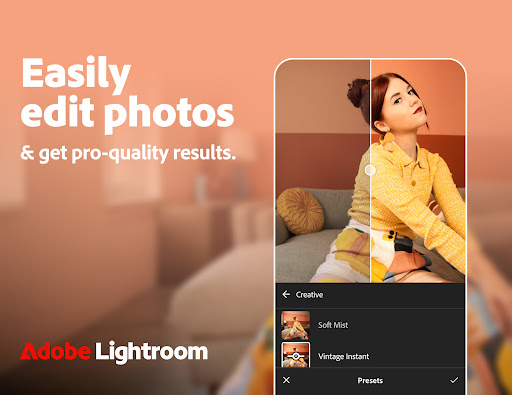
Get your best photos faster than ever with Lightroom’s free photo and video editor
Lightroom is the easy way for you to transform your snaps into photos that stand out. Offering intuitive AI-assisted tools, presets, filters, and advanced features that give you full control and pro-quality results.
Create your own style, apply filters, batch edit photos, and get stunning pictures with this easy-to-use yet powerful photo and video editor.
Quick Actions
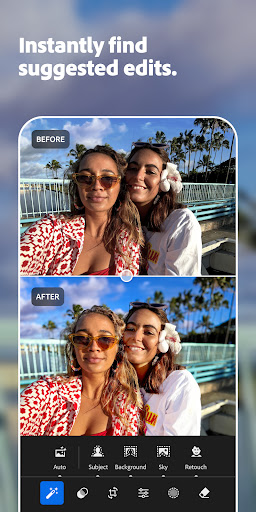
Instantly get suggestions, tailored to your photos, so you can get the edits you want.
Portrait Photos
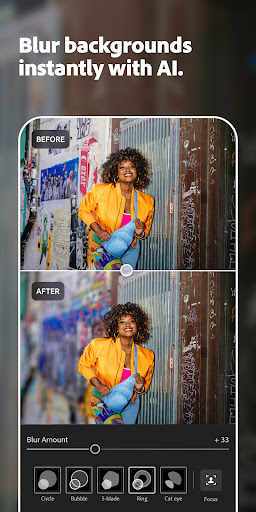
Use the Lens Blur tool to make people stand out and Generative Remove to erase background distractions, blemishes or shiny skin
Travel Photos
Presets and filters that enhance the sky in one tap, and Remove tools to clean up distractions and unwanted objects, for a photo worth sharing
Food Photos
Selective edits that make your subject stand out
Street Photos
HDR, Texture, and Grain editor that brings out the atmosphere of the location
Landscape Photos
Hue and Saturation editor to set the tone of your photo
AI-Powered Features
• Quick Actions: instantly suggests the best edits for your photo, including skin smoothing, portrait retouching, and subject enhancement, based on your photo’s content
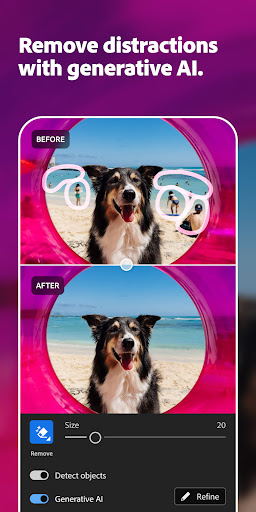
• Generative Remove: easily remove photobombers and pesky objects that ruin your otherwise perfect photo
• Lens Blur: add blur to backgrounds to make people really stand out (now available as Blur Background Presets)
• Adaptive Presets: easily make subjects and skies pop with one tap
• Masking: quickly select any part of a photo and make detailed edits to get the right balance in your image
• Recommended Presets and Filters: with so many presets and filters tailored to any photo, you can create stunning images and share to your social media in a few taps
Powerful Editing Tools
• Edit suggestions: Quick Actions recommends the best edits for your photos.
• Remove: high-precision tools to flawlessly retouch and remove any distraction from your photos
• Lighting tools: take control of Exposure, Highlights, Shadows, and Curves to capture the right light in your photo
• Colour tools: adjust Hue, Saturation, Luminance, and Colour grading to add style or get a film look
• Details or effects: modify Clarity, Texture, Dehaze, Grain, and Vignette to add texture and depth to your images
• Crop and geometry: alter the perspective, resize, rotate, and straighten photos
• HDR: edit the full dynamic range of your image for high-quality photos
Video
• Style: Presets, Light, Colour, and Edit tools to create stylistic videos
• Social: Create edit replay for reels you can post to social media
Camera
• Get all the controls of a pro camera on your phone
• ISO, Exposure, Shutter Speed, and more
Additional Features
• Create and save your own filters and presets to apply to all your photos
• Instant access to your photo gallery
• Quick search for pictures
Lightroom photo and video editor gives you pro-quality results with powerful filters, editing, and Remove tools that make your pictures stand out.
Terms & Conditions:
Your use of this application is governed by the Adobe General Terms of Use http://www.adobe.com/go/terms_au and the Adobe Privacy Policy https://www.adobe.com/go/privacy_policy_au
Do not sell or share my personal information www.adobe.com/go/ca-rights
أظهر المزيد

1. قم بتنزيل برنامج MEmu واكمال تثبيته

2. قم بتشغيل برنامج MEmu وفتح Google Play على الصفحة الرئيسية

3. ابح Adobe Lightroom - Photo Editor & Pro Camera في Google Play
Install
4. تنزيل وتثبيت Adobe Lightroom - Photo Editor & Pro Camera
5. انقر على الرمز للتشغيل بعد اكتمال التثبيت

6. استخدم MEmu لتجربة Adobe Lightroom - Photo Editor & Pro Camera على جهاز الكمبيوتر الخاص بك.
تطبيق MEmuهو افضل محاكى اندرويد مجانى وبالفعل 50 مليون شخص يستمتعون حاليا بتجربه اللعب عليه. تمكّنك تقنية MEmu الافتراضية من تشغيل آلاف ألعاب Android بسلاسة على الكمبيوتر الشخصي ، حتى أكثرها استخدامًا للرسومات.
شاشة أكبر وجرافيك افضل ووقت أطول بدون حدود البطارية وباقة التليفون
لوحة مفاتيح كاملة تدعم تحكم كامل عن طريق لوحة المفاتيح و الفأره وجيم باد
عدة العاب وحسابات ومهمات علي جهاز الكمبيوتر في وقت معين عن طريق Memu متعدد النوافذ
Use Adobe Lightroom - Photo Editor & Pro Camera on PC by following steps: