Adobe Express: AI Video Design
تم التحديث
الإصدار الحالي
30.9.0
تقديم

لا داعي للقلق بشأن الشحن الزائد عند استخدام Adobe Express: AI Video Design على هاتفك. تحرر من قيود الشاشة الصغيرة واستمتع به على شاشة أكبر باستخدام لوحة المفاتيح والفأرة. يوفر MEmu جميع الميزات الرائعة التي تتوقعها: تثبيت سريع، إعداد سهل، أدوات تحكم بديهية، ودون قيود على عمر البطارية، أو استخدام البيانات، أو المكالمات الواردة. يُعد MEmu 9 الجديد الخيار الأمثل لتجربة Adobe Express: AI Video Design على جهاز الكمبيوتر. بفضل تقنية التشفير الفريدة، يتيح لك مدير الحسابات المتعددة تشغيل حسابين أو أكثر في وقت واحد. والأهم من ذلك، أن محرك المحاكاة الفريد يستغل أداء جهاز الكمبيوتر بالكامل، مما يُحسّن تجربة التطبيق ويجعل كل شيء سلسًا للغاية.
أظهر المزيد
قم بتنزيل Adobe Express: AI Video Design على الكمبيوتر بإستخدام جهاز مقلد أندروز MEmu.استمتع بمتعة اللعب على الشاشة الكبيرة. التطبيق السريع والسهل لإنشاء أي شيء.
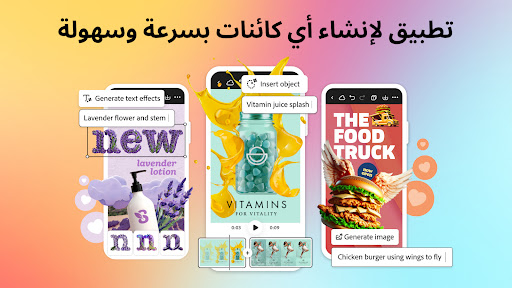
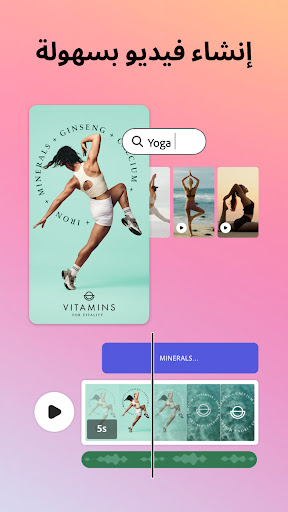
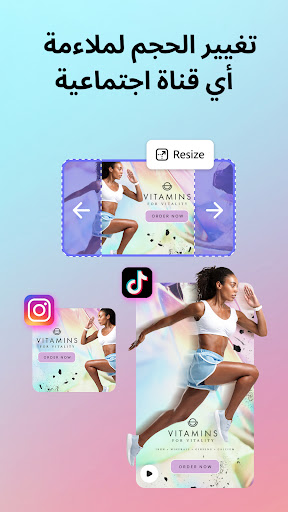
التطبيق السريع والسهل لإنشاء أي شيء. صمم منشورات شبكات اجتماعية وصور ومقاطع فيديو وكتيبات رائعة بسرعة وغير ذلك المزيد.
إنشاء مقاطع فيديو بسهولة
ابدأ باستخدام قوالب الفيديو القابلة للتخصيص ودمج مقاطع الفيديو والصور والموسيقى. قم بتحريك العناصر وإضافة المؤثرات الصوتية لجعل مقاطع الفيديو مميزة. يمكنك بسهولة إنشاء مقاطع فيديو مذهلة لمشاركتها عبر جميع قنوات التواصل الاجتماعي.
احلم. صمم. بكل سهولة.
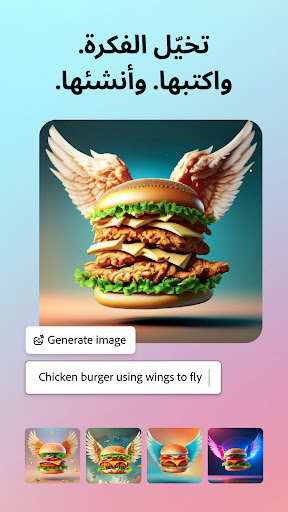
انطلق بإبداعك مستعينًا بالميزة Generate Image (إنشاء صورة)، المدعومة بالذكاء الاصطناعي التوليدي. حوِّل المطالبات النصية بسرعة إلى صور فنية استثنائية، وشاهد خيالك يتحقق في أرض الواقع باستخدام أداة إنشاء الصور باستخدام الذكاء الاصطناعي.
ودِّع الخلفيات
باستخدام الميزة Quick Actions (الإجراءات السريعة)، أصبح من السهل إزالة الخلفيات وإضافة تعليقات الفيديو التوضيحية وإنشاء رموز الاستجابة السريعة وتحويل الصور إلى GIF وتغيير حجم المحتوى بضغطة واحدة.
حقق المستحيل
باستخدام الميزة Generative Fill (الملء التأسيسي)، يمكنك إدراج الأشخاص والعناصر وغير ذلك، أو أزالتهم أو استبدالهم باستخدام مطالبة مكتوبة. حقق النتائج التي لم تتخيل تحقيقها.
عناوين متميزة
سواء أكنت تصمم كتيبًا أو منشورك التالي على TikTok، فبادر بإبراز كل كلمة باستخدام Generate text effect (إنشاء تأثيرات النص). اكتب مطالبة وحوّل النص إلى أي شي تتخيله.
اطرح أفكارك
اجعل خيالك يتحقق على أرض الواقع باستخدام الميزة Generate Template (إنشاء قالب)، المدعومة من الذكاء الاصطناعي التوليدي. اكتب مطالبة وأنشئ القوالب المذهلة القابلة للتحرير لمنشورات الشبكات الاجتماعية والكتيبات والبطاقات وغير ذلك المزيد.
تحقيق الاتساق أصبح سهلاً
باستخدام مجموعات العلامة التجارية، يسهل تصميم محتوى متسق مع العلامة التجارية. حافظ على كل الخطوط والألوان والشعارات بين يديك، جاهزة لاستخدامها في أي تصميم. طِّبق علامتك التجارية عبر كل محتوى الشبكات الاجتماعية بضغطة واحدة.
تبسيط جدولة المحتوى
باستخدام أداة جدولة المحتوى، يمكنك تخطيط المحتوى ومعاينته وجدولته ونشره بكل سهولة على كل قنوات الشبكات الاجتماعية بنقرات قليلة. حيثما ووقتما تشاء.
أدوات الإجراء السريع
· قص التصميمات وتغيير حجمها لتلائم أي قناة
· إزالة الخلفيات وتحويل ملفات الصور وقص الصور لمنصات متعددة وغير ذلك المزيد
· تحويل صور GIF إلى صور ومقاطع فيديو
· إنشاء شفرات الاستجابة السريعة بأنماط وألوان مختلفة
· تحريك شخصية بصوتك
· إنشاء تعليقات الفيديو التوضيحية وتحريرها
بعض الميزات غير مدعومة حاليًا على كل الأجهزة، لكن ستتوفر الميزات الرائعة قريبًا. سيتم توفير الدعم لمزيد من الأجهزة بمرور الوقت.
هل لديك أسئلة؟
ستساعدنا ملاحظاتك وتفاعلاتك على تحسين Adobe Express للجميع.
انضمام إلى مجتمع Discord
[https://discord.gg/adobeexpress] لمشاركة أفكارك والتواصل مع المجتمع والمشاركة في تحديات إبداعية
تفضل بزيارة Uservoice [https://adobeexpress.uservoice.com/forums/951181-adobe-express] لطلب ميزات جديدة
أخبرنا بما تواجه من أعطال أو مشكلات في منتدى مجتمع Adobe [https://community.adobe.com/t5/adobe-express/ct-p/ct-adobe-express]
عضوية PREMIUM
توفر لك عضويتك Adobe Express Premium إمكانية الوصول إلى ميزات Premium:
· أكثر من 200 مليون صورة ومقطع فيديو ومسار موسيقى وعناصر تصميم وخطوط من Adobe Stock غير خاضعة لحقوق الملكية
· 250 نقطة تأسيسية لإنشاء الصور والقوالب وغير ذلك المزيد
· إزالة خلفية الفيديو وتغيير الحجم بنقرة واحدة ليلائم قنوات متعددة ومجموعات العلامة التجارية وغير ذلك المزيد
استخدم خطة Adobe Express Premium عبر متصفح الجهاز المكتبي والهاتف الجوال. كما يشمل Adobe Photoshop Express على الجوال.
الرجاء مراجعة شروط الخدمة المتبعة لدينا لمزيد من التفاصيل. [https://www.adobe.com/eg_ar/legal/terms.html]
الشروط والأحكام:
يخضع استخدامك لهذا التطبيق من أدوبي لشروط استخدام أدوبي العامة https://www.adobe.com/mena_ar/legal/terms.html وسياسات خصوصية أدوبي http://www.adobe.com/go/privacy_policy_mena_ar وأي إصدارات لاحقة لها.
لا أريد أن يتم بيع معلوماتي الشخصية أو مشاركتها www.adobe.com/go/ca-rights
جميع العلامات التجارية ملك لأصحابها.
أظهر المزيد

1. قم بتنزيل برنامج MEmu واكمال تثبيته

2. قم بتشغيل برنامج MEmu وفتح Google Play على الصفحة الرئيسية

3. ابح Adobe Express: AI Video Design في Google Play
Install
4. تنزيل وتثبيت Adobe Express: AI Video Design
5. انقر على الرمز للتشغيل بعد اكتمال التثبيت

6. استخدم MEmu لتجربة Adobe Express: AI Video Design على جهاز الكمبيوتر الخاص بك.
تطبيق MEmuهو افضل محاكى اندرويد مجانى وبالفعل 50 مليون شخص يستمتعون حاليا بتجربه اللعب عليه. تمكّنك تقنية MEmu الافتراضية من تشغيل آلاف ألعاب Android بسلاسة على الكمبيوتر الشخصي ، حتى أكثرها استخدامًا للرسومات.
شاشة أكبر وجرافيك افضل ووقت أطول بدون حدود البطارية وباقة التليفون
لوحة مفاتيح كاملة تدعم تحكم كامل عن طريق لوحة المفاتيح و الفأره وجيم باد
عدة العاب وحسابات ومهمات علي جهاز الكمبيوتر في وقت معين عن طريق Memu متعدد النوافذ
Use Adobe Express: AI Video Design on PC by following steps: