
Lightroom Photo & Video Editor
Обновлено
Текущая версия
Продавец

Перестаньте беспокоиться о быстром разряде батареи при использовании Lightroom Photo & Video Editor на вашем телефоне. Освободитесь от крошечного экрана и наслаждайтесь приложением на гораздо большем экране. Теперь вы можете работать с приложением в полноэкранном режиме с удобством клавиатуры и мыши. MEmu предлагает вам все ожидаемые удивительные функции: быструю установку и простую настройку, интуитивно понятное управление и больше никаких забот о времени автономной работы, мобильном трафике или неожиданных звонках. Совершенно новый MEmu 9 — идеальный выбор для использования Lightroom Photo & Video Editor на вашем компьютере. С помощью менеджера нескольких экземпляров MEmu вы можете одновременно использовать два или более аккаунтов. И самое главное, наш эксклюзивный движок эмуляции раскрывает весь потенциал вашего ПК, обеспечивая плавную и приятную работу.
Показать больше
Скачайте Lightroom Photo & Video Editor на ПК с помощью Андроид эмулятора MEmu. Наслаждайтесь на большом экране. Get your best photos faster than ever with Lightroom’s free photo and video editor.
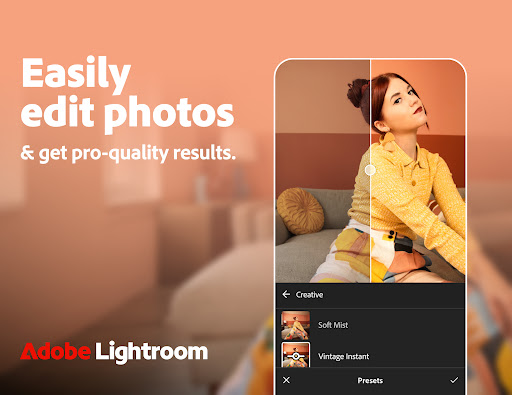
Get your best photos faster than ever with Lightroom’s free photo and video editor
Lightroom is the easy way for you to transform your snaps into photos that stand out. Offering intuitive AI-assisted tools, presets, filters, and advanced features that give you full control and pro-quality results.
Create your own style, apply filters, batch edit photos, and get stunning pictures with this easy-to-use yet powerful photo and video editor.
Quick Actions
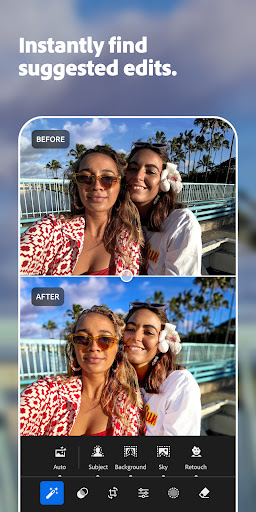
Instantly get suggestions, tailored to your photos, so you can get the edits you want.
Portrait Photos
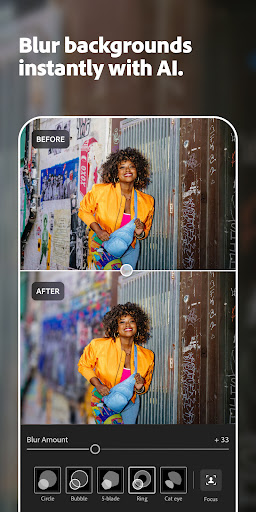
Use the Lens Blur tool to make people stand out and Generative Remove to erase background distractions, blemishes or shiny skin
Travel Photos
Presets and filters that enhance the sky in one tap, and Remove tools to clean up distractions and unwanted objects, for a photo worth sharing
Food Photos
Selective edits that make your subject stand out
Street Photos
HDR, Texture, and Grain editor that brings out the atmosphere of the location
Landscape Photos
Hue and Saturation editor to set the tone of your photo
AI-Powered Features
• Quick Actions: instantly suggests the best edits for your photo, including skin smoothing, portrait retouching, and subject enhancement, based on your photo’s content
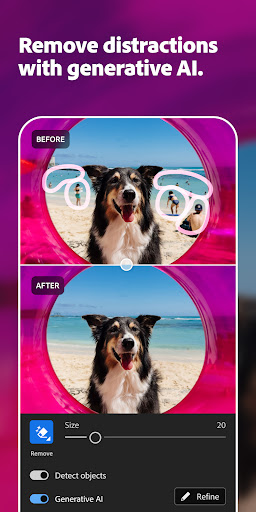
• Generative Remove: easily remove photobombers and pesky objects that ruin your otherwise perfect photo
• Lens Blur: add blur to backgrounds to make people really stand out (now available as Blur Background Presets)
• Adaptive Presets: easily make subjects and skies pop with one tap
• Masking: quickly select any part of a photo and make detailed edits to get the right balance in your image
• Recommended Presets and Filters: with so many presets and filters tailored to any photo, you can create stunning images and share to your social media in a few taps
Powerful Editing Tools
• Edit suggestions: Quick Actions recommends the best edits for your photos.
• Remove: high-precision tools to flawlessly retouch and remove any distraction from your photos
• Lighting tools: take control of Exposure, Highlights, Shadows, and Curves to capture the right light in your photo
• Colour tools: adjust Hue, Saturation, Luminance, and Colour grading to add style or get a film look
• Details or effects: modify Clarity, Texture, Dehaze, Grain, and Vignette to add texture and depth to your images
• Crop and geometry: alter the perspective, resize, rotate, and straighten photos
• HDR: edit the full dynamic range of your image for high-quality photos
Video
• Style: Presets, Light, Colour, and Edit tools to create stylistic videos
• Social: Create edit replay for reels you can post to social media
Camera
• Get all the controls of a pro camera on your phone
• ISO, Exposure, Shutter Speed, and more
Additional Features
• Create and save your own filters and presets to apply to all your photos
• Instant access to your photo gallery
• Quick search for pictures
Lightroom photo and video editor gives you pro-quality results with powerful filters, editing, and Remove tools that make your pictures stand out.
Terms & Conditions:
Your use of this application is governed by the Adobe General Terms of Use http://www.adobe.com/go/terms_au and the Adobe Privacy Policy https://www.adobe.com/go/privacy_policy_au
Do not sell or share my personal information www.adobe.com/go/ca-rights
Показать больше

1. Скачать инсталлятор MEmu и завершайте установку

2. Запускайте MEmu, затем откройте Google Play на главной странице

3. Ищите Lightroom Photo & Video Editor в Google Play
Install
4. Скачайте и установите Lightroom Photo & Video Editor
5. При завершении установки, нажмите на значок для старта

6. Наслаждайтесь Lightroom Photo & Video Editor на своем компьютере с помощью MEmu.
MEmu Play — лучший бесплатный эмулятор Android, превосходный опыт работы с которым оценили 50 миллионов пользователей. Технология виртуализации MEmu позволяет без проблем запускать тысячи Android-приложений на вашем компьютере, даже самые требовательные.
Большой экран с лучшей графикой; Большая продолжительность, без ограничения батареи или мобильных данных.
Полная поддержка установки клавиш для точного управления клавиатурой и мышью или геймпадом.
Несколько игровых учетных записей или задач на одном компьютере одновременно с менеджером нескольких экземпляров.
Use Lightroom Photo & Video Editor on PC by following steps: