Nebula: Cloud Gaming
تم التحديث
الإصدار الحالي
1.6.0
تقديم

لا داعي للقلق بشأن الشحن الزائد عند استخدام Nebula: Cloud Gaming على هاتفك. تحرر من قيود الشاشة الصغيرة واستمتع به على شاشة أكبر باستخدام لوحة المفاتيح والفأرة. يوفر MEmu جميع الميزات الرائعة التي تتوقعها: تثبيت سريع، إعداد سهل، أدوات تحكم بديهية، ودون قيود على عمر البطارية، أو استخدام البيانات، أو المكالمات الواردة. يُعد MEmu 9 الجديد الخيار الأمثل لتجربة Nebula: Cloud Gaming على جهاز الكمبيوتر. بفضل تقنية التشفير الفريدة، يتيح لك مدير الحسابات المتعددة تشغيل حسابين أو أكثر في وقت واحد. والأهم من ذلك، أن محرك المحاكاة الفريد يستغل أداء جهاز الكمبيوتر بالكامل، مما يُحسّن تجربة التطبيق ويجعل كل شيء سلسًا للغاية.
أظهر المزيد
استمتع بتجربة رائعة لاستخدام Nebula: Cloud Gaming على جهاز الكمبيوتر مع MEmu Play. إنه محاكي أندرويد قوي ومجاني يوفر لك آلاف تطبيقات أندرويد لإصدار سطح المكتب. استمتع بالتواصل مع أصدقائك وحسّن عملك بكفاءة أعلى! "Play the Latest AAA Games on Your Android Device with Nebula – No Gaming PC Needed!
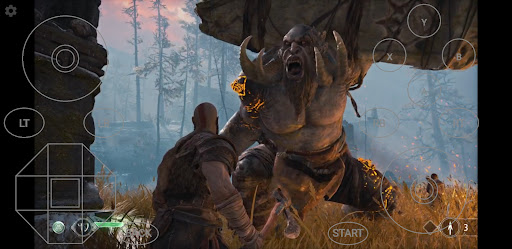
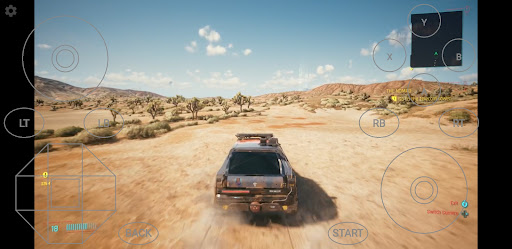
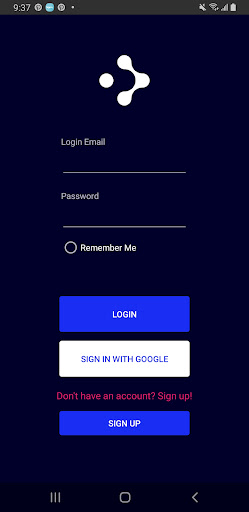
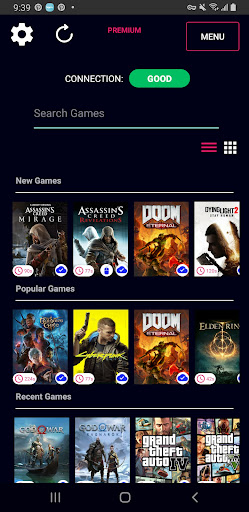
"Play the Latest AAA Games on Your Android Device with Nebula – No Gaming PC Needed!"
Nebula is your ultimate cloud gaming app, letting you play high-end PC and console-quality games straight from your Android device—no long installations or expensive hardware required. All games are included, and all you need is good internet.
Key Features:
Play AAA Games Anywhere: Enjoy the latest PC games on any Android device—smartphone, tablet, or even your Android TV.
Games Included: Access a wide range of titles without needing to buy or install them.
Free VPN for Optimized Gaming: Automatically connects to our secure Nebula VPN, ensuring smooth gameplay (currently available in Southeast Asia, connecting through Singapore, etc.).
Cloud Save: Pick up right where you left off every time with cloud saves, across any device.
Simple and User-Friendly: Easy setup, intuitive interface, and Bluetooth controller support.
How Does Nebula Work?
Nebula turns your Android device into a gaming powerhouse. Simply download our app, create an account, and select a game. Start playing instantly with just a tap! You can even connect your Bluetooth controller for a console-like experience.
All you need is good internet, and Nebula will handle the rest, securely connecting you to our gaming servers using the built-in Nebula VPN.
Nebula VPN: What You Need to Know
Nebula’s VPN feature is built using the WireGuard protocol and integrates with Android’s VpnService framework to create a securely encrypted connection between your device and our servers. The VPN is active only when you're gaming on Nebula, automatically deactivating when you close the app or it runs in the background.
Is Nebula’s VPN Necessary?
We provide our premium VPN for free as an option to help improve network connections to our servers. Experiment with it to find the best configuration for a smooth gameplay experience. The VPN only manages connection and traffic to Nebula's game servers and nothing else - we do not collect or manage any of your traffic data outside of Nebula's gaming traffic and will never collect, manage or distribute your data.
Nebula VPN Features:
- Secure Gaming: Enjoy a private and protected gaming session with end-to-end encryption.
- Improved Performance: Optimize network routes and reduce latency for a smoother, faster gaming experience.
- Completely Free: Get all the benefits of a paid VPN at no extra cost!
Permissions Required:
To establish a VPN connection, Nebula will prompt you to grant network access when you switch it on. Once granted, the VPN will activate and securely connect you to our network.
For any questions about VpnService or our privacy practices, please reach out to us via the links below.
Minimum Requirements:
Minimum Internet Speed: 30 Mbps
Recommended Speed: 100 Mbps and above for the best experience.
Get Started in 3 Simple Steps:
Download the app and create an account at www.nebula.my.
Log in with your account and browse our game library.
Select a game and start playing instantly!
Flexible Pricing Plans
We offer a range of pricing options to suit every gamer’s needs. Check them out here: www.nebula.my/pricing.
Connect with Us:
Discord: Nebula - Gaming Platform
Instagram: @nebula_my
Contact Form: www.nebula.my/contact
Email: admin@nebula.my
Learn More:
Visit us at www.nebula.my for more information, or check out our Privacy Policy and Terms & Conditions:
Privacy Policy
Terms and Conditions
Note: WireGuard is a registered trademark of Jason A. Donenfeld.
أظهر المزيد

1. قم بتنزيل برنامج MEmu واكمال تثبيته

2. قم بتشغيل برنامج MEmu وفتح Google Play على الصفحة الرئيسية

3. ابح Nebula: Cloud Gaming في Google Play
Install
4. تنزيل وتثبيت Nebula: Cloud Gaming
5. انقر على الرمز للتشغيل بعد اكتمال التثبيت

6. استخدم MEmu لتجربة Nebula: Cloud Gaming على جهاز الكمبيوتر الخاص بك.
تطبيق MEmuهو افضل محاكى اندرويد مجانى وبالفعل 50 مليون شخص يستمتعون حاليا بتجربه اللعب عليه. تمكّنك تقنية MEmu الافتراضية من تشغيل آلاف ألعاب Android بسلاسة على الكمبيوتر الشخصي ، حتى أكثرها استخدامًا للرسومات.
شاشة أكبر وجرافيك افضل ووقت أطول بدون حدود البطارية وباقة التليفون
لوحة مفاتيح كاملة تدعم تحكم كامل عن طريق لوحة المفاتيح و الفأره وجيم باد
عدة العاب وحسابات ومهمات علي جهاز الكمبيوتر في وقت معين عن طريق Memu متعدد النوافذ
Use Nebula: Cloud Gaming on PC by following steps: