Palette Home
تم التحديث
الإصدار الحالي
2023.1.140.4895
تقديم

لا داعي للقلق بشأن الشحن الزائد عند استخدام Palette Home على هاتفك. تحرر من قيود الشاشة الصغيرة واستمتع به على شاشة أكبر باستخدام لوحة المفاتيح والفأرة. يوفر MEmu جميع الميزات الرائعة التي تتوقعها: تثبيت سريع، إعداد سهل، أدوات تحكم بديهية، ودون قيود على عمر البطارية، أو استخدام البيانات، أو المكالمات الواردة. يُعد MEmu 9 الجديد الخيار الأمثل لتجربة Palette Home على جهاز الكمبيوتر. بفضل تقنية التشفير الفريدة، يتيح لك مدير الحسابات المتعددة تشغيل حسابين أو أكثر في وقت واحد. والأهم من ذلك، أن محرك المحاكاة الفريد يستغل أداء جهاز الكمبيوتر بالكامل، مما يُحسّن تجربة التطبيق ويجعل كل شيء سلسًا للغاية.
أظهر المزيد
قم بتنزيل Palette Home على الكمبيوتر بإستخدام جهاز مقلد أندروز MEmu.استمتع بمتعة اللعب على الشاشة الكبيرة. Palette Home is a new app developed by Palette CAD AG, the number 1 in planning 3D interior design.
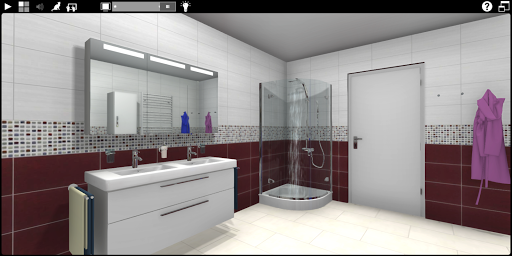
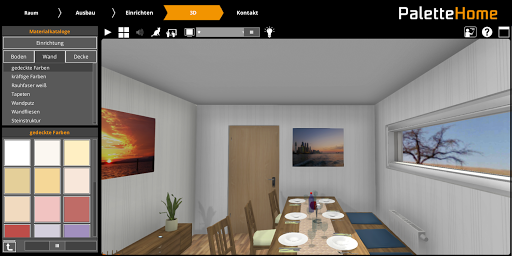
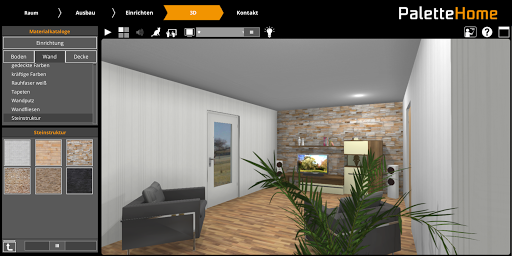
Palette Home is a new app developed by Palette CAD AG, the number 1 in planning 3D interior design. It was created to let you, the user design any kind of room.
Redesign your bathroom in just a few minutes or let your imagination run wild when reorganizing your living room. Would you like to fulfill a long-term wish of owning a cosy stove? Palette Home is the ideal app for you.
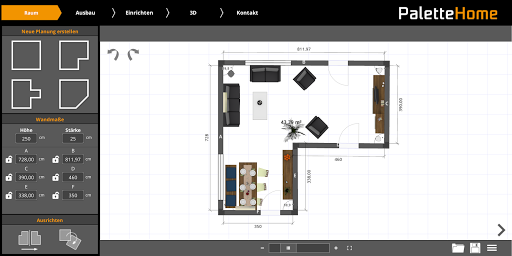
The virtual design app Palette Home leads the user intuitively through all the stages of the planning process from start to finish. This begins with the definition of your rooms cubic measures and continues with the placement of doors, windows and if desired even front wall installations and pitched roofs. The clearly organised objects are readily available and can be dragged into the plan and positioned easily and quickly. The objects can also align themselves to the walls automatically. At any time you can switch into 3D mode and freely move about and examine your room. You can now explore your room in real time while accompanied by our company cat, - the “Palette-cat”. The immersive feel and quality of the graphics are impressive.
You can also save your plan and import it into our PC program Palette CAD and from there to our other apps Palette MOVE and Palette PLAY.
أظهر المزيد

1. قم بتنزيل برنامج MEmu واكمال تثبيته

2. قم بتشغيل برنامج MEmu وفتح Google Play على الصفحة الرئيسية

3. ابح Palette Home في Google Play
Install
4. تنزيل وتثبيت Palette Home
5. انقر على الرمز للتشغيل بعد اكتمال التثبيت

6. استخدم MEmu لتجربة Palette Home على جهاز الكمبيوتر الخاص بك.
تطبيق MEmuهو افضل محاكى اندرويد مجانى وبالفعل 50 مليون شخص يستمتعون حاليا بتجربه اللعب عليه. تمكّنك تقنية MEmu الافتراضية من تشغيل آلاف ألعاب Android بسلاسة على الكمبيوتر الشخصي ، حتى أكثرها استخدامًا للرسومات.
شاشة أكبر وجرافيك افضل ووقت أطول بدون حدود البطارية وباقة التليفون
لوحة مفاتيح كاملة تدعم تحكم كامل عن طريق لوحة المفاتيح و الفأره وجيم باد
عدة العاب وحسابات ومهمات علي جهاز الكمبيوتر في وقت معين عن طريق Memu متعدد النوافذ
Use Palette Home on PC by following steps: