Lan FTP Server
আপডেট করা হয়েছে
বর্তমান সংস্করণ
2.1-free
অফার করেছে

আপনার মোবাইলে Lan FTP Server ব্যবহার করার সময় অতিরিক্ত চার্জ নিয়ে চিন্তা করা বন্ধ করুন, নিজেকে ছোট পর্দা থেকে মুক্ত করুন এবং অনেক বড় ডিসপ্লেতে অ্যাপ ব্যবহার করে উপভোগ করুন। এখন থেকে, কীবোর্ড এবং মাউস দিয়ে আপনার অ্যাপের একটি পূর্ণ-স্ক্রীন অভিজ্ঞতা পান। MEmu আপনাকে সমস্ত আশ্চর্যজনক বৈশিষ্ট্যগুলি অফার করে যা আপনি আশা করেছিলেন: দ্রুত ইনস্টল এবং সহজ সেটআপ, স্বজ্ঞাত নিয়ন্ত্রণ, ব্যাটারির আর কোন সীমাবদ্ধতা নেই, মোবাইল ডেটা এবং বিরক্তিকর কল৷ একদম নতুন MEmu 9 হল আপনার কম্পিউটারে Lan FTP Server ব্যবহার করার সেরা পছন্দ। MEmu মাল্টি-ইনস্ট্যান্স ম্যানেজার একই সময়ে 2 বা তার বেশি অ্যাকাউন্ট খোলা সম্ভব করে তোলে। এবং সবচেয়ে গুরুত্বপূর্ণ, আমাদের একচেটিয়া ইমুলেশন ইঞ্জিন আপনার পিসির সম্পূর্ণ সম্ভাবনা প্রকাশ করতে পারে, সবকিছুকে মসৃণ এবং উপভোগ্য করে তুলতে পারে।
বেশি দেখান
MEmu Play ব্যবহার করে পিসিতে Lan FTP Server ব্যবহারের এক অসাধারণ অভিজ্ঞতা উপভোগ করুন। এটি একটি শক্তিশালী বিনামূল্যের অ্যান্ড্রয়েড এমুলেটর যা আপনাকে তাদের ডেস্কটপ সংস্করণের জন্য হাজার হাজার অ্যান্ড্রয়েড অ্যাপ সরবরাহ করে। বন্ধুদের সাথে সংযোগ স্থাপন এবং উচ্চ দক্ষতার সাথে আপনার কাজকে আরও সুন্দর করে তোলার উপভোগ করুন! You can transform your Android device into a professional FTP server, allowing you to share files seamlessly across your local network.
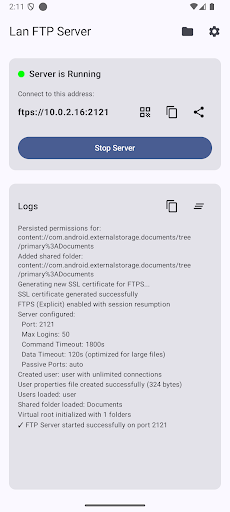
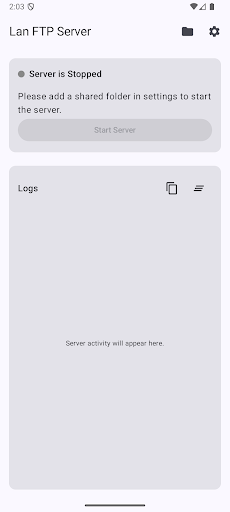
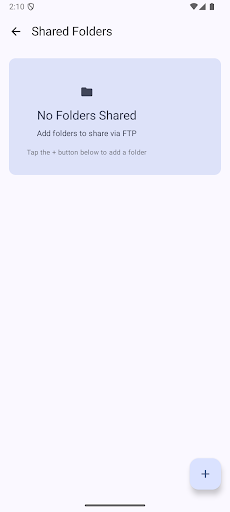
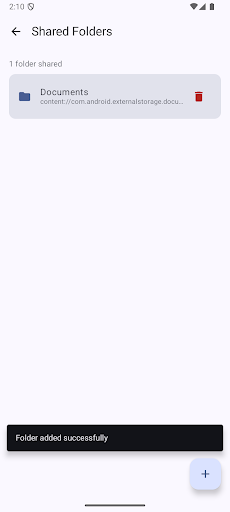
You can transform your Android device into a professional FTP server, allowing you to share files seamlessly across your local network. Lan FTP Server is the ultimate file sharing solution for home users, professionals, and tech enthusiasts who need reliable, secure, and fast wireless file transfers.
WHY CHOOSE LAN FTP SERVER?
Lightning Fast Transfers - Optimized for large files and folders
Military-Grade Security - FTPS encryption with SSL/TLS support
Works Offline - No internet required, 100% local network
Easy Setup - Start sharing files in under 60 seconds
Cross-Platform Compatible - Works with Windows, Mac, Linux, iOS, and Android FTP clients
POWERFUL FILE SHARING FEATURES
FTP Server for Android
Transform your phone or tablet into a full-featured FTP server. Share documents, photos, videos, music, and any files wirelessly, without the need for USB cables or cloud storage.
FTPS Encryption
Enable SSL/TLS encryption (FTPS) to protect sensitive files during transfer. Perfect for business documents, private photos, and confidential data.
Multiple Folder Sharing
Share multiple folders simultaneously. Choose exactly which directories to make accessible via FTP - Downloads, DCIM, Documents, or custom folders.
Anonymous or Authenticated Access
Choose between password-protected access or anonymous login for quick, convenient file sharing with trusted devices.
QR Code Connection
Generate a QR code with your FTP server address for instant connection from other devices. No manual IP typing required!
PRIVACY & SECURITY FIRST
Zero Data Collection - No analytics, no tracking, no telemetry
Local Network Only - Files never leave your network
Self-Signed SSL Certificates - Generated on-device
Secure Credentials - Encrypted password storage with Android DataStore
Permission Control - You choose which folders to share
USE CASES
For Home Users:
Transfer photos and videos from phone to computer wirelessly
Access phone storage from any device on your Wi-Fi network
For Professionals:
Share documents between devices without cloud storage
Transfer large files, videos, or project folders
Quick file sharing in office environments
Remote access to phone files from a laptop or a desktop
For Developers & IT:
Test FTP client applications
Transfer APKs and development builds
Access Android app data and logs
Quick file deployment to test devices
For Content Creators:
Transfer 4K videos and RAW photos wirelessly
Share media files with editing workstations
Quick backup of content before editing
KEY HIGHLIGHTS
Modern Material Design 3 UI - Beautiful, intuitive interface
Dark Mode Support - Easy on the eyes during night usage
Foreground Service - Reliable server operation even when the app is in the background
Notification Controls - Start/stop server directly from notification
No Root Required - Works on any Android 9+ device
Optimized Battery Usage - Efficient server implementation
Regular Updates - Active development with new features
Compatible FTP Clients:
FileZilla, WinSCP, Cyberduck, Transmit, FTP Rush, Total Commander, ES File Explorer, Solid Explorer, CX File Explorer, and any standard FTP/FTPS client.
SUPPORT & FEEDBACK
Need help? Have suggestions? Contact us at fahdev@proton.me
We respond within 48 hours and continuously improve based on your feedback.
বেশি দেখান

1. MEmu ইনস্টলার ডাউনলোড করুন এবং সেটআপ শেষ করুন

2. MEmu শুরু করুন তারপর ডেস্কটপে Google Play খুলুন

3. Google Play এ Lan FTP Server খুঁজুন
Install
4. Lan FTP Server ডাউনলোড এবং ইনস্টল করুন
5. ইনস্টল সমাপ্তি শুরু করতে আইকনে ক্লিক করুন

6. MEmu ব্যবহার করে আপনার কম্পিউটারে Lan FTP Server উপভোগ করুন
MEmu Play হল সেরা অ্যান্ড্রয়েড এমুলেটর, যার ১০ কোটিরও বেশি ব্যবহারকারী এর উন্নত অ্যান্ড্রয়েড অ্যাপ অভিজ্ঞতা উপভোগ করছেন। MEmu 9 এর ভার্চুয়ালাইজেশন প্রযুক্তি আপনাকে আপনার কম্পিউটারে হাজার হাজার অ্যান্ড্রয়েড অ্যাপ মসৃণভাবে চালাতে দেয়, এমনকি সবচেয়ে চাহিদাসম্পন্ন অ্যাপগুলিও।
ভালো গ্রাফিক্সের সাথে বড় স্ক্রীন; লম্বা অবধি, ব্যাটারি বা মোবাইল ডাটা'র কোন সীমা ছাড়া।
কীবোর্ড এবং মাউস বা গেমপ্যাডের সুনির্দিষ্ট নিয়ন্ত্রণের জন্য সম্পূর্ণ কীম্যাপিং সমর্থন।
মাল্টি-ইনস্ট্যান্স ম্যানেজারের সাথে একটি পিসিতে একাধিক গেম অ্যাকাউন্ট বা কাজ।
নিম্নলিখিত ধাপগুলোর মাধ্যমে পিসি এ Lan FTP Server ব্যবহার করুন: