Master Remote Control for Tv
আপডেট করা হয়েছে
বর্তমান সংস্করণ
1.3
অফার করেছে

আপনার মোবাইলে Master Remote Control for Tv ব্যবহার করার সময় অতিরিক্ত চার্জ নিয়ে চিন্তা করা বন্ধ করুন, নিজেকে ছোট পর্দা থেকে মুক্ত করুন এবং অনেক বড় ডিসপ্লেতে অ্যাপ ব্যবহার করে উপভোগ করুন। এখন থেকে, কীবোর্ড এবং মাউস দিয়ে আপনার অ্যাপের একটি পূর্ণ-স্ক্রীন অভিজ্ঞতা পান। MEmu আপনাকে সমস্ত আশ্চর্যজনক বৈশিষ্ট্যগুলি অফার করে যা আপনি আশা করেছিলেন: দ্রুত ইনস্টল এবং সহজ সেটআপ, স্বজ্ঞাত নিয়ন্ত্রণ, ব্যাটারির আর কোন সীমাবদ্ধতা নেই, মোবাইল ডেটা এবং বিরক্তিকর কল৷ একদম নতুন MEmu 9 হল আপনার কম্পিউটারে Master Remote Control for Tv ব্যবহার করার সেরা পছন্দ। MEmu মাল্টি-ইনস্ট্যান্স ম্যানেজার একই সময়ে 2 বা তার বেশি অ্যাকাউন্ট খোলা সম্ভব করে তোলে। এবং সবচেয়ে গুরুত্বপূর্ণ, আমাদের একচেটিয়া ইমুলেশন ইঞ্জিন আপনার পিসির সম্পূর্ণ সম্ভাবনা প্রকাশ করতে পারে, সবকিছুকে মসৃণ এবং উপভোগ্য করে তুলতে পারে।
বেশি দেখান
MEmu Play ব্যবহার করে পিসিতে Master Remote Control for Tv ব্যবহারের এক অসাধারণ অভিজ্ঞতা উপভোগ করুন। এটি একটি শক্তিশালী বিনামূল্যের অ্যান্ড্রয়েড এমুলেটর যা আপনাকে তাদের ডেস্কটপ সংস্করণের জন্য হাজার হাজার অ্যান্ড্রয়েড অ্যাপ সরবরাহ করে। বন্ধুদের সাথে সংযোগ স্থাপন এবং উচ্চ দক্ষতার সাথে আপনার কাজকে আরও সুন্দর করে তোলার উপভোগ করুন! Turn your smartphone into a powerful universal remote control with IR Master, the ultimate solution for managing all your entertainment devices.
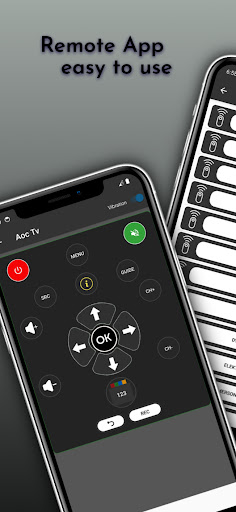
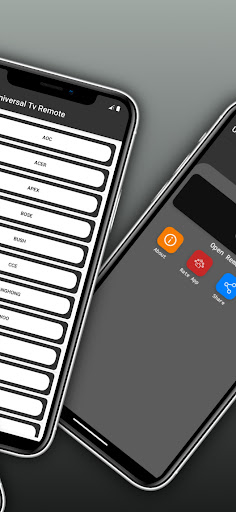
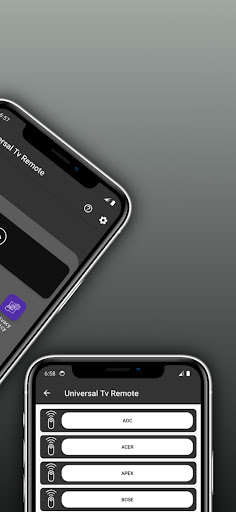
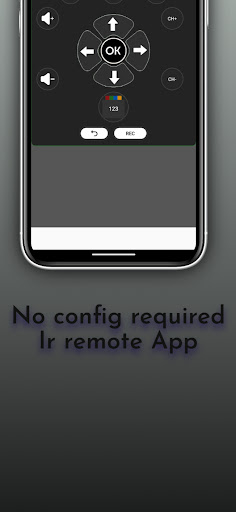
Turn your smartphone into a powerful universal remote control with IR Master, the ultimate solution for managing all your entertainment devices. Our app supports Infrared (IR) technology, making it the perfect companion for controlling your TV, set-top boxes, sound systems, and more.
Key Features:
Universal Compatibility:
IR Master is designed to work seamlessly with a wide range of devices. Control your TV devices effortlessly, all from the convenience of your smartphone.
Simple Setup:
Get started in minutes with our easy-to-follow setup process. Simply select your device from the extensive database, point your smartphone at the device, and let IR Master take care of the rest. No complicated configurations or technical expertise required!
Extensive Device Database:
Our app boasts a comprehensive database of IR codes for thousands of devices, ensuring compatibility with popular brands and models. Enjoy the convenience of a true universal remote control that works with virtually any IR-equipped device.
Macro Functionality:
Simplify your entertainment experience with customizable macros. Create sequences of commands to execute multiple actions with a single button press, such as turning on your TV, adjusting the volume, and launching your favorite streaming app simultaneously.
IR Learning:
Expand the capabilities of IR Master by teaching it to control devices not initially in the database. Capture IR signals from your existing remotes, and consolidate all your remote controls into one convenient app.
Favorite Channels:
Quickly access your most-watched channels with the ability to set up and navigate through your favorite channels effortlessly.
User-Friendly Interface:
Enjoy a clean and intuitive user interface that makes navigating through the app a breeze. Effortlessly switch between devices and functions with a few taps.
Upgrade your home entertainment setup with IR Master: the ultimate IR-based universal TV remote control app. Say goodbye to juggling multiple remotes and hello to simplified control with just your smartphone. Download now and experience the convenience of IR Master!
Note: IR Master requires a smartphone with an infrared blaster or an external infrared transmitter accessory for IR functionality. Ensure your device is equipped with IR capabilities for optimal performance.
বেশি দেখান

1. MEmu ইনস্টলার ডাউনলোড করুন এবং সেটআপ শেষ করুন

2. MEmu শুরু করুন তারপর ডেস্কটপে Google Play খুলুন

3. Google Play এ Master Remote Control for Tv খুঁজুন
Install
4. Master Remote Control for Tv ডাউনলোড এবং ইনস্টল করুন
5. ইনস্টল সমাপ্তি শুরু করতে আইকনে ক্লিক করুন

6. MEmu ব্যবহার করে আপনার কম্পিউটারে Master Remote Control for Tv উপভোগ করুন
MEmu Play হল সেরা অ্যান্ড্রয়েড এমুলেটর, যার ১০ কোটিরও বেশি ব্যবহারকারী এর উন্নত অ্যান্ড্রয়েড অ্যাপ অভিজ্ঞতা উপভোগ করছেন। MEmu 9 এর ভার্চুয়ালাইজেশন প্রযুক্তি আপনাকে আপনার কম্পিউটারে হাজার হাজার অ্যান্ড্রয়েড অ্যাপ মসৃণভাবে চালাতে দেয়, এমনকি সবচেয়ে চাহিদাসম্পন্ন অ্যাপগুলিও।
ভালো গ্রাফিক্সের সাথে বড় স্ক্রীন; লম্বা অবধি, ব্যাটারি বা মোবাইল ডাটা'র কোন সীমা ছাড়া।
কীবোর্ড এবং মাউস বা গেমপ্যাডের সুনির্দিষ্ট নিয়ন্ত্রণের জন্য সম্পূর্ণ কীম্যাপিং সমর্থন।
মাল্টি-ইনস্ট্যান্স ম্যানেজারের সাথে একটি পিসিতে একাধিক গেম অ্যাকাউন্ট বা কাজ।
নিম্নলিখিত ধাপগুলোর মাধ্যমে পিসি এ Master Remote Control for Tv ব্যবহার করুন: