Meego - Video Call, Live Chat
আপডেট করা হয়েছে
বর্তমান সংস্করণ
2.2.7
অফার করেছে

আপনার মোবাইলে Meego - Video Call, Live Chat ব্যবহার করার সময় অতিরিক্ত চার্জ নিয়ে চিন্তা করা বন্ধ করুন, নিজেকে ছোট পর্দা থেকে মুক্ত করুন এবং অনেক বড় ডিসপ্লেতে অ্যাপ ব্যবহার করে উপভোগ করুন। এখন থেকে, কীবোর্ড এবং মাউস দিয়ে আপনার অ্যাপের একটি পূর্ণ-স্ক্রীন অভিজ্ঞতা পান। MEmu আপনাকে সমস্ত আশ্চর্যজনক বৈশিষ্ট্যগুলি অফার করে যা আপনি আশা করেছিলেন: দ্রুত ইনস্টল এবং সহজ সেটআপ, স্বজ্ঞাত নিয়ন্ত্রণ, ব্যাটারির আর কোন সীমাবদ্ধতা নেই, মোবাইল ডেটা এবং বিরক্তিকর কল৷ একদম নতুন MEmu 9 হল আপনার কম্পিউটারে Meego - Video Call, Live Chat ব্যবহার করার সেরা পছন্দ। MEmu মাল্টি-ইনস্ট্যান্স ম্যানেজার একই সময়ে 2 বা তার বেশি অ্যাকাউন্ট খোলা সম্ভব করে তোলে। এবং সবচেয়ে গুরুত্বপূর্ণ, আমাদের একচেটিয়া ইমুলেশন ইঞ্জিন আপনার পিসির সম্পূর্ণ সম্ভাবনা প্রকাশ করতে পারে, সবকিছুকে মসৃণ এবং উপভোগ্য করে তুলতে পারে।
বেশি দেখান
Download Meego - Video Call, Live Chat on PC with MEmu Android Emulator. Enjoy playing on big screen. Wanna have live video calls, meet people, make new friends and connect with the world with just a tap?

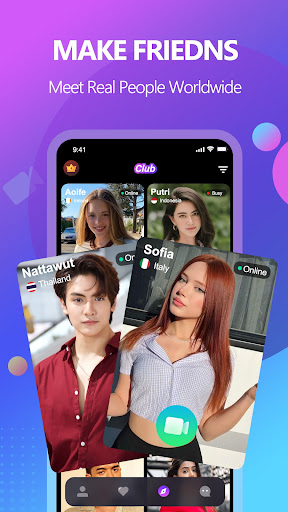

Wanna have live video calls, meet people, make new friends and connect with the world with just a tap? Meego is the app you are looking for!
Meego allows you to make friends with people from all over the world. With video calling and translation, you can communicate with strangers like face to face anytime and anywhere. You can use it to meet new people, have fun conversations, and learn about different cultures.
Here are some of the things you can do with Meego:
❤️ One-on-one Video Chats with New Faces. You can video call anyone, anywhere in the world.
❤️ Make friends with people from all over the world. At Meego, you'll find cool friends to chat with no matter where you are.
❤️ Discover friends you may like via cover photo or short videos, and easily call them back.
❤️ Have fun conversations. You can use Meego to talk about anything you want, from your favorite hobbies to your deepest thoughts and feelings.
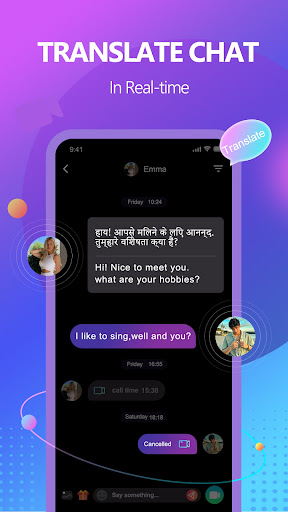
❤️ Communicate without barriers. Meego supports real-time translation, so you can chat with people who speak other languages.
❤️ AI Beauty effects. Apply beauty effects for you automatically. It will surely make you more attractive and stylish in live video calls.
❤️ Have secure and private video chats. Meego uses end-to-end encryption to protect your privacy.
❤️ Learn about different cultures. Meego is a great way to learn about different cultures and meet people from all walks of life.
If you're looking for a fun and easy way to make friends from all over the world, then Meego is the app for you. Download it now and start chatting!
Here are some additional tips for using Meego:
❤️ Be yourself. The best way to make friends is to be yourself. Don't try to be someone you're not, because people will be able to tell.
❤️ Be respectful. Remember that you're talking to real people, so be respectful of their time and feelings.
❤️ Be patient. It may take some time to find people you click with, but don't give up. Just keep chatting and eventually you'll find your people.
Hope you enjoy using Meego!
বেশি দেখান

1. MEmu ইনস্টলার ডাউনলোড করুন এবং সেটআপ শেষ করুন

2. MEmu শুরু করুন তারপর ডেস্কটপে Google Play খুলুন

3. Google Play এ Meego - Video Call, Live Chat খুঁজুন
Install
4. Meego - Video Call, Live Chat ডাউনলোড এবং ইনস্টল করুন
5. ইনস্টল সমাপ্তি শুরু করতে আইকনে ক্লিক করুন

6. MEmu ব্যবহার করে আপনার কম্পিউটারে Meego - Video Call, Live Chat উপভোগ করুন
MEmu Play হল সেরা অ্যান্ড্রয়েড এমুলেটর, যার ১০ কোটিরও বেশি ব্যবহারকারী এর উন্নত অ্যান্ড্রয়েড অ্যাপ অভিজ্ঞতা উপভোগ করছেন। MEmu 9 এর ভার্চুয়ালাইজেশন প্রযুক্তি আপনাকে আপনার কম্পিউটারে হাজার হাজার অ্যান্ড্রয়েড অ্যাপ মসৃণভাবে চালাতে দেয়, এমনকি সবচেয়ে চাহিদাসম্পন্ন অ্যাপগুলিও।
ভালো গ্রাফিক্সের সাথে বড় স্ক্রীন; লম্বা অবধি, ব্যাটারি বা মোবাইল ডাটা'র কোন সীমা ছাড়া।
কীবোর্ড এবং মাউস বা গেমপ্যাডের সুনির্দিষ্ট নিয়ন্ত্রণের জন্য সম্পূর্ণ কীম্যাপিং সমর্থন।
মাল্টি-ইনস্ট্যান্স ম্যানেজারের সাথে একটি পিসিতে একাধিক গেম অ্যাকাউন্ট বা কাজ।
নিম্নলিখিত ধাপগুলোর মাধ্যমে পিসি এ Meego - Video Call, Live Chat ব্যবহার করুন: