স্মার্ট ভূমি নকশা
আপডেট করা হয়েছে
বর্তমান সংস্করণ
1.3
অফার করেছে

আপনার মোবাইলে স্মার্ট ভূমি নকশা ব্যবহার করার সময় অতিরিক্ত চার্জ নিয়ে চিন্তা করা বন্ধ করুন, নিজেকে ছোট পর্দা থেকে মুক্ত করুন এবং অনেক বড় ডিসপ্লেতে অ্যাপ ব্যবহার করে উপভোগ করুন। এখন থেকে, কীবোর্ড এবং মাউস দিয়ে আপনার অ্যাপের একটি পূর্ণ-স্ক্রীন অভিজ্ঞতা পান। MEmu আপনাকে সমস্ত আশ্চর্যজনক বৈশিষ্ট্যগুলি অফার করে যা আপনি আশা করেছিলেন: দ্রুত ইনস্টল এবং সহজ সেটআপ, স্বজ্ঞাত নিয়ন্ত্রণ, ব্যাটারির আর কোন সীমাবদ্ধতা নেই, মোবাইল ডেটা এবং বিরক্তিকর কল৷ একদম নতুন MEmu 9 হল আপনার কম্পিউটারে স্মার্ট ভূমি নকশা ব্যবহার করার সেরা পছন্দ। MEmu মাল্টি-ইনস্ট্যান্স ম্যানেজার একই সময়ে 2 বা তার বেশি অ্যাকাউন্ট খোলা সম্ভব করে তোলে। এবং সবচেয়ে গুরুত্বপূর্ণ, আমাদের একচেটিয়া ইমুলেশন ইঞ্জিন আপনার পিসির সম্পূর্ণ সম্ভাবনা প্রকাশ করতে পারে, সবকিছুকে মসৃণ এবং উপভোগ্য করে তুলতে পারে।
বেশি দেখান
Download স্মার্ট ভূমি নকশা on PC with MEmu Android Emulator. Enjoy playing on big screen. This app is to search Mouza and Plot information using Map as well as search option.

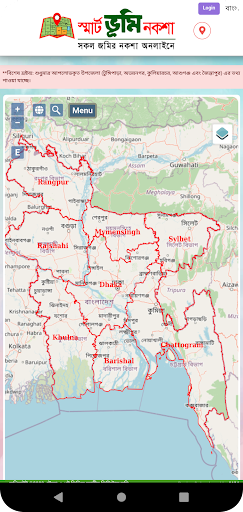
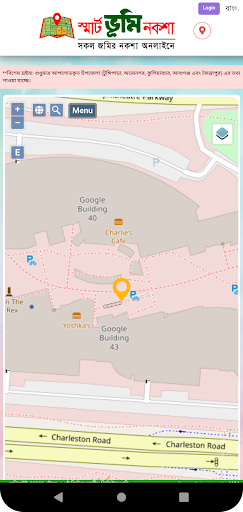
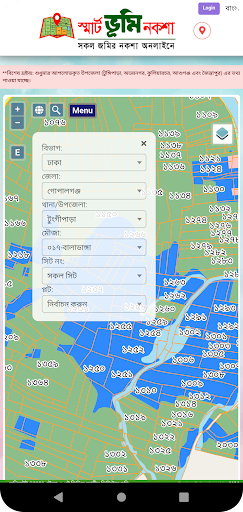
This app is to search Mouza and Plot information using Map as well as search option. User can view the plot and Land use of the plot. User can also get available Khatian information. User can also send the feedback to authority if they want to. This app is developed under Project “Mouza and plot based national digital land zoning project" - Ministry of Land, Bangladesh
Goals and Objectives of the Project
1. Development of digital maps and reports for maximum utilization of land based on land use
2. Development of mauza and plot based data base across the country for land management related to land use at central and field level
Main activities of the project
1. Digitization of 1,38,412 Mauza map sheets across the country under the project
2. 1,38,412 Digitized Mouza Map Sheets Database Preparation with Georeferencing
3. Preparation of digital land use and land zoning maps based on Mouza and plot by projecting digitized Mouza map sheet on georeferenced satellite images and land use classification (land use data).
Benefits of the Project
1. If implemented, the project will enable planned better use of scarce land resources through digital land use and land zoning maps across the country.
2. Three-crop, two-crop and one-crop agricultural lands will be identified in the country. As a result, the project will play an effective role in the protection of agricultural land and ensure optimum utilization of agricultural land
3. If the project is implemented, class-based utilization of natural resources of the country will be ensured
4. The project will mainly help the central and local administrations in planning the future of land
5. The project is in line with the current government's long-term political philosophy of creating a 'Digital Bangladesh'.
বেশি দেখান

1. MEmu ইনস্টলার ডাউনলোড করুন এবং সেটআপ শেষ করুন

2. MEmu শুরু করুন তারপর ডেস্কটপে Google Play খুলুন

3. Google Play এ স্মার্ট ভূমি নকশা খুঁজুন
Install
4. স্মার্ট ভূমি নকশা ডাউনলোড এবং ইনস্টল করুন
5. ইনস্টল সমাপ্তি শুরু করতে আইকনে ক্লিক করুন

6. MEmu ব্যবহার করে আপনার কম্পিউটারে স্মার্ট ভূমি নকশা উপভোগ করুন
MEmu Play হল সেরা অ্যান্ড্রয়েড এমুলেটর, যার ১০ কোটিরও বেশি ব্যবহারকারী এর উন্নত অ্যান্ড্রয়েড অ্যাপ অভিজ্ঞতা উপভোগ করছেন। MEmu 9 এর ভার্চুয়ালাইজেশন প্রযুক্তি আপনাকে আপনার কম্পিউটারে হাজার হাজার অ্যান্ড্রয়েড অ্যাপ মসৃণভাবে চালাতে দেয়, এমনকি সবচেয়ে চাহিদাসম্পন্ন অ্যাপগুলিও।
ভালো গ্রাফিক্সের সাথে বড় স্ক্রীন; লম্বা অবধি, ব্যাটারি বা মোবাইল ডাটা'র কোন সীমা ছাড়া।
কীবোর্ড এবং মাউস বা গেমপ্যাডের সুনির্দিষ্ট নিয়ন্ত্রণের জন্য সম্পূর্ণ কীম্যাপিং সমর্থন।
মাল্টি-ইনস্ট্যান্স ম্যানেজারের সাথে একটি পিসিতে একাধিক গেম অ্যাকাউন্ট বা কাজ।
নিম্নলিখিত ধাপগুলোর মাধ্যমে পিসি এ স্মার্ট ভূমি নকশা ব্যবহার করুন: