Super Screen Recorder, Capture
আপডেট করা হয়েছে
বর্তমান সংস্করণ
1.1.6
অফার করেছে

আপনার মোবাইলে Super Screen Recorder, Capture ব্যবহার করার সময় অতিরিক্ত চার্জ নিয়ে চিন্তা করা বন্ধ করুন, নিজেকে ছোট পর্দা থেকে মুক্ত করুন এবং অনেক বড় ডিসপ্লেতে অ্যাপ ব্যবহার করে উপভোগ করুন। এখন থেকে, কীবোর্ড এবং মাউস দিয়ে আপনার অ্যাপের একটি পূর্ণ-স্ক্রীন অভিজ্ঞতা পান। MEmu আপনাকে সমস্ত আশ্চর্যজনক বৈশিষ্ট্যগুলি অফার করে যা আপনি আশা করেছিলেন: দ্রুত ইনস্টল এবং সহজ সেটআপ, স্বজ্ঞাত নিয়ন্ত্রণ, ব্যাটারির আর কোন সীমাবদ্ধতা নেই, মোবাইল ডেটা এবং বিরক্তিকর কল৷ একদম নতুন MEmu 9 হল আপনার কম্পিউটারে Super Screen Recorder, Capture ব্যবহার করার সেরা পছন্দ। MEmu মাল্টি-ইনস্ট্যান্স ম্যানেজার একই সময়ে 2 বা তার বেশি অ্যাকাউন্ট খোলা সম্ভব করে তোলে। এবং সবচেয়ে গুরুত্বপূর্ণ, আমাদের একচেটিয়া ইমুলেশন ইঞ্জিন আপনার পিসির সম্পূর্ণ সম্ভাবনা প্রকাশ করতে পারে, সবকিছুকে মসৃণ এবং উপভোগ্য করে তুলতে পারে।
বেশি দেখান
Download Super Screen Recorder, Capture on PC with MEmu Android Emulator. Enjoy playing on big screen. Capture high-quality screenshots and screen recordings.
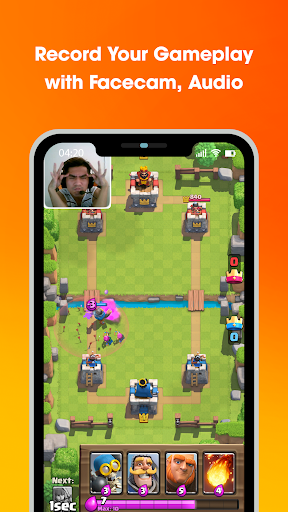
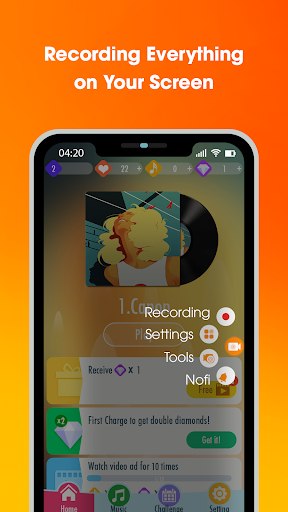
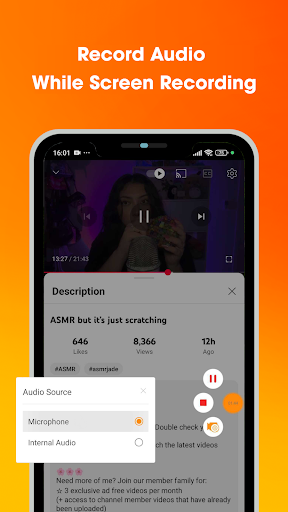
Capture high-quality screenshots and screen recordings.
It's easy to revisit TV shows, gameplay sessions, or video playbacks with screen recording software that captures both audio and video.
Super Recorder is a FREE & STABLE, high-quality screen recorder with internal audio that helps you smoothly and clearly record videos on your phone screen. With features like screen capture, video screen recording, image editing, and no need for root access, Super Recorder makes it simple to record screen everything, from video games and video calls to live performances. Enhance your recordings with audio and facecam features!
SUPER RECORDER FEATURES
1. Screen recorder with facecam, audio, and editor
The screen video recorder is completely non-rooted and optimized for smooth performance on mobile platforms. Use it to record live videos, gameplay, or any activity on your screen with the following features:
- Control the video screenshot recorder via the notification bar or on-screen controls.
- Pause/Resume recording during screen recording.
- Turn external audio recording on/off.
- Display an instructional pointer while recording the screen.
2. Capture your phone screen and edit photos
With a single touch, you can easily take screenshots and capture screenshot, even while recording a video. No need for long presses—you can take screenshots and edit them in just 3 seconds with these tools:
- Instant screenshot: Capture a screenshot that instantly appears on the screen.
- Crop pictures: Cut out unwanted parts of your screenshots.
- Mosaic photo effect: Blur specific areas of the image to mask sensitive details.
- Brush painting: Draw on your screenshots to add personal touches.
- Collage feature: Combine multiple images into one.
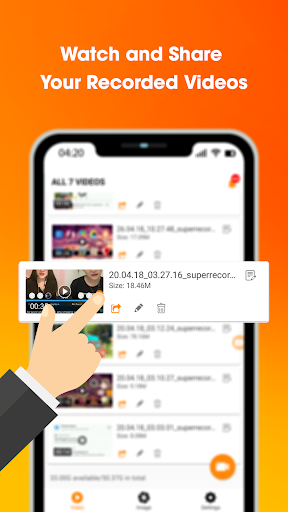
3. View and share videos
- Watch your recorded videos with ease and share them instantly on popular social networks like Facebook, YouTube, and Twitch.
- Easy sharing: Post your videos directly to social media platforms.
- Custom settings: Adjust video quality and countdown timers.
- Advanced options: Configure settings for professional-quality video recordings.
- Playback feature: Playback your recorded videos.
Super Recorder Key Features:
⚡ Quick control panel in the notification bar and floating window.
⚡ Video resolution options: HD 720p, FullHD 1080p, 2K, 4K, and more.
⚡ Screen recording without root access.
⚡ Capture video screens directly from a quick access panel.
⚡ Professional image editing tools: crop, blur, and draw on photos.
⚡ Record high-quality videos with audio using the quick control panel.
⚡ Best-in-class screen recorder with facecam and audio.
⚡ Share videos/screenshots with friends on social media platforms.
⚡ Start/Stop recording easily while screen video recorder with sound.
⚡ Pause/Resume button for screen recording.
⚡ Capture screenshots during video recording.
⚡ HD screen recording without a watermark.
⚡ Screen recorder with internal audio and external audio (for Android 10+).
⚡ Language support: English, Spanish, Portuguese, Indonesian, Vietnamese, and more.
⚡ Screen recorder with facecam for YouTube creators.
⚡ Completely FREE with no in-app purchases.
⚡ No root required, no recording time limit, and no watermark.
⚡ Intuitive interface for hassle-free video recording.
Download this best-in-class screen recorder for Android now and create your first great video!
If you have any comments or suggestions for our screen video recorder app with sound, please let us know. We appreciate your feedback!
বেশি দেখান

1. MEmu ইনস্টলার ডাউনলোড করুন এবং সেটআপ শেষ করুন

2. MEmu শুরু করুন তারপর ডেস্কটপে Google Play খুলুন

3. Google Play এ Super Screen Recorder, Capture খুঁজুন
Install
4. Super Screen Recorder, Capture ডাউনলোড এবং ইনস্টল করুন
5. ইনস্টল সমাপ্তি শুরু করতে আইকনে ক্লিক করুন

6. MEmu ব্যবহার করে আপনার কম্পিউটারে Super Screen Recorder, Capture উপভোগ করুন
MEmu Play হল সেরা অ্যান্ড্রয়েড এমুলেটর, যার ১০ কোটিরও বেশি ব্যবহারকারী এর উন্নত অ্যান্ড্রয়েড অ্যাপ অভিজ্ঞতা উপভোগ করছেন। MEmu 9 এর ভার্চুয়ালাইজেশন প্রযুক্তি আপনাকে আপনার কম্পিউটারে হাজার হাজার অ্যান্ড্রয়েড অ্যাপ মসৃণভাবে চালাতে দেয়, এমনকি সবচেয়ে চাহিদাসম্পন্ন অ্যাপগুলিও।
ভালো গ্রাফিক্সের সাথে বড় স্ক্রীন; লম্বা অবধি, ব্যাটারি বা মোবাইল ডাটা'র কোন সীমা ছাড়া।
কীবোর্ড এবং মাউস বা গেমপ্যাডের সুনির্দিষ্ট নিয়ন্ত্রণের জন্য সম্পূর্ণ কীম্যাপিং সমর্থন।
মাল্টি-ইনস্ট্যান্স ম্যানেজারের সাথে একটি পিসিতে একাধিক গেম অ্যাকাউন্ট বা কাজ।
নিম্নলিখিত ধাপগুলোর মাধ্যমে পিসি এ Super Screen Recorder, Capture ব্যবহার করুন: