Text behind image
আপডেট করা হয়েছে
বর্তমান সংস্করণ
27
অফার করেছে

আপনার মোবাইলে Text behind image ব্যবহার করার সময় অতিরিক্ত চার্জ নিয়ে চিন্তা করা বন্ধ করুন, নিজেকে ছোট পর্দা থেকে মুক্ত করুন এবং অনেক বড় ডিসপ্লেতে অ্যাপ ব্যবহার করে উপভোগ করুন। এখন থেকে, কীবোর্ড এবং মাউস দিয়ে আপনার অ্যাপের একটি পূর্ণ-স্ক্রীন অভিজ্ঞতা পান। MEmu আপনাকে সমস্ত আশ্চর্যজনক বৈশিষ্ট্যগুলি অফার করে যা আপনি আশা করেছিলেন: দ্রুত ইনস্টল এবং সহজ সেটআপ, স্বজ্ঞাত নিয়ন্ত্রণ, ব্যাটারির আর কোন সীমাবদ্ধতা নেই, মোবাইল ডেটা এবং বিরক্তিকর কল৷ একদম নতুন MEmu 9 হল আপনার কম্পিউটারে Text behind image ব্যবহার করার সেরা পছন্দ। MEmu মাল্টি-ইনস্ট্যান্স ম্যানেজার একই সময়ে 2 বা তার বেশি অ্যাকাউন্ট খোলা সম্ভব করে তোলে। এবং সবচেয়ে গুরুত্বপূর্ণ, আমাদের একচেটিয়া ইমুলেশন ইঞ্জিন আপনার পিসির সম্পূর্ণ সম্ভাবনা প্রকাশ করতে পারে, সবকিছুকে মসৃণ এবং উপভোগ্য করে তুলতে পারে।
বেশি দেখান
Download Text behind image on PC with MEmu Android Emulator. Enjoy playing on big screen. Add text inside image to unlock the magic of stunning visuals with Text Behind Image editor, the ultimate app for creating eye-catching photos that blend text seamlessly behind subjects.
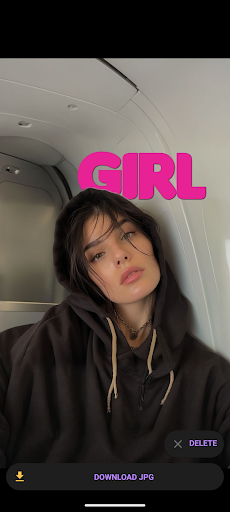
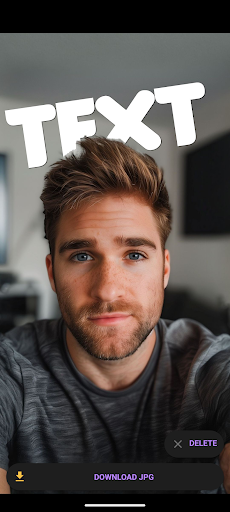
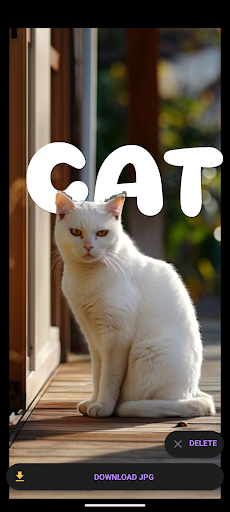
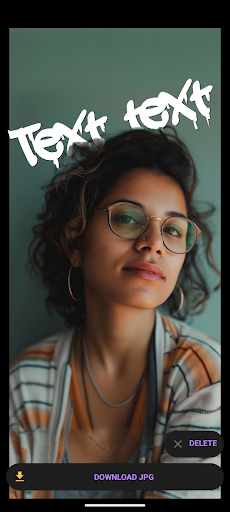
Add text inside image to unlock the magic of stunning visuals with Text Behind Image editor, the ultimate app for creating eye-catching photos that blend text seamlessly behind subjects. Embrace the latest design trend that's captivating YouTubers, influencers, and major brands, and elevate your images to a new level of creativity and engagement with Image text layering app.
Key Features:
- Automatic Subject Detection: Our advanced AI technology automatically identifies the primary subjects in your photos, ensuring your text fits perfectly behind them with just a tap.
- Simple Text Editing: Easily add and customize text with a wide variety of fonts, colors, and styles to match your creative vision. Move text with fingers between image layers.
- Manual Adjustments: Fine-tune your text placement with intuitive drag-and-drop functionality, giving you complete control over your design.
- Layer Management: Effortlessly manage layers to decide what elements stay in front and which ones blend into the background.
- Multiple Export Options: Save your creations in high-resolution for social media, marketing materials, or personal keepsakes.
- Blur background with Text underlay editor
- Instant WOW Factor: Transform ordinary photos into extraordinary visuals that grab attention and make a lasting impression with Picture text masking
- Versatile Use: Perfect for social media posts for Instagram, YouTube thumbnails, marketing campaigns, personal projects, just add text in photo layers.
- User-Friendly Interface: Designed for both beginners and pros, our easy-to-use interface ensures a smooth and enjoyable editing experience with Overlay caption editor.
- Regular Updates: Stay ahead of design trends with frequent updates and new features that keep your creativity flowing.
- 3D text effect using Hidden text image
বেশি দেখান

1. MEmu ইনস্টলার ডাউনলোড করুন এবং সেটআপ শেষ করুন

2. MEmu শুরু করুন তারপর ডেস্কটপে Google Play খুলুন

3. Google Play এ Text behind image খুঁজুন
Install
4. Text behind image ডাউনলোড এবং ইনস্টল করুন
5. ইনস্টল সমাপ্তি শুরু করতে আইকনে ক্লিক করুন

6. MEmu ব্যবহার করে আপনার কম্পিউটারে Text behind image উপভোগ করুন
MEmu Play হল সেরা অ্যান্ড্রয়েড এমুলেটর, যার ১০ কোটিরও বেশি ব্যবহারকারী এর উন্নত অ্যান্ড্রয়েড অ্যাপ অভিজ্ঞতা উপভোগ করছেন। MEmu 9 এর ভার্চুয়ালাইজেশন প্রযুক্তি আপনাকে আপনার কম্পিউটারে হাজার হাজার অ্যান্ড্রয়েড অ্যাপ মসৃণভাবে চালাতে দেয়, এমনকি সবচেয়ে চাহিদাসম্পন্ন অ্যাপগুলিও।
ভালো গ্রাফিক্সের সাথে বড় স্ক্রীন; লম্বা অবধি, ব্যাটারি বা মোবাইল ডাটা'র কোন সীমা ছাড়া।
কীবোর্ড এবং মাউস বা গেমপ্যাডের সুনির্দিষ্ট নিয়ন্ত্রণের জন্য সম্পূর্ণ কীম্যাপিং সমর্থন।
মাল্টি-ইনস্ট্যান্স ম্যানেজারের সাথে একটি পিসিতে একাধিক গেম অ্যাকাউন্ট বা কাজ।
নিম্নলিখিত ধাপগুলোর মাধ্যমে পিসি এ Text behind image ব্যবহার করুন: