Typing Speed Test & Practice
আপডেট করা হয়েছে
বর্তমান সংস্করণ
2.3.2
অফার করেছে

আপনার মোবাইলে Typing Speed Test & Practice ব্যবহার করার সময় অতিরিক্ত চার্জ নিয়ে চিন্তা করা বন্ধ করুন, নিজেকে ছোট পর্দা থেকে মুক্ত করুন এবং অনেক বড় ডিসপ্লেতে অ্যাপ ব্যবহার করে উপভোগ করুন। এখন থেকে, কীবোর্ড এবং মাউস দিয়ে আপনার অ্যাপের একটি পূর্ণ-স্ক্রীন অভিজ্ঞতা পান। MEmu আপনাকে সমস্ত আশ্চর্যজনক বৈশিষ্ট্যগুলি অফার করে যা আপনি আশা করেছিলেন: দ্রুত ইনস্টল এবং সহজ সেটআপ, স্বজ্ঞাত নিয়ন্ত্রণ, ব্যাটারির আর কোন সীমাবদ্ধতা নেই, মোবাইল ডেটা এবং বিরক্তিকর কল৷ একদম নতুন MEmu 9 হল আপনার কম্পিউটারে Typing Speed Test & Practice ব্যবহার করার সেরা পছন্দ। MEmu মাল্টি-ইনস্ট্যান্স ম্যানেজার একই সময়ে 2 বা তার বেশি অ্যাকাউন্ট খোলা সম্ভব করে তোলে। এবং সবচেয়ে গুরুত্বপূর্ণ, আমাদের একচেটিয়া ইমুলেশন ইঞ্জিন আপনার পিসির সম্পূর্ণ সম্ভাবনা প্রকাশ করতে পারে, সবকিছুকে মসৃণ এবং উপভোগ্য করে তুলতে পারে।
বেশি দেখান
MEmu Play ব্যবহার করে পিসিতে Typing Speed Test & Practice ব্যবহারের এক অসাধারণ অভিজ্ঞতা উপভোগ করুন। এটি একটি শক্তিশালী বিনামূল্যের অ্যান্ড্রয়েড এমুলেটর যা আপনাকে তাদের ডেস্কটপ সংস্করণের জন্য হাজার হাজার অ্যান্ড্রয়েড অ্যাপ সরবরাহ করে। বন্ধুদের সাথে সংযোগ স্থাপন এবং উচ্চ দক্ষতার সাথে আপনার কাজকে আরও সুন্দর করে তোলার উপভোগ করুন! Typing Speed Test Skills.
Typing Speed Test Skills
Are you ready to enhance your typing skills and boost your words per minute (WPM)? Look no further! SpeedTyper is the ultimate typing app that combines fun and functionality, making it the perfect tool for beginners and experienced typists alike. The app has a rich set of free typing lessons with options like hard/medium/easy typing to do online typing practice. It helps you find, how fast you can type. Typing Speed Test app is very useful to user who would like to test or measure the Typing Speed and accuracy of a user. This Typing Master app help you to type Fast and Accurate.
Whether you're preparing for a job that requires fast typing, striving to communicate more efficiently, or simply looking to enhance your digital skills, our app is your go-to choice.
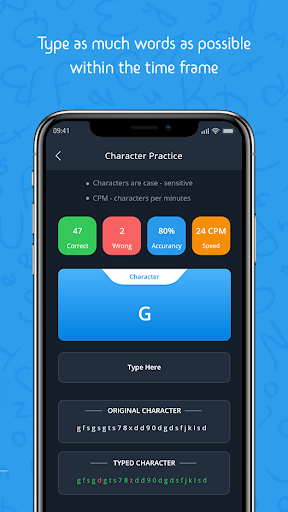
You must be committed to practicing every day if you want to improve your typing skill. Typing Speed Test app provides challenging paragraphs which you need to type. You need to type as much words as possible within the time frame. The score is in words per minute format. There's a time counter depending upon the character lengths in a paragraph. Each correct word will be added to your score and wrong typed word will not be counted. User can also practice by connecting the physical keyboard with a phone using OTG Cable.
Key Features:
Typing Practice:
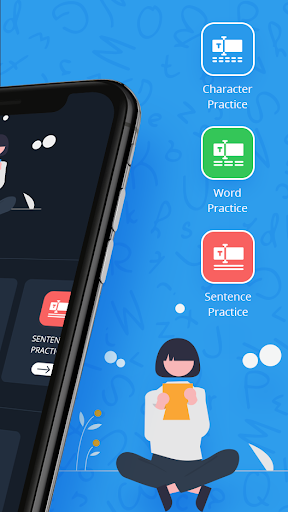
- Sharpen your typing skills with a wide range of engaging exercises.
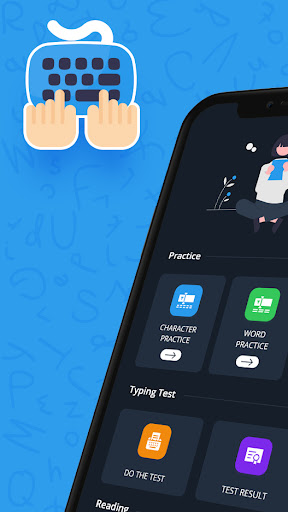
- With this Typing Speed Test app Get acquainted with the keyboard or a keypad and start typing speedily.
- Get the statistics Characters Per Minute of the typed character with the best Typing Master app.
WPM Challenge:
- Test and improve your typing speed with our Words Per Minute (WPM) challenge.
- With Typing Master app you can Practice word with typing lessons.
- Press "space" to get the next word on the screen.
- Words Per Minute will show your accuracy in words per minute (average WPM).
Sentence Practice
- Typing test paragraphs will help you to increase your typing speed.
- Practice to write the paragraphs by fast typing and appear for typing test.
Typing Assessment:
- Get a detailed analysis of your typing performance to track your progress.
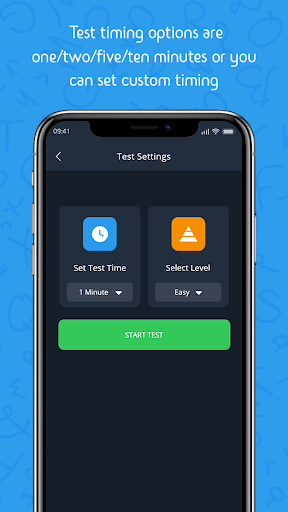
- In Typing Master app Test timing options are one/two/five/ten minutes or you can set custom timing.
- The test will start after you type the first character of the paragraph shown to you.
⌨ 10 Fingers Typing:
- Learn to type like a pro with our "Fast 10 Fingers" exercises.
Speed Tests:
- Take typing speed tests and watch your WPM soar!
Brain Training:
- Typing isn't just about speed; it's about accuracy and memory too. We've got you covered.
Online & Offline:
- Enjoy our typing tests and practices online and offline. No internet? No problem!
⏰ Time Trials:
- Feeling competitive? Race against the clock and see how you stack up.
Learn Typing Skills:
- Improve your typing accuracy and speed with our comprehensive lessons.
Fun & Educational:
- Typing is made fun with our interactive exercises and challenges.
Detailed Analytics:
- Track your progress over time and see how you've improved.
Typing Master Speed Test app shows you result or statistics as below,
- Number of Correct Characters typed
- Number of Wrong Characters typed
- Typing Accuracy in terms of Percentage (%)
- Typing Speed in Words Per Minute (WPM)
Increasing your typing skill is something that you can do on your own or with proper training. You can become a typing master with the help of Typing Master app or can play typing game for fun. Use the typing master app and challenge your friend for a typing test game with the best Typing Speed Test app.
Download SpeedTyper: Typing Speed Test & Practice now and type your way to success! Unlock your full potential and conquer the keyboard with ease.
বেশি দেখান

1. MEmu ইনস্টলার ডাউনলোড করুন এবং সেটআপ শেষ করুন

2. MEmu শুরু করুন তারপর ডেস্কটপে Google Play খুলুন

3. Google Play এ Typing Speed Test & Practice খুঁজুন
Install
4. Typing Speed Test & Practice ডাউনলোড এবং ইনস্টল করুন
5. ইনস্টল সমাপ্তি শুরু করতে আইকনে ক্লিক করুন

6. MEmu ব্যবহার করে আপনার কম্পিউটারে Typing Speed Test & Practice উপভোগ করুন
MEmu Play হল সেরা অ্যান্ড্রয়েড এমুলেটর, যার ১০ কোটিরও বেশি ব্যবহারকারী এর উন্নত অ্যান্ড্রয়েড অ্যাপ অভিজ্ঞতা উপভোগ করছেন। MEmu 9 এর ভার্চুয়ালাইজেশন প্রযুক্তি আপনাকে আপনার কম্পিউটারে হাজার হাজার অ্যান্ড্রয়েড অ্যাপ মসৃণভাবে চালাতে দেয়, এমনকি সবচেয়ে চাহিদাসম্পন্ন অ্যাপগুলিও।
ভালো গ্রাফিক্সের সাথে বড় স্ক্রীন; লম্বা অবধি, ব্যাটারি বা মোবাইল ডাটা'র কোন সীমা ছাড়া।
কীবোর্ড এবং মাউস বা গেমপ্যাডের সুনির্দিষ্ট নিয়ন্ত্রণের জন্য সম্পূর্ণ কীম্যাপিং সমর্থন।
মাল্টি-ইনস্ট্যান্স ম্যানেজারের সাথে একটি পিসিতে একাধিক গেম অ্যাকাউন্ট বা কাজ।
নিম্নলিখিত ধাপগুলোর মাধ্যমে পিসি এ Typing Speed Test & Practice ব্যবহার করুন: