Vocal Remover - Musiclab
আপডেট করা হয়েছে
বর্তমান সংস্করণ
1.7.5
অফার করেছে

আপনার মোবাইলে Vocal Remover - Musiclab ব্যবহার করার সময় অতিরিক্ত চার্জ নিয়ে চিন্তা করা বন্ধ করুন, নিজেকে ছোট পর্দা থেকে মুক্ত করুন এবং অনেক বড় ডিসপ্লেতে অ্যাপ ব্যবহার করে উপভোগ করুন। এখন থেকে, কীবোর্ড এবং মাউস দিয়ে আপনার অ্যাপের একটি পূর্ণ-স্ক্রীন অভিজ্ঞতা পান। MEmu আপনাকে সমস্ত আশ্চর্যজনক বৈশিষ্ট্যগুলি অফার করে যা আপনি আশা করেছিলেন: দ্রুত ইনস্টল এবং সহজ সেটআপ, স্বজ্ঞাত নিয়ন্ত্রণ, ব্যাটারির আর কোন সীমাবদ্ধতা নেই, মোবাইল ডেটা এবং বিরক্তিকর কল৷ একদম নতুন MEmu 9 হল আপনার কম্পিউটারে Vocal Remover - Musiclab ব্যবহার করার সেরা পছন্দ। MEmu মাল্টি-ইনস্ট্যান্স ম্যানেজার একই সময়ে 2 বা তার বেশি অ্যাকাউন্ট খোলা সম্ভব করে তোলে। এবং সবচেয়ে গুরুত্বপূর্ণ, আমাদের একচেটিয়া ইমুলেশন ইঞ্জিন আপনার পিসির সম্পূর্ণ সম্ভাবনা প্রকাশ করতে পারে, সবকিছুকে মসৃণ এবং উপভোগ্য করে তুলতে পারে।
বেশি দেখান
Download Vocal Remover - Musiclab on PC with MEmu Android Emulator. Enjoy playing on big screen. Musiclab is a free AI vocal remover and audio splitter.

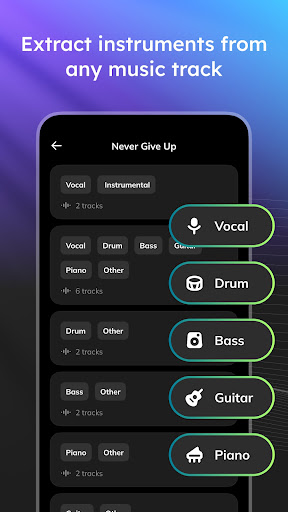
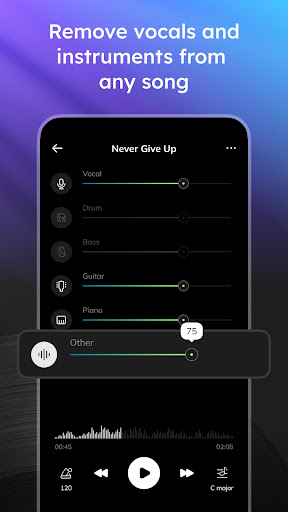
Musiclab is a free AI vocal remover and audio splitter. It allows you to extract vocals, instruments, and accompaniment from songs using cutting-edge AI technology. Musicians can easily reduce noise in audio and split songs into mutiple tracks with Musiclab, a free and perfect alternative to Moises.
Main Features of The Vocal Remover & AI Audio Splitter:
-AI Audio Separation of stems: Easily separate vocals, drums, guitar, bass, piano, strings, and other instruments in any song. Musiclab serves as your vocal remover or backing track maker.
-Export: Extract and share high-quality audio mixes and separated stems. Perfect for extracting stems for use with other track makers or with our vocal remover.
-Backing Tracks: Create acapella, drum, guitar, karaoke, and piano backing tracks.
-Noise Reducer: Remove background noise and enhance audio quality for a crystal-clear listening experience.
How to Remove Vocals And Instruments from Songs:
The free vocal isolator makes removing vocals a breeze in 4 simple steps:
-Upload any audio/video file, device, or public URL.
-AI separates vocals and instruments into multiple tracks.
-Modify tracks, remove vocals, control volume, and easily mute tracks.
-Download tracks or custom mix.
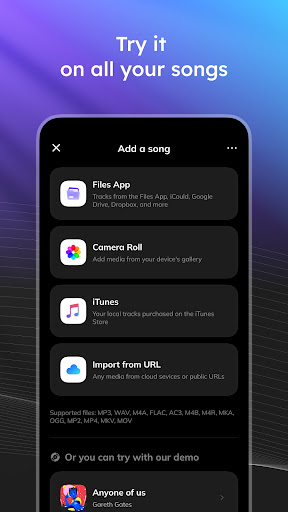
Supported import methods:
Import from Google Drive, Dropbox, iCloud, or public URL.
Add songs in MP3, WAV, or M4A formats.
Instrument Remover:
Musiclab is more than just a vocal remover; it can also remove drums, bass, piano, and other instruments from songs.
Voice remover: eliminate vocals
Drum remover: eliminate drums
Bass remover: eliminate bass
Piano remover: eliminate piano
Guitar/harmonics remover
Instrument Booster:
Boost the volume and amplify the sound of any instrument - drums, bass, piano, and more.
Musiclab is the perfect tool for:
Music lovers, students, and teachers.
Drummers, bassists, guitarists: set the beat and groove.
Singers, acapella groups, pianists, karaoke enthusiasts: use our vocal remover to hit the right pitch and harmony.
Social Media Content Creators: create tunes and follow trends.
বেশি দেখান

1. MEmu ইনস্টলার ডাউনলোড করুন এবং সেটআপ শেষ করুন

2. MEmu শুরু করুন তারপর ডেস্কটপে Google Play খুলুন

3. Google Play এ Vocal Remover - Musiclab খুঁজুন
Install
4. Vocal Remover - Musiclab ডাউনলোড এবং ইনস্টল করুন
5. ইনস্টল সমাপ্তি শুরু করতে আইকনে ক্লিক করুন

6. MEmu ব্যবহার করে আপনার কম্পিউটারে Vocal Remover - Musiclab উপভোগ করুন
MEmu Play হল সেরা অ্যান্ড্রয়েড এমুলেটর, যার ১০ কোটিরও বেশি ব্যবহারকারী এর উন্নত অ্যান্ড্রয়েড অ্যাপ অভিজ্ঞতা উপভোগ করছেন। MEmu 9 এর ভার্চুয়ালাইজেশন প্রযুক্তি আপনাকে আপনার কম্পিউটারে হাজার হাজার অ্যান্ড্রয়েড অ্যাপ মসৃণভাবে চালাতে দেয়, এমনকি সবচেয়ে চাহিদাসম্পন্ন অ্যাপগুলিও।
ভালো গ্রাফিক্সের সাথে বড় স্ক্রীন; লম্বা অবধি, ব্যাটারি বা মোবাইল ডাটা'র কোন সীমা ছাড়া।
কীবোর্ড এবং মাউস বা গেমপ্যাডের সুনির্দিষ্ট নিয়ন্ত্রণের জন্য সম্পূর্ণ কীম্যাপিং সমর্থন।
মাল্টি-ইনস্ট্যান্স ম্যানেজারের সাথে একটি পিসিতে একাধিক গেম অ্যাকাউন্ট বা কাজ।
নিম্নলিখিত ধাপগুলোর মাধ্যমে পিসি এ Vocal Remover - Musiclab ব্যবহার করুন: