Battlezone Saga: Gacha Diva
Aktualisiert
Aktuelle Version
Angeboten von

Bei all Ihrer Leidenschaft für das Spielen von Battlezone Saga: Gacha Diva sollten Ihre Hände nicht auf einen winzigen Bildschirm Ihres Telefons beschränkt sein. Spielen Sie wie ein Profi und übernehmen Sie die volle Kontrolle über Ihr Spiel mit Tastatur und Maus. MEmu bietet Ihnen all die Dinge, die Sie erwarten. Laden Sie Battlezone Saga: Gacha Diva herunter und spielen Sie es auf dem PC. Spielen Sie so lange, wie Sie wollen, ohne Grenzwerte für Akku, mobile Daten und störende Anrufe. Das brandneue MEmu 9 ist die beste Wahl, um Battlezone Saga: Gacha Diva auf dem PC zu spielen. Das exquisite voreingestellte Tastaturbelegungssystem, das mit unserem Fachwissen vorbereitet wurde, macht Battlezone Saga: Gacha Diva zu einem echten PC-Spiel. Der MEmu Multi-Instanz-Manager ermöglicht das Spielen von 2 oder mehr Konten auf demselben Gerät. Und das Wichtigste: Unsere exklusive Emulations-Engine kann das volle Potenzial Ihres PCs freisetzen und für reibungslose Abläufe sorgen.
Mehr anzeigen
Laden Sie Play Battlezone Saga: Gacha Diva auf dem PC mit MEmu Android Emulator. Viel Spaß beim Spielen auf großmundieren. As a commander chosen by destiny, you will lead legendary heroes onto the battlefield, uncover forgotten truths, and decide the future of a world on the brink of collapse.
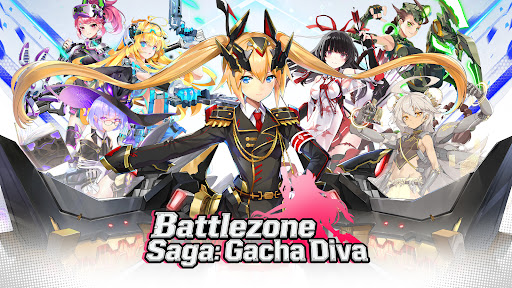
As a commander chosen by destiny, you will lead legendary heroes onto the battlefield, uncover forgotten truths, and decide the future of a world on the brink of collapse. Every choice matters, and every battle brings you closer to the heart of this saga!
Dive into Battlezone Saga: Gacha Diva, a story-rich idle SRPG set in a shattered world where war, fate and heroes collide.
-Game Features-
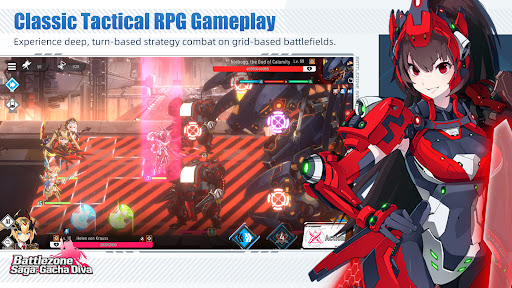
Classic Tactical RPG Gameplay
Experience deep, turn-based strategy combat on grid-based battlefields. Positioning, terrain effects, and skill timing are key to victory. Outsmart your enemies with careful planning and decisive tactics.
Unique Heroes & Spectacular Combat
Recruit a wide roster of beautifully illustrated heroes, each with distinct personalities, abilities, and combat roles. From fearless warriors to mysterious divas wielding arcane power, every hero brings a new strategic possibility to your team.
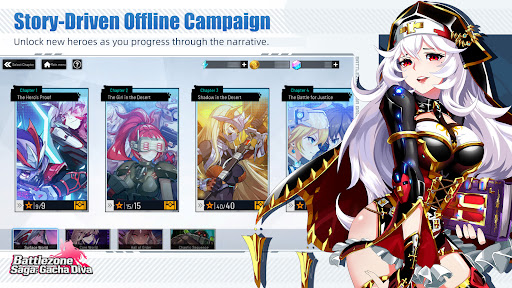
Varied Story-Driven Offline Campaign Stages
Experience a thrilling single-player main story full of twists and turns. Unlock new heroes as you progress through the narrative.Explore diverse and engaging stages packed with challenges. Earn and exchange valuable in-game rewards.
Gacha Collection & Hero Growth
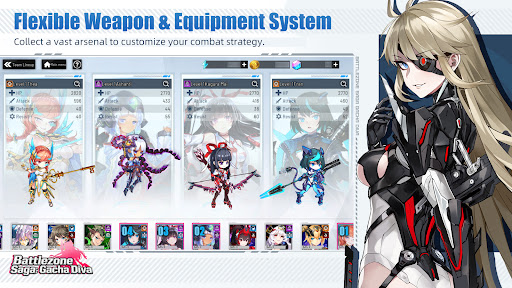
Summon powerful heroes through the gacha system and develop them through leveling, skill upgrades, and exclusive equipment. Build your dream squad and create powerful synergies tailored to your playstyle.
Strategic Depth, Accessible Play
Easy to learn but hard to master, Battlezone Saga: Gacha Diva is designed for both casual players and hardcore SRPG fans. Enjoy meaningful progression without sacrificing strategic depth.
Endless Outfit Customization
Mix and match hundreds of stylish outfits to create your own unique squad and battle in style!
Command. Strategize. Dominate the Battlefield. Enter the war-torn world of Battlezone Saga: Gacha Diva and write your own legend. The battlefield awaits—will you rise as its ultimate commander?
Follow us on
official website: https://bsgdapk.r2games.com
Facebook: https://www.facebook.com/BattlezoneSagaGachaDiva/
discord: https://discord.gg/ZZqs4Y4KbQ
YouTube: https://www.youtube.com/@BattlezoneSagaGachaDiva
Mehr anzeigen

1. Laden das MEmu-Installationsprogramm herunter und beenden die Installation

2. MEmu starten und Google Play auf der Homepage öffnen

3. Suchen Battlezone Saga: Gacha Diva in Google Play
Install
4. Herunterladen und Installieren Battlezone Saga: Gacha Diva
5. Klicken nach Abschluss der Installation auf das Symbol, um es zu starten

6. Viel Spaß beim Spielen von Battlezone Saga: Gacha Diva auf dem PC mit MEmu
MEmu App Player ist der beste kostenlose Android-Emulator und 50 Millionen Menschen genießen bereits seine hervorragende Android-Gaming-Erfahrung. Mit der MEmu-Virtualisierungstechnologie können Sie Tausende von Android-Spielen problemlos auf Ihrem PC spielen, selbst bei grafikintensiven Spielen.
BGrößeres Bild mit besserer Grafik; Keine unterbrechungen, keine sorgen um Akku
Komplette Tastenbelegung unterstützt mit Maus und Tastatur oder Controller
Mit dem „Multi-Instance-Manager“ können Sie mehrere Spielkonten oder Spiele gleichzeitig auf einem PC ausführen.
Play Battlezone Saga: Gacha Diva on PC by following steps: