Clone Drone in the Danger Zone
Aktualisiert
Aktuelle Version
Angeboten von

Bei all Ihrer Leidenschaft für das Spielen von Clone Drone in the Danger Zone sollten Ihre Hände nicht auf einen winzigen Bildschirm Ihres Telefons beschränkt sein. Spielen Sie wie ein Profi und übernehmen Sie die volle Kontrolle über Ihr Spiel mit Tastatur und Maus. MEmu bietet Ihnen all die Dinge, die Sie erwarten. Laden Sie Clone Drone in the Danger Zone herunter und spielen Sie es auf dem PC. Spielen Sie so lange, wie Sie wollen, ohne Grenzwerte für Akku, mobile Daten und störende Anrufe. Das brandneue MEmu 9 ist die beste Wahl, um Clone Drone in the Danger Zone auf dem PC zu spielen. Das exquisite voreingestellte Tastaturbelegungssystem, das mit unserem Fachwissen vorbereitet wurde, macht Clone Drone in the Danger Zone zu einem echten PC-Spiel. Der MEmu Multi-Instanz-Manager ermöglicht das Spielen von 2 oder mehr Konten auf demselben Gerät. Und das Wichtigste: Unsere exklusive Emulations-Engine kann das volle Potenzial Ihres PCs freisetzen und für reibungslose Abläufe sorgen.
Mehr anzeigen
Laden Sie Play Clone Drone in the Danger Zone auf dem PC mit MEmu Android Emulator. Viel Spaß beim Spielen auf großmundieren. Clone Drone in the Danger Zone is a robot voxel slice-em-up where any part of your body can be sliced off.
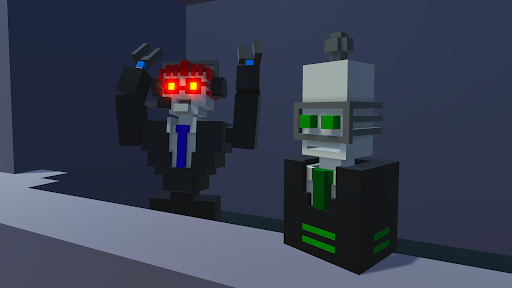
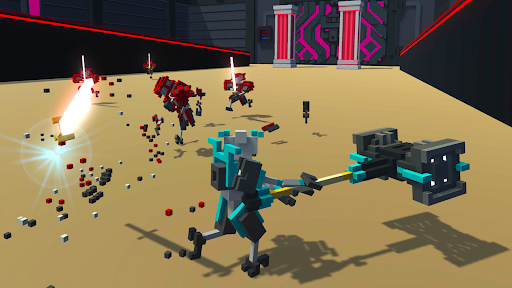
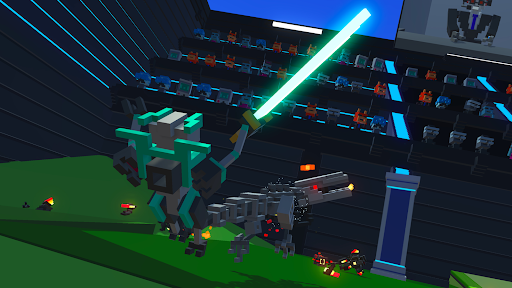
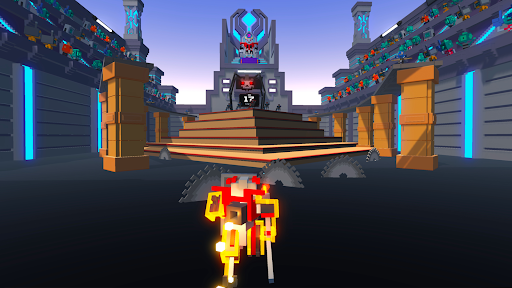
Clone Drone in the Danger Zone is a robot voxel slice-em-up where any part of your body can be sliced off. With your mind downloaded into a robot gladiator, you must survive the sinister trials of the arena. You can finally play the indie action hit on the go. It's Clone Drone on your mobile phone!
Single Player Game Modes
• Story Mode - One part epic tale of human defiance, another part laser swords.
• Endless Mode - Challenge yourself to fight through 86 level variants spread across 7 difficulty tiers. Can you make it to TITANIUM?
• Challenge Mode - Bow-only, hammer-only, can you still survive the arena?
Multiplayer Game Modes
• Last Bot Standing - A Battle-Royale-like game mode with short, 5-10 minute play sessions and up to 15 players. Survive, and shower in the remains of your fellow robot competitors.
• Private Duels - Challenge your friend to a 1v1 duel!
• Online Co-op! - Use the power of human friendship (and laser swords!) to survive in the arena!
Features:
• Epic Voxel Dismemberment: In addition to looking cool, the ability to cut off body parts is central to the gameplay. Jumping on one leg is a common occurrence. Large enemies need to be cut down to size before a fatal blow can be delivered.
• Sharp Sword Combat: Combat is fast and intense, putting great emphasis on movement, timing and positioning. You are never safe, as any blow can instantly kill or dismember.
• Intuitive Controls: On-screen buttons allow you to smoothly jump, dash, and destroy any robot adversary.
• Spin Attack: Perform a deadly 360 spin in this mobile exclusive attack!
• Entertaining Commentary: Commentatron and Analysis-Bot provide a play-by-play of your performance and react to your activities.
• Upgrade Your Robot: Jetpack, bow, kicking, deflection, clones, armor, FIRE BREATH.
• Terrifying Robotic Enemies: They actually get pretty hard! Sword robots, bow robots, Spidertron 5000, Spidertron 6000, gigantic hammer bots. So many things to dismember.
• Achievements! Unlock upgrades, emotes and multiplayer skins by achieving a rich variety of things!
• Emotes! Do the Funky Pillar Dance, mock your foes, or flap your arms delightfully!
Mehr anzeigen

1. Laden das MEmu-Installationsprogramm herunter und beenden die Installation

2. MEmu starten und Google Play auf der Homepage öffnen

3. Suchen Clone Drone in the Danger Zone in Google Play
Install
4. Herunterladen und Installieren Clone Drone in the Danger Zone
5. Klicken nach Abschluss der Installation auf das Symbol, um es zu starten

6. Viel Spaß beim Spielen von Clone Drone in the Danger Zone auf dem PC mit MEmu
MEmu App Player ist der beste kostenlose Android-Emulator und 50 Millionen Menschen genießen bereits seine hervorragende Android-Gaming-Erfahrung. Mit der MEmu-Virtualisierungstechnologie können Sie Tausende von Android-Spielen problemlos auf Ihrem PC spielen, selbst bei grafikintensiven Spielen.
BGrößeres Bild mit besserer Grafik; Keine unterbrechungen, keine sorgen um Akku
Komplette Tastenbelegung unterstützt mit Maus und Tastatur oder Controller
Mit dem „Multi-Instance-Manager“ können Sie mehrere Spielkonten oder Spiele gleichzeitig auf einem PC ausführen.
Play Clone Drone in the Danger Zone on PC by following steps: