BRINKO - Party Royale
Aktualisiert
Aktuelle Version
0.1.16
Angeboten von

Bei all Ihrer Leidenschaft für das Spielen von BRINKO - Party Royale sollten Ihre Hände nicht auf einen winzigen Bildschirm Ihres Telefons beschränkt sein. Spielen Sie wie ein Profi und übernehmen Sie die volle Kontrolle über Ihr Spiel mit Tastatur und Maus. MEmu bietet Ihnen all die Dinge, die Sie erwarten. Laden Sie BRINKO - Party Royale herunter und spielen Sie es auf dem PC. Spielen Sie so lange, wie Sie wollen, ohne Grenzwerte für Akku, mobile Daten und störende Anrufe. Das brandneue MEmu 9 ist die beste Wahl, um BRINKO - Party Royale auf dem PC zu spielen. Das exquisite voreingestellte Tastaturbelegungssystem, das mit unserem Fachwissen vorbereitet wurde, macht BRINKO - Party Royale zu einem echten PC-Spiel. Der MEmu Multi-Instanz-Manager ermöglicht das Spielen von 2 oder mehr Konten auf demselben Gerät. Und das Wichtigste: Unsere exklusive Emulations-Engine kann das volle Potenzial Ihres PCs freisetzen und für reibungslose Abläufe sorgen.
Mehr anzeigen
Laden Sie Play BRINKO - Party Royale auf dem PC mit MEmu Android Emulator. Viel Spaß beim Spielen auf großmundieren. BRINKO.
BRINKO
Race, fall, respawn, and fight your way back in a fast online party royale.
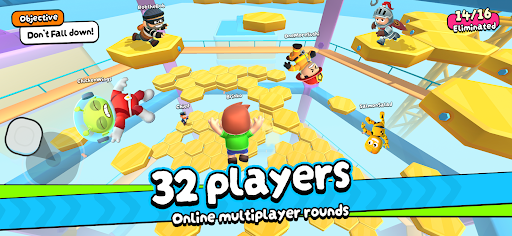
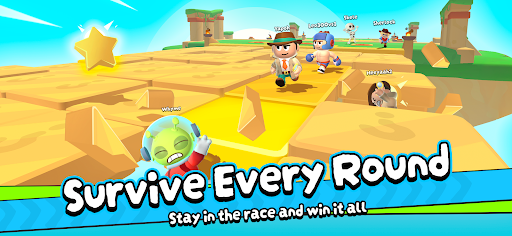
BRINKO is a real-time multiplayer obstacle racing game where up to 32 players dash through chaotic courses, dodge wild hazards, wipe out in hilarious ways, and bounce back for another shot at victory.
Easy to play. Funny to fail. Skillful to master.
32-PLAYER REAL-TIME ONLINE RACES
Jump into fast online races with up to 32 players in real time. Sprint with the crowd, dodge moving obstacles, avoid messy pileups, and race your way to the finish before the chaos catches you.
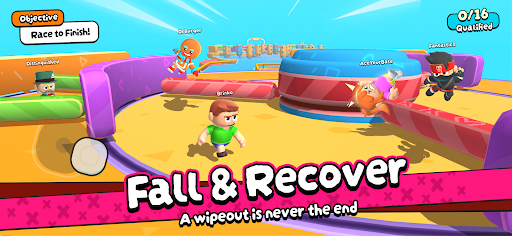
FALL FAST. RESPAWN FASTER.
In BRINKO, falling does not mean the fun is over. Wipe out, respawn quickly, rejoin the race, and keep moving. A bad jump can still turn into your next comeback.
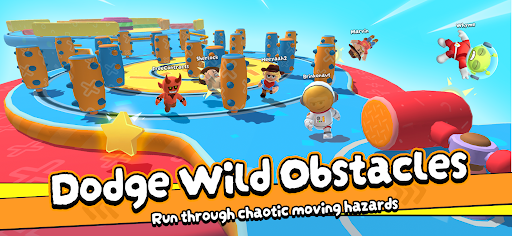
CHAOTIC OBSTACLE COURSES
Run through colorful levels packed with swinging hazards, spinning obstacles, moving platforms, tricky jumps, and unpredictable physics. Every race is quick, messy, and full of surprise moments.
FUNNY PHYSICS, REAL SKILL
BRINKO uses playful physics to create hilarious stumbles, close calls, and unexpected recoveries. The controls are simple, but smart movement matters. Time your jumps, read the course, dodge the crowd, and find the best path through the chaos.
QUICK MATCHES, INSTANT REMATCHES
BRINKO is built for short, action-packed sessions. Jump in for a quick race, wipe out, recover, finish, and play again. Every match gives you another chance to improve, win, or pull off a ridiculous comeback.
PLAY WITH FRIENDS
Party up with friends and race together in chaotic online matches. Compete for the finish, laugh at the wipeouts, and see who can survive the madness.
COLLECT EXTRA REWARDS WHILE YOU RACE
Keep your eyes on the course — extra collectibles can appear during matches. Grab them as you race to boost your progress and earn more rewards over time.
CUSTOMIZE YOUR BRINKO STYLE
Keep progressing to unlock new skins and customize your character. Claim your favorites, switch your look, and stand out in every race.
NO GACHA. NO LOOTBOXES.
BRINKO does not use gacha or mystery rewards. Purchases are clear and direct, so you always know exactly what you are getting before you buy.
NO PAY-TO-WIN.
BRINKO is built to stay fair. Purchases will not decide who wins the race. Skill, timing, recovery, and a little bit of chaos matter more than anything you can buy.
BUILT TO KEEP GROWING
BRINKO is made for more maps, events, mini games, customization, social features, gameplay updates, and fresh ways to play over time.
WHY PLAY BRINKO?
• Fast online party royale racing
• Up to 32 players in real-time races
• Chaotic obstacle courses
• Funny physics and wild wipeouts
• Quick respawns after falls
• Short matches and instant rematches
• Simple, responsive touch controls
• Skill-based jumping, dodging, and recovery
• Party up and play with friends
• Collect extra rewards during races
• Unlock skins and customize your character
• No gacha or mystery purchases
• No pay-to-win
BRINKO is for players who want a casual online party royale that is fast, funny, competitive, and easy to replay.
Winning feels great.
Falling is part of the fun.
Play BRINKO and bounce back faster than everyone else.
Mehr anzeigen

1. Laden das MEmu-Installationsprogramm herunter und beenden die Installation

2. MEmu starten und Google Play auf der Homepage öffnen

3. Suchen BRINKO - Party Royale in Google Play
Install
4. Herunterladen und Installieren BRINKO - Party Royale
5. Klicken nach Abschluss der Installation auf das Symbol, um es zu starten

6. Viel Spaß beim Spielen von BRINKO - Party Royale auf dem PC mit MEmu
MEmu App Player ist der beste kostenlose Android-Emulator und 50 Millionen Menschen genießen bereits seine hervorragende Android-Gaming-Erfahrung. Mit der MEmu-Virtualisierungstechnologie können Sie Tausende von Android-Spielen problemlos auf Ihrem PC spielen, selbst bei grafikintensiven Spielen.
BGrößeres Bild mit besserer Grafik; Keine unterbrechungen, keine sorgen um Akku
Komplette Tastenbelegung unterstützt mit Maus und Tastatur oder Controller
Mit dem „Multi-Instance-Manager“ können Sie mehrere Spielkonten oder Spiele gleichzeitig auf einem PC ausführen.
Play BRINKO - Party Royale on PC by following steps: